← Back to overview

The AI-Powered SEO Playbook

14 scripts, a monthly cadence, and a companion repo that gives you the same capabilities enterprises pay Ahrefs and SEMrush for.

~22,000 words9 chapters + appendicesBy Victor Sowers
Abstract visualization of an AI-powered SEO pipeline — keywords flowing through clusters, SERP analysis, content production, and monitoring
Chapter 0

The System — What You're Building and Why

This guide gives you a complete SEO operating system — keyword research, competitive analysis, content production, rank tracking, backlinks, AI search optimization. Fourteen scripts, one config file, and a monthly cadence that turns SEO from a manual chore into automated infrastructure.

I know it works because I've been running it. Steepworks.io, bmorefamilies.com, client sites — hundreds of generated pages, all managed by an AI coding agent. This isn't a guide about a system I theorized. It's the exact infrastructure I use in production, and you're getting all of it.

Here's what makes this different from every other SEO guide you've read.

You describe what you need. Your agent handles the rest. Tell your AI coding agent — Claude Code, Cursor, Copilot, whatever you use — "research keywords for my product category" or "show me what's ranking for this topic." It runs the scripts, parses the output, and comes back with options. You make the strategic calls: what to target, what to write, when to publish. No terminal. No command flags. Just decisions.

Research feeds a content machine. The keyword research in Chapter 1 doesn't just produce a spreadsheet. It feeds into semantic clustering (Chapter 2), which maps your content architecture. That architecture feeds competitive SERP analysis (Chapter 3), which generates content briefs. Those briefs feed drafting workflows with automated quality gates (Chapter 4). Each step enriches the last. Your agent chains them together: research → clustering → briefs → drafts → voice gate → publication. What comes out the other end is a compounding content pipeline, not a pile of one-off blog posts.

The real edge: combining search data with YOUR data. Every competitor can pull the same keyword volumes and SERP results. None of them have your call transcripts, your sales objections, your product documentation, your operational experience. When your agent combines SEO intelligence with your proprietary context (the actual questions your customers ask, the specific problems your product solves, the nuance your team lives with daily), it produces content no competitor can replicate. That's the moat.

This is a pipeline, not a tool. Most operators treat SEO as a manual, part-time chore: open Ahrefs once a month, find some keywords, maybe write something. This system turns SEO into automated infrastructure that compounds. Your agent runs the research pipeline quarterly, the monitoring cadence monthly, and the content workflow weekly. You review the output and make strategic calls. The system stacks results over months, the same way a well-built sales pipeline compounds pipeline coverage.

Setup takes an afternoon. And you're getting the exact system I use in production, not a sanitized tutorial version.

Who this is for: Operators with an AI coding agent who want to build SEO infrastructure that compounds. Not SEO specialists looking for another point-and-click tool. You don't need to know Python. Your agent handles the execution. You need to know your market, your customers, and what content you can write better than anyone else. This guide gives your agent the scripts and your judgment the framework.

This chapter maps the entire system. By the end, you'll understand what each tool does, how they connect, and where to start based on how mature your current SEO practice is.

The Complete 14-Script System at a Glance
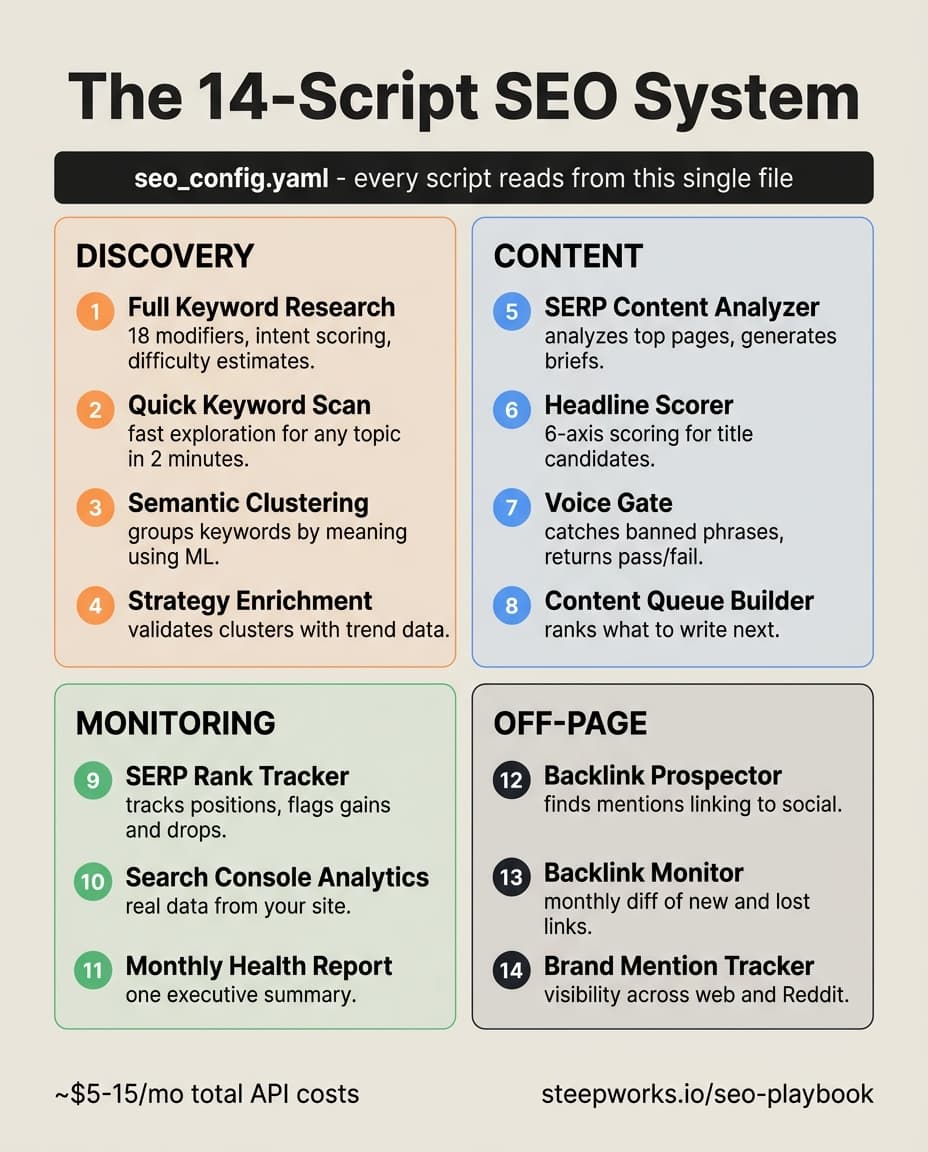
Infographic showing the 14-script SEO system organized into four categories: Discovery, Content, Monitoring, and Off-Page

The 14-Script Pipeline

seo_config.yamlDISCOVERY & STRATEGYKeyword ResearchQuick KeywordsClusteringStrategy EnrichmentMONITORING & ANALYTICSSERP MonitorGSC AnalyticsHealth ReportCONTENT PRODUCTIONSERP AnalyzerHeadline ScorerVoice GateContent QueueOFF-PAGE & BRANDBacklink ProspectorBacklink MonitorBrand Tracker

What Each Script Gives You

Get the scripts: All 14 scripts, the config template, and setup instructions are available at github.com/steepworks/seo-playbook-scripts. Clone the repo and you're running in minutes.

The system has 14 scripts, each producing a specific output your agent delivers to you. No web interfaces. No dashboards to log into. You describe the outcome you need, your agent runs the right script, and you make the strategic decision. Here's what you get from each group:

Discovery & Strategy (4 scripts)

ScriptWhat It Does
keyword_research.pyFull keyword research with intent classification, difficulty scoring, and Google Trends
quick_keyword_research.pyLightweight keyword discovery — Google Autocomplete only, no API keys
semantic_cluster.pyGroups keywords by meaning using machine learning — finds natural clusters automatically
enhance_seo_strategy.pyChecks and enriches your keyword clusters with real search data

These four scripts handle the "what should we write about?" question. You start with 3-7 seed keywords, and the discovery pipeline expands them into scored, classified, and clustered content targets. In production, a single seed like "pipeline automation" returns 150-200 keyword candidates in five minutes, already classified by intent (informational, commercial, transactional) and grouped into content clusters your agent can act on immediately.

Starter prompt — paste this to your agent to seed your keyword research:

"I need a keyword strategy for [YOUR DOMAIN]. My business does [ONE SENTENCE]. My target buyer is [TITLE/ROLE]. Seed keywords: [SEED 1], [SEED 2], [SEED 3]. Build me a complete keyword strategy from these seeds. I want: keyword candidates expanded from autocomplete data, each scored for difficulty and classified by search intent, then grouped into semantic clusters by meaning. For each cluster, tell me the primary keyword, the long-tail variations, the intent mix, and whether competition looks weak or strong. Recommend which clusters to target first based on competition and commercial intent. Available scripts: keyword_research.py, semantic_cluster.py, enhance_seo_strategy.py."

Monitoring & Analytics (3 scripts)

ScriptWhat It Does
serp_monitor.pyTracks your keyword rankings weekly, reports position changes
gsc_analytics.pyPulls Google Search Console data — top queries, quick wins, trends
seo_health_report.pyMonthly summary combining ranking data, backlinks, and content freshness

Monitoring tells you whether your work is moving the needle. The gsc_analytics.py quick-wins flag is particularly useful: it finds keywords where you rank positions 11-20, which means a small content improvement can push you onto page one. One quick-win update to an existing article moved a client keyword from position 14 to position 9 in three weeks. That's the kind of signal these scripts surface automatically.

Content Production (3 scripts)

ScriptWhat It Does
serp_content_analyzer.pyAnalyzes top-ranking pages for a keyword, generates a competitive content brief
headline_demand_research.pyScores headlines on 6 axes, expands seed keywords via autocomplete
voice_gate.pyPre-publish quality gate — scans drafts for banned patterns, returns PASS or FAIL

The content scripts bridge strategy and execution. Tell your agent "analyze the competition for this keyword" and you get back a content brief with word count targets, the H2 topics every competitor covers (table stakes), and the gaps none of them address (your differentiation). The headline scorer gives you objective data on which title will perform, scoring candidates across specificity, action promise, curiosity gap, and three other axes. The voice gate catches the bland, generic writing that search engines and readers both ignore before it ever reaches your audience.

Starter prompt — paste this to your agent before writing any content piece:

"I'm writing content targeting '[YOUR KEYWORD]' for [YOUR DOMAIN]. Give me everything I need to write a piece that outranks what's currently on page 1: a content brief with word count target, topics I must cover, gaps in the existing SERP I can exploit, and my top 5 headline candidates scored against demand signals. After I draft the piece, check it against voice and quality standards before I publish. Quality bar: the brief should show me exactly where I can differentiate from current top-ranking content — not just match them. Available scripts: serp_content_analyzer.py, headline_demand_research.py, voice_gate.py."

Off-Page & Brand (3 scripts)

ScriptWhat It Does
backlink_prospector.pyFinds brand mentions linking to your LinkedIn instead of your website
backlink_monitor.pyMonthly mention check — surfaces new mentions and tracks trends
brand_mention_tracker.pyTracks brand + category co-occurrence across web, Reddit, and Quora

Off-page is where most DIY SEO falls apart because nobody has time to do it manually. These scripts make it systematic. The backlink prospector finds sites that already mention your brand but link to your social profiles instead of your website. One email fixes that, and the conversion rate on these reclamation emails runs 30-50% because you're correcting a mistake, not asking for a favor.

Starter prompt — paste this to your agent for monthly off-page work:

"Audit my off-page SEO situation for [YOUR DOMAIN]. I need to know: (1) Who mentions my brand but links to my LinkedIn/Twitter instead of my website (these are easy reclamation wins), (2) Any new brand mentions since last month — and any lost mentions I should investigate, (3) Podcast appearances where show notes don't link to my site. For each reclamation opportunity, draft a personalized outreach email. Prioritize by estimated domain authority. Available scripts: backlink_prospector.py, backlink_monitor.py, brand_mention_tracker.py."

Content Queue (1 script)

ScriptWhat It Does
content_queue_builder.pyAnalyzes your recent work sessions, clusters emerging topics, outputs a ranked content queue

This one bridges operational knowledge and content planning. Instead of guessing what to write next, it surfaces topics that already emerged from your actual work. If you spent the last two weeks solving a gnarly integration problem for a client, the queue builder catches that pattern and proposes it as a content target — because you already have the expertise and the story to tell.

The Pipeline: How Outputs Feed Forward

The real power isn't in any individual script — it's in the pipeline. Each script's output becomes the next script's input. Here's the dependency flow:

                    ┌─────────────────────────┐
                    │     seo_config.yaml      │
                    │  (your domain, keywords, │
                    │   clusters, API keys)    │
                    └────────┬────────────────┘
                             │
            ┌────────────────┼─────────────────┐
            ▼                ▼                  ▼
    ┌──────────────┐ ┌──────────────┐  ┌──────────────┐
    │  DISCOVERY   │ │  MONITORING  │  │  OFF-PAGE    │
    │              │ │              │  │              │
    │keyword_      │ │serp_         │  │backlink_     │
    │research.py   │ │monitor.py    │  │prospector.py │
    │      OR      │ │              │  │              │
    │quick_keyword_│ │gsc_          │  │backlink_     │
    │research.py   │ │analytics.py  │  │monitor.py    │
    └──────┬───────┘ │              │  │              │
           │         │seo_health_   │  │brand_mention_│
           ▼         │report.py     │  │tracker.py    │
    ┌──────────────┐ └──────────────┘  └──────────────┘
    │  CLUSTERING  │
    │              │
    │semantic_     │
    │cluster.py    │
    └──────┬───────┘
           │
           ▼
    ┌──────────────┐
    │  STRATEGY    │
    │              │
    │enhance_seo_  │
    │strategy.py   │
    └──────┬───────┘
           │
           ▼
    ┌──────────────┐     ┌──────────────┐
    │ CONTENT      │────▶│  QUALITY     │
    │ PRODUCTION   │     │              │
    │              │     │voice_gate.py │
    │serp_content_ │     └──────────────┘
    │analyzer.py   │
    │              │
    │headline_     │
    │demand_       │
    │research.py   │
    │              │
    │content_queue_│
    │builder.py    │
    └──────────────┘

Three things to notice:

  1. Everything reads from one config file. Change your domain, seed keywords, or API keys in seo_config.yaml and every script adapts. You configure once.

  2. Discovery feeds strategy feeds content. The left column flows downward: you research keywords, cluster them, validate the clusters, then use them to generate content briefs. Each step enriches the previous output.

  3. Monitoring and off-page run independently. You don't need to wait for content production to track rankings or find backlink opportunities. Start monitoring on day one, even before you write a single word.

The Config File

Every script reads from a single YAML configuration file. Here's the structure:

domain:
  site_url: "https://your-domain.com"
  site_name: "YOUR BRAND"
  industry: "Your Industry"

keyword_research:
  seed_keywords:
    - "your core topic"
    - "your product category"
    - "problem you solve"
  clusters:
    - name: "Topic Cluster Name"
      priority: "P0"              # P0 = critical, P3 = backlog
      competition: "LOW"          # UNCONTESTED / LOW / CONTESTABLE / HIGH
      hub_url: "/your-hub-page"
      primary_keywords: [...]
      long_tail_keywords: [...]

monitoring:
  tracked_keywords: [...]
  competitors: ["competitor1.com", "competitor2.com"]

api_keys:
  serper: "${SERPER_API_KEY}"     # From .env — never hardcode

content:
  voice_gate:
    banned_phrases_source: "path/to/your-brand-standards.md"
  output_dir: "path/to/content/output"

You don't need to fill everything on day one. Start with domain and seed_keywords. The clusters section gets populated after your agent runs the discovery scripts. The monitoring section grows as you identify keywords worth tracking.

What's Ahead

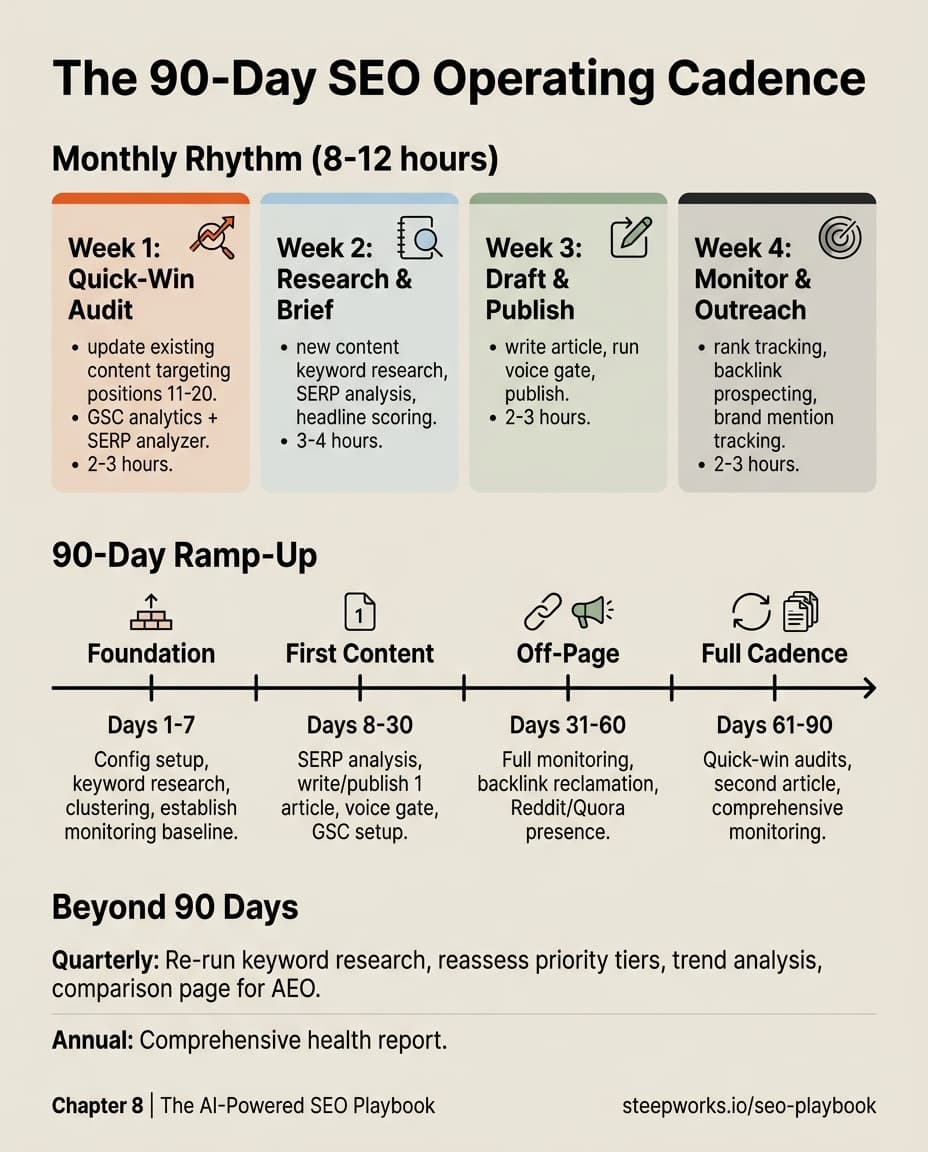
You'll build from the ground up. First, keyword research that produces scored, classified candidates from real search data (Chapter 1). Then clustering that turns a flat keyword list into a structured content strategy with priorities (Chapter 2). SERP analysis grounds your strategy in reality — what's actually ranking, where the gaps are (Chapter 3). Content production gives you a repeatable workflow with objective quality gates (Chapter 4). Programmatic SEO multiplies your output from structured data (Chapter 5). Backlinks and AEO/GEO build the authority and AI visibility that make your content rank (Chapters 6-7). And the operating cadence ties it all into a monthly rhythm that runs in 8-12 hours (Chapter 8).

Each chapter produces a concrete output you can use immediately. The companion GitHub repo gives you every script, ready to clone and configure for your domain.

Five Maturity Levels

1

Level 1 — Discovery

~2 hours setup. Keyword research + clustering + strategy enrichment.

2

Level 2 — Monitoring

GSC analytics + weekly rank tracking.

3

Level 3 — Content Production

SERP analysis + headline scoring + voice gate.

4

Level 4 — Off-Page

Backlink prospecting + mention monitoring + brand tracking.

5

Level 5 — Full System

Monthly health reports + content queue from work sessions.

Ready to Start?

Once you've cloned the companion repo and configured seo_config.yaml, paste one of these prompts to your agent to get moving.

Competitive Landscape (before you run any scripts):

"Conduct a competitive landscape analysis for my SEO strategy. Domain: [YOUR DOMAIN]. Topic: [YOUR CORE TOPIC]. Seeds: [KEYWORD 1], [KEYWORD 2], [KEYWORD 3]. Known competitors: [COMPETITOR 1], [COMPETITOR 2]. I need: a keyword universe mapped across head terms, long-tail, questions, and comparison queries. For the top keywords, show me who currently ranks, what content format dominates, and where the gaps are between my content and theirs. Deliver a prioritized action plan: quick wins (existing content to optimize), creation priorities (gaps I should fill), and keywords to defer (too competitive right now). Weight priorities by: business relevance (30%), competition difficulty (25%), search volume (25%), gap size (20%). Tag findings as [FACT], [ESTIMATED], or [ASSUMPTION]. If data is unavailable, say so — never fabricate. Available scripts: keyword_research.py, semantic_cluster.py, serp_content_analyzer.py, enhance_seo_strategy.py."

End-to-End First Run (after configuring seo_config.yaml):

"I've configured seo_config.yaml with my domain and seed keywords. This is my first run of the full system. Take me from zero to a complete SEO strategy: research keywords from my seeds, cluster them by meaning, validate clusters against real search data, and check what's currently ranking for my top priorities. Establish a day-zero baseline of my current positions. At each stage, show me the key findings before moving forward. If something looks wrong (a keyword harder than expected, a cluster that doesn't make sense), flag it and recommend whether to adjust. Deliver a strategic summary: total keywords discovered, clusters formed, which 3-5 to target first and why, and what my first content piece should be. Available scripts: keyword_research.py, semantic_cluster.py, enhance_seo_strategy.py, serp_content_analyzer.py, serp_monitor.py."

Let's start building.

All 14 Scripts at a Glance

Discovery & Strategy

keyword_research.py

Full keyword research with intent classification and difficulty scoring

Discovery

quick_keyword_research.py

Lightweight discovery via Google Autocomplete

Discovery

semantic_cluster.py

ML keyword grouping into natural clusters

Clustering

keyword_research.py
enhance_seo_strategy.py

Validates clusters with real search data

Strategy

semantic_cluster.py

Monitoring & Analytics

serp_monitor.py

Weekly keyword ranking tracker

Monitoring

gsc_analytics.py

Google Search Console data — top queries, quick wins

Monitoring

seo_health_report.py

Monthly summary combining all SEO data

Monitoring

serp_monitor.pygsc_analytics.py

Content Production

serp_content_analyzer.py

Competitive content briefs from top SERP results

Content

headline_demand_research.py

6-axis headline scoring

Content

voice_gate.py

Pre-publish quality gate — PASS or FAIL

Quality

content_queue_builder.py

Surfaces content topics from work sessions

Content

Off-Page & Brand

backlink_prospector.py

Finds mentions linking to social instead of site

Off-Page

backlink_monitor.py

Monthly mention tracking

Off-Page

brand_mention_tracker.py

Brand + category co-occurrence tracking

Off-Page
Google Autocomplete is a free, unauthenticated API that tells you exactly what real people are searching for right now.
Chapter 1

Keyword Research

Every SEO effort starts with the same question: what are people actually searching for?

Google Autocomplete (the dropdown that suggests searches as you type) tells you exactly what real people are searching for right now. The scripts in this chapter wrap that API with modifiers, deduplication, intent classification, and difficulty scoring to produce keyword lists that cover what an operator needs for content planning.

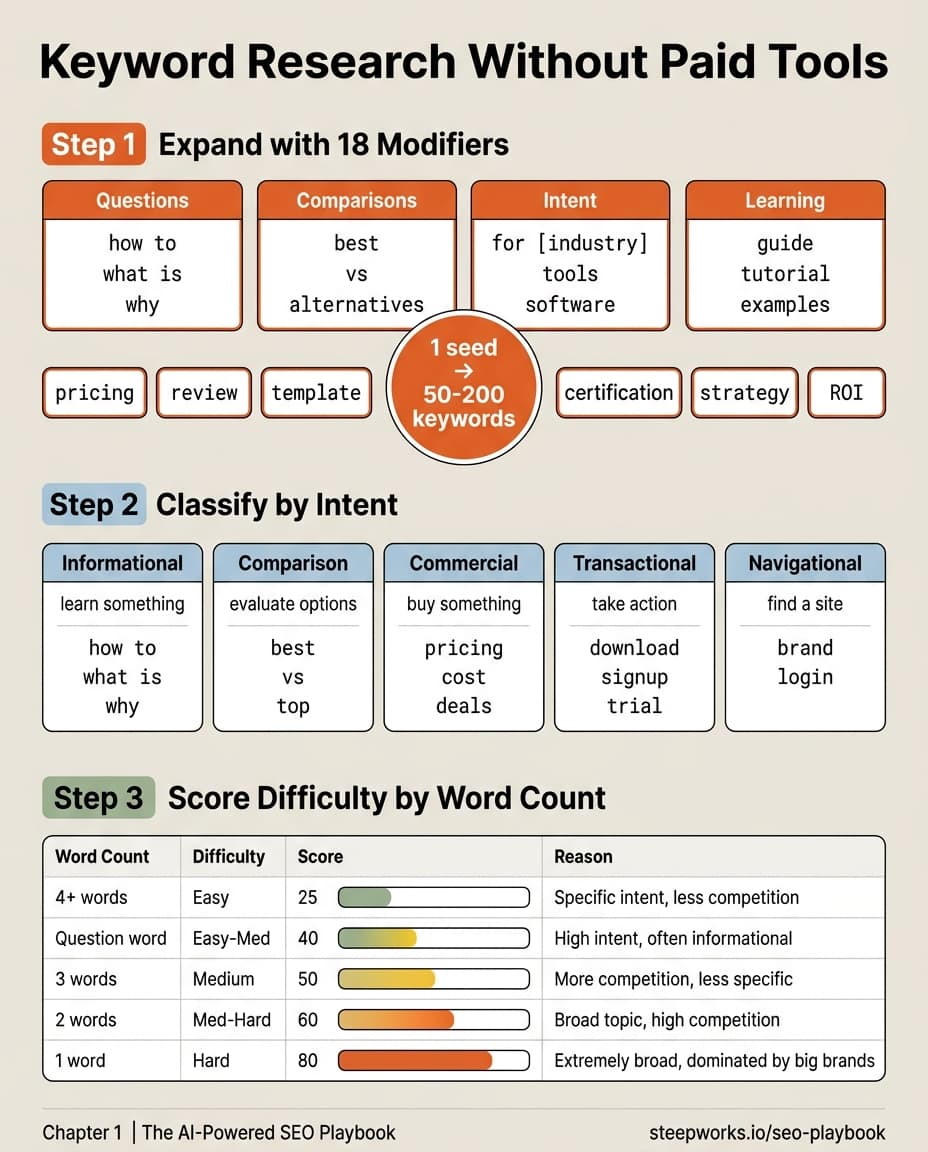
Keyword Research — 3-Step Process

Infographic showing a 3-step keyword research process: expand with 18 modifiers, classify by intent, and score difficulty by word count

18-Modifier Keyword Expansion

SEEDKEYWORDhow towhat iswhybestvsalternativesfor [industry]toolssoftwareguidetutorialexamplespricingreviewtemplatecertificationstrategyROIHover modifiers to see example expansions18 modifiers × ~10 suggestions each = 50-200 unique keywords per seed

You Need Two Speeds of Keyword Research

Keyword research has two modes: fast exploration ("is there signal here?") and deep strategy ("what exactly should I target and why?"). This system gives you one script for each.

quick_keyword_research.py is your exploration tool. It uses 10 modifiers against Google Autocomplete, runs in about two minutes, and gives you a fast read on any topic. Tell your agent "explore keyword demand for project management software" and it runs:

python quick_keyword_research.py --keyword "project management software"

keyword_research.py is your strategy tool. It uses 18 modifiers, adds People Also Ask generation, difficulty scoring, intent classification, and optionally pulls Google Trends data. The output is a full exportable report (JSON and CSV) that feeds directly into the clustering script in Chapter 2. Tell your agent "run the full keyword research for project management software" and it runs:

python keyword_research.py --keyword "project management software"

Or, tell your agent "research all my seed keywords at once" and it runs:

python keyword_research.py --config

Start with quick_keyword_research.py to explore. Have your agent switch to keyword_research.py when you're ready to build your actual strategy.

The difference in practice: a quick run on "pipeline automation" returns 40-60 suggestions in two minutes. A full run returns 150-200 with difficulty scores, intent tags, and optional trend data in about five minutes. The quick run tells you "there's signal here." The full run tells you "here's what to target and why."

How the Autocomplete Expansion Works

A single seed keyword gets expanded by prepending and appending modifier phrases. For keyword_research.py, the 18 modifiers include:

  • Question patterns: "how to [keyword]", "what is [keyword]", "why [keyword]"
  • Comparison patterns: "best [keyword]", "[keyword] vs", "[keyword] alternatives"
  • Intent patterns: "[keyword] for [industry]", "[keyword] tools", "[keyword] software"
  • Learning patterns: "[keyword] guide", "[keyword] tutorial", "[keyword] examples"

Each modifier generates a separate Autocomplete API call. Google returns up to 10 suggestions per call. After deduplication, a single seed keyword typically produces 50-200 unique keyword suggestions.

That number matters. If you start with 5 seed keywords (a reasonable starting point for most businesses), you'll generate 250-1,000 keyword candidates before doing any manual research. That's your raw material for clustering (Chapter 2) and strategy planning.

The quick_keyword_research.py version uses a trimmed-down set of 10 modifiers, the essentials without the long-tail generators. Same API, fewer calls, faster execution. Good enough for exploration. Not deep enough for strategy.

What the Raw Output Looks Like

Here's what you'll see after running the full script against a single seed:

Keyword Research: "project management software"
============================================================
Getting suggestions for 'project management software'...
  → 87 unique suggestions found

Top Suggestions:
┌────────────────────────────────────────┬──────────────┬────────────┬───────┐
│ Keyword                                │ Intent       │ Difficulty │ Score │
├────────────────────────────────────────┼──────────────┼────────────┼───────┤
│ project management software free       │ transactional│ Easy       │    25 │
│ best project management software       │ comparison   │ Easy-Medium│    40 │
│ project management software for small  │ commercial   │ Easy       │    25 │
│   teams                                │              │            │       │
│ project management                     │ informational│ Medium-Hard│    60 │
│ what is project management software    │ informational│ Easy-Medium│    40 │
└────────────────────────────────────────┴──────────────┴────────────┴───────┘

Your agent's output uses Rich formatting for readability. Behind it, the script also writes a CSV with every keyword in a flat file — one row per keyword, with columns for intent, difficulty, score, word count, whether it's a question, and whether it qualifies as long-tail. That CSV is your input for Chapter 2.

Choosing Your Seed Keywords

Your seed keywords are the 3-7 terms that define what your business does, who you serve, and how you solve their problem. They're not clever marketing phrases. They're the words your customers actually use.

Here's how to think about it by business type:

SaaS product company:

  • Your product category ("project management software")
  • The problem you solve ("team collaboration tools")
  • Your target buyer's role ("engineering manager productivity")

Consulting or services firm:

  • Your service category ("B2B marketing strategy")
  • The outcome you deliver ("revenue operations consulting")
  • The industry you serve ("[industry] growth strategy")

Local or niche business:

  • Your location + service ("[city] family events", "[city] yoga studio")
  • Your specific offering ("kids birthday party venue [city]")
  • The decision your customer is making ("things to do this weekend in [city]")

E-commerce or marketplace:

  • Your product category ("organic coffee beans")
  • The buying decision ("best [product] for [use case]")
  • Comparison terms ("[brand] vs [competitor]")

A good test: if you showed your seed keywords to a customer, would they say "yes, that's what I searched for"? If the answer is no, you're optimizing for the wrong language.

Good Seeds vs. Bad Seeds

Seed TypeGood ExampleBad ExampleWhy
Product category"project management software""enterprise solutions"Customers search the first; nobody searches the second
Problem framing"team can't hit deadlines""resource optimization"Use customer language, not vendor language
Buyer role"CTO security tools""stakeholder alignment"Roles are searchable; buzzwords aren't
Competitor comparison"alternative to monday.com""differentiated platform"People search for alternatives; they don't search for adjectives

The pattern: good seeds use words your customer already uses. Bad seeds use words your marketing team wishes they'd use. When in doubt, check your support tickets, sales call recordings, or Slack channels for the actual vocabulary.

How to Choose Seed Keywords

What type of business?SaaS Productproduct categoryproblem you solvebuyer's role + outcomeServices / Consultingservice categoryoutcome deliveredindustry servedLocal / Nichelocation + servicespecific offeringcustomer's decisionE-commerceproduct categorybuying decisioncomparison terms

Intent Classification: Why It Matters More Than Volume

Every keyword carries an intent signal. Someone searching "what is project management" wants education. Someone searching "best project management software 2026" is comparison shopping. Someone searching "Asana login" already made their choice.

The script classifies every keyword into five categories:

IntentWhat the Searcher WantsYour Content Strategy
InformationalLearn something — "how to", "what is", "why"Blog posts, guides, educational content
ComparisonEvaluate options — "best", "top", "vs", "alternatives"Comparison pages, review articles
CommercialBuy something — "pricing", "cost", "deals"Product pages, pricing pages
TransactionalTake action — "download", "free trial", "signup"Landing pages, CTAs
NavigationalFind a specific site — "[brand].com", "login"Ignore unless it's your brand

The classification uses trigger words. If the keyword starts with "how" or "what", it's informational. If it contains "best" or "vs", it's comparison. If it mentions "price" or "cost", it's commercial.

This matters because intent determines content format. A comparison keyword needs a comparison page. If you write a blog post for "best project management software", you'll lose to the sites that built actual comparison tables. An informational keyword needs depth. If your "how to" guide is 300 words, you'll lose to the one that's 2,000.

When prioritizing which keywords to target first, use this order:

  1. Comparison + Commercial have the highest conversion potential, closest to the buying decision. A visitor searching "best CRM for startups" is weeks from a purchase. Produce comparison pages (more on this in Chapter 7).
  2. Informational with specificity beats generic. "How to build a B2B content calendar in HubSpot" attracts qualified readers. "What is content marketing" attracts students.
  3. Transactional only matters if you have a product or free tool to offer. "Download free SEO checklist" only works if you actually have one.
  4. Navigational you can ignore unless you're tracking branded search. You can't compete for "Ahrefs login."

A common mistake: optimizing only for informational keywords because they have the highest search volume. Volume without intent is vanity. A comparison page that gets 200 monthly visits and converts at 5% is worth more than a "what is" article with 10,000 visits that converts at 0.1%.

The intent data from this script feeds directly into your prioritization. Sort your CSV by intent, then by difficulty within each intent bucket. Your highest-priority targets are low-difficulty comparison and commercial keywords.

Difficulty Scoring: A Useful Proxy, Not Gospel

You can't know true keyword difficulty without tools like Ahrefs or SEMrush, which calculate it from backlink data and proprietary formulas.

What we can do is estimate, and the estimate is surprisingly useful.

The script uses word count as its primary heuristic:

Keyword PatternDifficultyScoreWhy
4+ words (long-tail)Easy25Fewer competitors target specific long-tail phrases
Starts with question wordEasy-Medium40Question keywords often have less competition
1 word ("marketing")Hard80Single-word terms are dominated by high-authority sites
2 words ("content marketing")Medium-Hard60Broad enough to attract serious competition
3 words ("B2B content marketing")Medium50More specific, but still competitive

Is this perfect? No. "Best CRM software" is only three words but extremely competitive. "Pneumonoultramicroscopicsilicovolcanoconiosis treatment guidelines" is four words but nobody's searching for it.

The scoring is a starting filter, not a final answer. It gets you 80% of the way, and the SERP analysis in Chapter 3 confirms the other 20%. The workflow is: score here, verify there, then decide.

For practical targeting, focus on keywords scoring 25-50 (easy to medium). These are your greenfield opportunities: specific enough to rank for, searched enough to generate traffic, and narrow enough that your content can be genuinely useful.

When the Heuristic Misleads

Three patterns where word count alone won't tell you the truth:

  1. Short but niche. "Revenue attribution modeling" is two words (score: 60) but has minimal competition because the topic is specialized. The heuristic says medium-hard; the reality is low competition.

  2. Long but commercial. "Best CRM software for small businesses" is six words (score: 25) but highly competitive because every CRM vendor targets it. The heuristic says easy; the SERP says otherwise.

  3. Question format in competitive niches. "How do I choose a project management tool" scores 40, but the top results are from monday.com, Asana, and Atlassian. They have domain authority you don't.

This is why Chapter 3 exists. The difficulty score gets you a starting list. SERP analysis confirms it. Don't publish 20 articles based on difficulty scores alone. Validate your top 5-10 targets first, then scale.

python keyword_research.py --keyword 'project management software'
Keyword Research: "project management software"
============================================================
Getting suggestions for 'project management software'...
→ 87 unique suggestions found
Top Suggestions:
┌──────────────────────────────────────┬──────────────┬────────────┬───────┐
│ Keyword │ Intent │ Difficulty │ Score │
├──────────────────────────────────────┼──────────────┼────────────┼───────┤
│ project management software free │ transactional│ Easy │ 25 │
│ best project management software │ comparison │ Easy-Medium│ 40 │
│ project management software for sm.. │ commercial │ Easy │ 25 │
│ project management │ informational│ Medium-Hard│ 60 │
│ what is project management software │ informational│ Easy-Medium│ 40 │
└──────────────────────────────────────┴──────────────┴────────────┴───────┘
✓ CSV exported: keyword_research_results.csv (87 rows)
✓ JSON exported: keyword_research_results.json

In 15 Minutes: Your First Keyword Set

Your first research session produces a scored, classified keyword list you can act on immediately. Here's the workflow:

Step 1: Configure your seeds

Have your agent edit seo_config.yaml:

keyword_research:
  seed_keywords:
    - "your core topic"
    - "your product category"
    - "problem you solve"
    - "buyer role + pain point"
    - "alternative to [competitor]"

Step 2: Quick exploration first

Tell your agent: "Run a quick keyword scan across all my seed keywords."

python quick_keyword_research.py --config

This runs fast and gives you a rough landscape. Scan the output. Do the suggestions match your business? Are there unexpected topics you hadn't considered? Are there keywords you'd never target (wrong audience, wrong intent)?

Step 3: Deep research on promising seeds

For each seed keyword that showed strong signal in the quick pass, tell your agent: "Run the full keyword research on [your promising seed], skip Trends data for now."

python keyword_research.py --keyword "your promising seed" --no-trends

Use --no-trends on your first run. Google Trends data is useful for prioritization, but the PyTrends library rate-limits aggressively and sometimes returns empty data. Get the core research done first, then optionally tell your agent to add Trends data:

python keyword_research.py --keyword "your promising seed"

If PyTrends fails mid-run, your research is still 80% complete. The script handles the failure gracefully, logging a warning and continuing with everything else.

Step 4: Review the output

The script outputs a formatted table and exports to CSV with columns for the keyword, its intent, difficulty level, score, word count, and whether it's a question or long-tail phrase.

Sort by difficulty score (ascending) and scan for keywords where:

  • Difficulty score is 25-50 (your sweet spot)
  • Intent is comparison or informational
  • The keyword matches a topic you can write about with genuine expertise

Step 5: Save your top candidates

Your CSV export is the input for Chapter 2 (clustering). Keep all candidates, even the ones you won't target immediately. Clustering reveals patterns you can't see in a flat list.

Common First-Run Mistakes

Starting with too many seeds. Five is enough for your first session. Ten seeds generates so many candidates that clustering becomes noisy. Start narrow, expand later.

Ignoring keywords that surprise you. Autocomplete surfaces what people actually search for, which often differs from what you'd expect. If you see suggestions you hadn't considered, that's a feature — those are the gaps your competition missed too.

Filtering too aggressively before clustering. Don't delete keywords because they "seem irrelevant." Let the clustering algorithm in Chapter 2 do the grouping first. Keywords that look like outliers individually often form coherent clusters when viewed together.

Skipping the config file. Running --keyword one at a time works but doesn't scale. Put your seeds in seo_config.yaml from the start. When you're ready to re-run research in three months (and you should), your agent refreshes everything with a single command.

Case Study: Consulting Business Keyword Research

A consulting business in an adjacent B2B space ran this exact process with 5 seed keywords. Starting from zero: no existing keyword strategy, no SEO tooling, no Ahrefs.

Results:

  • 5 seed keywords expanded to 78 unique keyword candidates
  • Clustering (Chapter 2) organized them into 7 distinct topic groups
  • 60% of keywords scored as greenfield opportunities (difficulty 25-50)
  • 3 keyword clusters had zero meaningful competition in SERP analysis

The entire process, from seed selection to clustered strategy, took about 4 hours. The output fed directly into a content calendar that generated measurable organic traffic within 90 days.

That 60% greenfield rate is typical for businesses that haven't done systematic keyword research before. If you've been publishing content based on gut feel, there are almost certainly keywords you should be targeting but aren't, because you never looked.

The 3 clusters with zero competition were particularly valuable. These were long-tail topic areas where no competitor had published meaningful content. Not because the topics were obscure, but because nobody had done the keyword research to find them. That's the advantage of systematic discovery over intuition.

What "Greenfield" Looks Like in Practice

A greenfield keyword has three characteristics:

  1. Real search volume. People are searching for it (it appears in autocomplete).
  2. Low difficulty. Scoring 25-40 in the heuristic, meaning long-tail or question format.
  3. Weak SERP competition. The top results are forums, outdated articles, or tangentially related content (validated in Chapter 3).

When you find a cluster of greenfield keywords, that's your fastest path to page-one rankings. You're not competing with established sites. You're filling a gap that the search ecosystem hasn't served yet.

What You Have After This Chapter

At this point, you should have:

  • A seo_config.yaml with 3-7 seed keywords configured
  • A CSV export with 50-200+ keyword candidates per seed, each scored for difficulty and classified by intent
  • A rough sense of which keywords are greenfield opportunities

This raw keyword list is powerful but unorganized. The next chapter turns it into a strategy by clustering keywords by semantic meaning, assigning priorities, and mapping them to your content architecture.

Chapter 2

Semantic Clustering

You have a CSV with hundreds of keywords. Some are clearly related. Some look like duplicates. Some seem random. Scrolling through the list and grouping them by hand works for 30 keywords. It falls apart at 200.

This chapter introduces semantic_cluster.py, a script that uses machine learning to group keywords by meaning — automatically and locally. The output transforms a flat keyword list into a structured content strategy: clusters of related topics, each one a potential pillar page with spoke articles around it.

Hub-Spoke Content Architecture + Priority Tiers

Infographic showing hub-spoke content architecture with pillar pages connected to spoke articles, plus P0-P3 priority tier table

HDBSCAN Keyword Clustering — Three Distinct Topic Groups

HDBSCAN clustering visualization showing three keyword clusters in ember, moss, and sky colors with scattered noise points

What Semantic Clustering Actually Does

The idea is simple: the script reads the meaning of each keyword, not just the words, and groups the ones that mean similar things together. "Project management tools" and "project management software" land in the same cluster because they mean the same thing. "Project management tools" and "organic coffee beans" don't.

The clustering algorithm figures out how many groups exist on its own — you don't have to tell it. Where keywords clump together by meaning, it draws a boundary.

Keywords that don't fit any cluster get labeled as "noise." That doesn't mean they're bad keywords. It means they don't have semantic siblings in your current dataset. A keyword like "office lease tax deduction guide" might land as noise because nothing else in your research is about tax. These outliers often become standalone articles.

The model runs locally after a one-time download (~80MB). No API calls, no rate limits.

Tell your agent: "Cluster my keyword research results by meaning." It runs:

python semantic_cluster.py --file keywords.csv --column keyword

Or tell your agent: "Cluster all the keywords from my config file."

python semantic_cluster.py --config

What the Output Looks Like

Semantic Keyword Clustering Report
===================================
Total keywords: 78
Clusters found: 7
Unclustered (noise): 12

Cluster 1 (9 keywords)
  - project management tools
  - project management software
  - project management app
  - free project management tools
  - best project management software for teams
  - project management platform
  ...

Cluster 2 (6 keywords)
  - how to manage projects
  - project management guide
  - project management tutorial
  - project management for beginners
  ...

Noise (12 keywords)
  - agile sprint planning template
  - kanban board for marketing
  - resource allocation spreadsheet
  ...

The script outputs both a markdown report and a JSON file. The JSON format includes cluster labels for every keyword, which feeds directly into the strategy enrichment step.

Tuning the Clustering

The default settings work for most keyword sets under 200. But if the results don't feel right, describe the problem to your agent:

  • Too many tiny clusters (15+ clusters from 80 keywords): Tell your agent: "The clusters are too fragmented — rerun with broader groupings."
  • Too few giant clusters (2-3 clusters catching everything): Tell your agent: "The clusters are too broad — break them into smaller groups."

Your agent adjusts the clustering sensitivity and reruns. One or two rounds usually gets it right — you're describing the outcome you want, not configuring an algorithm.

# Broader clusters (fewer, larger groups)
python semantic_cluster.py --config --min-cluster-size 5

# More granular clusters (more, tighter groups)
python semantic_cluster.py --config --min-cluster-size 2

Installation Note

Tell your agent: "Install the dependencies for the clustering script." It handles the rest, including platform-specific quirks (Windows sometimes needs extra build tools). The ML model (~80MB) downloads automatically on first run and caches locally — no internet needed after that.

pip install sentence-transformers hdbscan

Semantic vs. Strategic Clustering

Semantic (by meaning)

Algorithm groups by shared words & meaning

setup service pricing
setup consultation free
how to setup [product]
setup tutorial step by step
setup guide for beginners
setup troubleshooting

One cluster — all share "setup"

Strategic (by intent)

You split by business purpose & target page

Service Page

setup service pricing
setup consultation free

Tutorial Article

how to setup [product]
setup tutorial step by step
setup guide for beginners

Support FAQ

setup troubleshooting

3 content targets from 1 semantic cluster

Semantic Clusters vs. Strategic Clusters

This is the most important distinction in the chapter, and the one most people miss.

Semantic clusters group keywords by meaning. The algorithm puts "setup service" and "setup tutorial" in the same cluster because they share the word "setup" and mean similar things. Mathematically, they're neighbors.

Strategic clusters group keywords by business intent. "Setup service" is a commercial keyword (someone wants to pay for help). "Setup tutorial" is informational (someone wants to do it themselves). You might want these in completely different content pieces, even though the algorithm grouped them together.

The workflow is:

  1. Run semantic clustering. Let the machine do the heavy lifting of initial grouping.
  2. Review each cluster for mixed intent. Flag clusters where commercial and informational keywords coexist.
  3. Split or merge based on strategy. Separate mixed-intent clusters into distinct content pieces, or merge small clusters that serve the same strategic purpose.
  4. Assign priorities. Rank the final clusters by business value (more on this below).

The machine gives you the first 80%. Your judgment gives you the last 20%. Don't skip step 2; it's where the algorithm hands off to strategy.

A Real Example of the Split

A clustering run on "setup" keywords produced this single cluster:

Cluster: Setup
  - setup service pricing
  - setup consultation free
  - how to setup [product]
  - setup tutorial step by step
  - setup guide for beginners
  - setup troubleshooting

Semantically coherent, all about setup. Strategically, it's three different content pieces:

  • Commercial hub page: "Setup service pricing" + "setup consultation free" → a service page with pricing and CTA
  • Tutorial article: "How to setup" + "setup tutorial" + "setup guide" → a comprehensive how-to post
  • Support content: "Setup troubleshooting" → a troubleshooting FAQ

One semantic cluster became three strategic content targets. The clustering got you to the right neighborhood. Your judgment assigned the addresses.

Hub-Spoke Internal Linking Model

B2B ContentMarketingContentStrategySEOAutomationExamplesROIMeasurementStrategyTemplateMetricsDashboardEditorialCalendarPillarPagesTopicClustersKeywordResearchRankTrackingProgrammaticPagesAI WritingToolsHub page (pillar)SpokeAdvanced spokeNoiseHub↔Hub cross-link

The Hub-Spoke Content Architecture

Each finalized cluster maps to a hub page (the broad topic) with spoke articles (individual keywords) linking back to it. Noise keywords become standalone articles that link to the nearest hub. Cross-linking between hubs creates the topical authority signal that search engines reward — smaller sites outrank larger ones through topical depth and interconnection, not volume.

The linking rules are straightforward: spokes link back to their hub using the primary keyword as anchor text, hubs link to all their spokes, and hubs link to adjacent hubs where topics overlap. Chapter 5 covers the full hub-spoke implementation in depth, including how to scale this model with programmatic content.

Priority Tier Assignment

TierCriteriaActionTimeline
P0Uncontested + high commercial intent + genuine expertiseWrite immediatelyThis month
P1Low competition + moderate intent + adjacent to P0Schedule next quarterMonth 2-3
P2Contestable competition or primarily informationalBuild authority firstMonth 4-6
P3High competition or thin demandBackburner — revisit later6+ months

Priority Tiers: What to Write First

Not every cluster deserves the same attention. Prioritize based on competition, intent mix, and your expertise:

TierCriteriaActionTypical Timeline
P0Uncontested + high commercial/comparison intent + you have genuine expertiseWrite immediatelyThis month
P1Low competition + moderate intent + adjacent to P0 topicsSchedule for next quarterMonth 2-3
P2Contestable competition or primarily informationalBuild authority first with P0/P1 content, then come backMonth 4-6
P3High competition or thin demandBackburner — revisit when domain authority grows6+ months

The priority assignment happens after clustering, after the semantic-to-strategic split, and after reviewing each cluster's difficulty scores from Chapter 1.

For a typical first-time analysis producing 7 clusters from 5 seeds, you'll usually find:

  • 1-2 P0 clusters (your greenfield opportunities)
  • 2-3 P1 clusters (solid second-wave targets)
  • 2-3 P2/P3 clusters (longer-term plays)

Start with P0. Get those hub pages published and ranking before you move down the priority list. Spreading effort across all tiers simultaneously dilutes your topical authority signal.

The P0 Test

A cluster qualifies as P0 when all three conditions are true:

  1. Competition is low or uncontested. SERP results for the cluster's primary keywords show forums, thin content, or outdated articles (validated in Chapter 3).
  2. Intent is commercial or comparison. At least some keywords in the cluster signal buying intent, not just curiosity.
  3. You have genuine expertise. You can write content better than what currently ranks because you've done the work, not just researched it.

If any condition fails, the cluster drops to P1 or lower. The most common mistake is ranking a cluster P0 because the keywords look appealing, even though the competition is strong. That's a P2 at best. You need domain authority before competing for contested terms.

Validating Clusters Against Real Data

Your clusters need validation against real search data before you commit to content production. The enrichment step cross-checks your clusters against live autocomplete suggestions and Google Trends, surfacing new keyword opportunities, trend direction (rising vs. declining), and intent breakdown per cluster.

Tell your agent: "Validate and enrich all my clusters with real search data."

python enhance_seo_strategy.py --all

The script takes each cluster from your seo_config.yaml and reports:

  • New keyword opportunities that appeared in autocomplete but weren't in your original research
  • Trend direction showing which keywords have rising interest (prioritize) vs declining (deprioritize)
  • Intent breakdown showing what percentage of keywords in each cluster are informational, commercial, or comparison

The enhancement step is particularly useful when revisiting your strategy quarterly. Keywords that were rising three months ago may have plateaued. New long-tail variations may have emerged. Tell your agent: "Re-validate just the content marketing cluster."

# Enhance a specific cluster only
python enhance_seo_strategy.py --cluster "content marketing"

When to Re-Run Enhancement

Direct your agent to run enhance_seo_strategy.py in three situations:

  1. After initial clustering to validate your strategy before writing content
  2. Quarterly review when trends shift, new keywords emerge, and competition changes
  3. After a significant content publish to check whether your new content created search opportunities for adjacent keywords

The enhancement script respects your config file, so re-running it never overrides your strategic decisions. It adds data. It doesn't replace judgment.

Populating Your Config File

After clustering and strategic review, update your seo_config.yaml with the finalized clusters:

keyword_research:
  clusters:
    - name: "Setup and Onboarding"
      priority: "P0"
      competition: "UNCONTESTED"
      hub_url: "/guides/setup"
      primary_keywords:
        - "how to setup [product]"
        - "setup guide for beginners"
        - "setup tutorial step by step"
      long_tail_keywords:
        - "setup [product] on windows"
        - "[product] setup troubleshooting common errors"

    - name: "Pricing and Comparison"
      priority: "P0"
      competition: "LOW"
      hub_url: "/compare"
      primary_keywords:
        - "[product] vs [competitor]"
        - "best [category] software 2026"
      long_tail_keywords:
        - "[product] pricing for startups"
        - "[product] free tier limitations"

This config becomes the input for SERP analysis (Chapter 3), content briefs (Chapter 4), and monitoring (throughout). Configure it once, reference it everywhere.

What You Have After This Chapter

Starting from the flat keyword CSV in Chapter 1, you now have:

  • Semantically grouped keyword clusters (automatic)
  • Strategic clusters refined by intent and business value (your judgment)
  • Priority tiers that sequence your content plan
  • A hub-spoke model mapping clusters to content architecture
  • An enriched strategy with trend data and new keyword opportunities
  • A populated seo_config.yaml ready for the rest of the toolkit

A Note on Iterating

Your first clustering run won't be perfect. That's by design. The workflow is:

  1. Run 1: Get the initial clusters. Review them. Notice where the algorithm groups things that should be separate, or separates things that should be grouped.
  2. Adjust: Tell your agent the clusters are too broad or too fragmented. It re-runs with different sensitivity.
  3. Apply strategic splits: Take the cleaned-up clusters and split mixed-intent groups into distinct content targets.
  4. Populate config: Write the final clusters into seo_config.yaml.
  5. Validate quarterly: Re-run enhancement to catch new opportunities and shifting trends.

Steps 1-2 take five minutes. You're not manually sorting 200 keywords into spreadsheet tabs. The machine does the heavy lifting, and you provide the strategic override. Spend your time on judgment, not data entry.

The next chapter grounds your strategy in reality: what's actually ranking for these keywords, how strong the competition is, and where the gaps are that your content can fill.

The machine gives you the first 80%. Your judgment gives you the last 20%.
Chapter 3

SERP Analysis & Content Briefs

You have keywords. You have clusters. You have priority tiers. What you don't have yet is ground truth: what's actually ranking for these terms, how strong the competition is, and where the gaps are that your content can exploit.

This chapter covers two scripts that bridge the gap between keyword strategy and content execution. serp_content_analyzer.py tells you what the competition wrote and generates a content brief for your response. serp_monitor.py tracks your rankings over time so you can measure whether your work moves the needle.

Both scripts use the Serper API for SERP data.

4-Step SERP Analysis Pipeline

1

Fetch SERP

Query Serper API for top 10 organic results

2

Fetch Pages

Download HTML from each ranking page (~1 req/sec)

3

Analyze Structure

Extract headings, word count, meta tags

4

Generate Brief

Aggregate patterns, find gaps, set word count target

SERP Content Analysis: What the Competition Wrote

Before writing a single word of content, you want to know three things:

  1. How long are the top-ranking pages? This sets your word count target.
  2. What topics do they all cover? These are the table stakes you need to match.
  3. What do they miss? These gaps are your differentiation opportunity.

Tell your agent: "Analyze the competition for B2B content marketing strategy." It runs:

python serp_content_analyzer.py --keyword "B2B content marketing strategy"

How the Analysis Works

The script runs a four-step pipeline:

Step 1 — Fetch SERP results. Queries Serper for the top 10 organic results for your keyword. You get titles, URLs, snippets, and positions.

Step 2 — Fetch page content. Downloads the HTML from each ranking page. Rate-limited to avoid being blocked, about one request per second.

Step 3 — Analyze page structure. For each page, the script extracts:

  • Title tag and H1
  • All H2 and H3 headings
  • Meta description
  • Total word count
  • Content structure (heading hierarchy)

Step 4 — Aggregate and generate brief. Finds patterns across all 10 pages:

  • Which H2 topics appear on multiple pages (frequency analysis)
  • Average, minimum, and maximum word counts
  • Common structural patterns
  • Gaps — topics that only 1-2 competitors cover, or that none cover

Reading the Content Brief

The output is a markdown content brief that looks like this:

Content Brief: "B2B content marketing strategy"
================================================

Target Metrics
  Recommended word count: 2,880 (competitor avg × 1.2)
  Competitor average: 2,400
  Range: 1,200 - 4,100

Common Topics (Cover These)
  1. Content strategy framework (8/10 competitors)
  2. Content distribution channels (7/10)
  3. Measuring content ROI (6/10)
  4. Content calendar template (5/10)
  5. Team roles and responsibilities (4/10)

Competitor Analysis
  | Pos | Title                          | Words | H2s |
  |-----|--------------------------------|-------|-----|
  | 1   | The Complete Guide to B2B...   | 3,200 | 12  |
  | 2   | B2B Content Marketing: A...    | 2,800 | 9   |
  | 3   | How to Build a B2B Content...  | 2,100 | 7   |
  ...

Differentiation Opportunities
  - Only 2/10 competitors discuss AI in content workflows
  - None mention content repurposing strategy
  - Only 1/10 covers programmatic content

The 20% Rule

The brief recommends a word count 20% above the competitor average. If the top 10 pages average 2,400 words, your target is 2,880.

Why 20%? It's not a magic number. It's a practical threshold. Writing 50% more than competitors often produces bloated content. Writing the same length gives you no structural advantage. Twenty percent gives you room to cover everything they cover plus your differentiation topics, without padding.

This isn't a mandate. If you can cover the topic better in 1,800 words than they did in 2,400, do that. The word count target is a planning tool, not a quality measure. But when you're unsure how much to write, "20% above average" is a solid starting point.

Unclaimed vs. Oversaturated Keywords

The brief reveals which of your prioritized keywords are worth pursuing immediately:

Unclaimed keywords. SERP results show forums (Reddit, Quora), outdated articles (2+ years old), or thin content (under 500 words). This means no serious competitor has invested in the topic. Your well-structured, comprehensive article can rank quickly. These are your P0 validation. The priority tiers from Chapter 2 are confirmed.

Oversaturated keywords. SERP results show multiple 3,000+ word articles from high-authority domains (HubSpot, Moz, Ahrefs blog). The competition has invested heavily. You can still compete, but it'll take longer and require more backlinks. These are P2 or P3 targets.

Contestable keywords. SERP results are mixed. Some strong pages, some weak ones. The top result might be 3,000 words from a known brand, but positions 4-10 are thin or outdated. You can potentially crack the top 5 with strong content and some backlink work. These are P1 targets.

Have your agent run serp_content_analyzer.py on your P0 keywords first. If the analysis confirms they're unclaimed, start writing. If it reveals unexpected competition, re-evaluate the priority tier.

Building Your Analysis Workflow

For a cluster with 5 primary keywords, tell your agent: "Generate content briefs for my top 3 P0 keywords and save them to the briefs folder."

# Analyze each P0 keyword in the cluster
python serp_content_analyzer.py --keyword "primary keyword 1" --output briefs/
python serp_content_analyzer.py --keyword "primary keyword 2" --output briefs/
python serp_content_analyzer.py --keyword "primary keyword 3" --output briefs/

You get three content briefs that tell you:

  • Whether each keyword is worth targeting (unclaimed/contestable/oversaturated)
  • What structure and depth your content needs to compete
  • Where the content gaps are across all three keywords

If two or three of the keywords produce briefs with similar H2 topics, you may be able to cover them in a single hub page rather than three separate articles. This is where SERP analysis feeds back into your content architecture from Chapter 2.

What to Do When the SERP Surprises You

Sometimes the analysis reveals something unexpected. Three common surprises:

The keyword looks easy but isn't. Your difficulty heuristic scored it 25 (easy), but the top 5 results are 3,000-word guides from major brands. Solution: reclassify to P2 and move to your next P0 target.

The keyword is easier than expected. The top results are 500-word articles from 2021. Nobody has invested in this keyword recently. Solution: write a comprehensive, up-to-date article and you'll likely rank quickly.

The intent doesn't match your assumption. You expected "tool comparison" results, but the SERP shows "how-to tutorials." Solution: adjust your content format to match what Google is actually rewarding for this keyword. Don't fight the SERP. Match the intent it reveals.

python serp_content_analyzer.py --keyword 'B2B content marketing strategy'
Content Brief: "B2B content marketing strategy"
================================================
Target Metrics
Recommended word count: 2,880 (competitor avg × 1.2)
Competitor average: 2,400
Range: 1,200 - 4,100
Common Topics (Cover These)
1. Content strategy framework (8/10 competitors)
2. Content distribution channels (7/10)
3. Measuring content ROI (6/10)
4. Content calendar template (5/10)
5. Team roles and responsibilities (4/10)
Differentiation Opportunities
- Only 2/10 discuss AI in content workflows
- None mention content repurposing strategy
- Only 1/10 covers programmatic content

SERP Monitoring: Measuring What Moves

Content analysis tells you where to invest. SERP monitoring tells you whether that investment is working. Tell your agent: "Track my keyword rankings across all my monitored keywords."

python serp_monitor.py --config

Your agent queries Serper for every keyword in your seo_config.yaml monitoring list, finds your domain's position (if ranked), and saves a timestamped snapshot.

The Day-Zero Baseline

The first time your agent runs serp_monitor.py, you're establishing your day-zero baseline. This is your documented starting point before any SEO work.

Have your agent run this, save the output, and don't expect good news. If you've never done systematic SEO, your baseline will likely show:

  • Most keywords: not ranked (your domain doesn't appear in top 20)
  • A few keywords: ranked page 2-3 (positions 11-30, from incidental relevance)
  • Rarely: a keyword or two on page 1 (you got lucky or it's branded)

This isn't a failure. It's the starting line. You can't measure progress without it. Three months from now, your agent runs the same command and you see which keywords moved. Without the day-zero snapshot, you're guessing.

Tell your agent: "Establish my day-zero ranking baseline, then save the output."

# Establish your baseline
python serp_monitor.py --config

# Three months later: "Show me how my rankings changed"
python serp_monitor.py --config --history

Reading the Monitoring Report

The monitoring report shows position data and, when history exists, trend data:

SERP Monitoring Report — your-domain.com
=========================================

Keyword                          Position    Change    URL
─────────────────────────────────────────────────────────
B2B content marketing strategy   14          ↑ 3       /blog/content-strategy
content marketing ROI            —           NEW       /blog/content-roi
project management tools         22          ↓ 2       /tools
email marketing automation       —           —         (not ranked)

The signals that matter:

  • ↑ (position gained): Your content is working. Continue building backlinks and updating.
  • ↓ (position lost): Competitors published something better or your content aged out. Investigate.
  • NEW: You've entered the rankings for a new keyword. Often happens 4-8 weeks after publishing.
  • — (not ranked): Normal for new keywords. Check back next month.

Monitoring Cadence

Weekly monitoring is overkill for most sites. Rankings fluctuate day-to-day, and weekly snapshots amplify noise. Monthly monitoring gives you a clearer signal.

Tell your agent to run serp_monitor.py --config once a month, on the same day. After 3-4 months, you'll have enough data points to see real trends rather than random fluctuations.

For high-priority keywords (your P0 targets with published content), you might monitor biweekly during the first 90 days after publication. This lets you catch early signals. A new article often starts ranking 4-8 weeks after publishing, and the initial position can tell you whether the content is strong (position 15-20, likely to climb) or needs work (position 40+, unlikely to reach page 1 without changes).

Connecting Monitoring to Action

Monitoring data isn't useful unless it triggers decisions:

SignalAction
Keyword moved from 15 → 8This content is climbing. Build 2-3 backlinks to push it to page 1.
Keyword stuck at position 12-15 for 3 monthsContent is close but needs improvement. Re-analyze SERP, update content, add depth.
Keyword dropped from 8 → 20Competitor published something new. Run SERP analysis, compare, and update.
Keyword never ranked after 3 monthsThe keyword may be too competitive, or the content doesn't match intent. Re-evaluate.

The quick-win workflow from the operating cadence (Chapter 8) specifically targets keywords in positions 11-20. These are the keywords closest to page 1, and a content improvement or a few backlinks can push them over the threshold. The gsc_analytics.py --quick-wins flag identifies these automatically from your Google Search Console data.

Combining SERP Analysis with Monitoring

The two scripts complement each other in a cycle:

  1. Analyze (before writing): Your agent runs serp_content_analyzer.py on your target keyword. Understand the competition. Build your brief.
  2. Publish your content based on the brief.
  3. Monitor (monthly): Your agent runs serp_monitor.py to track whether your new content enters the rankings.
  4. Re-analyze (when stuck): If a keyword plateaus at position 12-15, have your agent re-run the content analyzer. The SERP may have changed since your original analysis: new competitors, different content formats, updated ranking factors.
  5. Update and re-monitor: Improve your content based on the new analysis, then track the next cycle.

This analyze-publish-monitor-update loop IS the operating cadence. Every other workflow in this guide feeds into or out of it. The scripts automate the data collection; your judgment drives the decisions.

python serp_monitor.py --config --report
SERP Monitor — Weekly Rank Report
=================================
Period: May 12 - May 19, 2026
Keyword Rank Δ Status
─────────────────────────────────────────────────────
B2B content marketing strategy 8 +3 ▲ Rising
content marketing ROI 12 +1 ▲ Rising
content calendar template 15 0 ── Stable
content distribution channels 23 -2 ▼ Dropped
programmatic content -- NEW ★ First rank
Summary: 3 ▲ 1 ── 1 ▼ 1 ★

Case Study: Day-Zero Baseline for an Engineering Services Firm

A mid-market engineering services firm with no prior SEO work ran their first baseline against 35 target keywords. The results:

  • 0 keywords on page 1
  • 4 keywords on page 2 (positions 11-18), all branded or near-branded terms
  • 31 keywords unranked. The site didn't appear in the top 100 results

The unclaimed territory was vast. SERP analysis revealed that for 12 of the 35 keywords, the top results were directory listings, LinkedIn profiles, or competitor pages with thin content (under 500 words). These were the immediate P0 targets: real search demand with no serious competition.

Within 6 months of publishing targeted hub pages for their P0 clusters, 8 of those 12 keywords reached page 1. The branded keywords that started on page 2 moved to positions 1-3 naturally as the site's domain authority grew from the new content.

The baseline made this progress measurable. Without it, they would have known their content "felt like it was working" but couldn't point to specific position gains for specific keywords on specific dates.

The lesson: starting from zero is not the same as having no strategy. The firms that measure from day zero catch wins early, double down on what works, and course-correct on what doesn't. The firms that skip the baseline celebrate vague "we're getting more traffic" claims without knowing which keywords drove it or which content investment paid off.

State Persistence and Historical Analysis

Both monitoring scripts save timestamped JSON files. serp_monitor.py saves files like serp_monitor_20260513_1430.json. Each file captures the complete state at that moment: keyword, position, URL, title, and snippet for every tracked keyword.

The diff logic compares the two most recent files in your output directory. This means:

  • You don't need to configure any database or external storage
  • Historical data accumulates as JSON files, lightweight and searchable
  • You can compare any two snapshots manually by reading the JSON
  • If you need to reset your monitoring (after a major site change), delete the old files and run a fresh baseline

Keep your monitoring output directory clean. After a year, you'll have 12 monthly snapshots, enough to see annual trends and seasonal patterns.

What You Have After This Chapter

Your keyword strategy is now grounded in reality:

  • Content briefs for your priority keywords, with word count targets and competitive gaps
  • A day-zero baseline documenting your starting position for every tracked keyword
  • A monthly monitoring cadence that measures progress
  • A clear picture of which keywords are unclaimed (write now), contestable (write soon), and oversaturated (write later)

The next chapter turns these briefs into production: how to go from "here's what the competition wrote" to "here's our published article that ranks above them."

From Strategy to Production

$0.16

Cost to analyze 40 keywords

20%

Word count above competitor avg

60

Banned phrase patterns in voice gate

6

Headline scoring axes

Chapter 4

Content Production

The previous three chapters built your strategy: keywords researched, clusters mapped, competition analyzed, briefs generated. This chapter is where you start writing.

Most SEO guides stop after "write good content." That's not actionable. This chapter gives you a repeatable production workflow. Every piece goes through the same quality gates, every headline gets scored against objective criteria, and every draft passes through an automated quality checker before publication.

Three scripts power this workflow: serp_content_analyzer.py (which you met in Chapter 3), headline_demand_research.py for headline scoring, and voice_gate.py for pre-publish quality enforcement.

The 7-Step Content Production Pipeline

Infographic showing a 7-step content production pipeline from SEO pre-check through publish and monitor, with Voice Gate detail

7-Step Content Production Workflow

1

1. SEO Pre-Check

Verify keyword aligns with cluster strategy, no cannibalization

2

2. Content Brief

Generate competitive brief with word count target + gap analysis

3

3. Headline Research

Score headline candidates on 6 axes, pick winner

4

4. Draft Article

Write informed by brief, headline, and hub-spoke mapping

5

5. Voice Gate

Automated quality check — PASS or FAIL with line-level fixes

6

6. SEO Quality Check

Verify keyword placement, internal links, meta description

7

7. Publish + Monitor

Publish, add to rank tracker, watch performance weekly

The Per-Piece Workflow

Every content piece, whether it's a 500-word spoke article or a 3,000-word hub page, follows the same seven-step production flow:

Step 1: SEO Pre-Check

Before writing anything, verify that your target keyword aligns with your cluster strategy:

  • Does this keyword belong to an existing cluster? If not, is it worth creating a new one?
  • Has another piece of content already targeted this keyword? (Keyword cannibalization — two pages competing for the same term — hurts both pages.)
  • Which hub page will this piece link to?

This takes two minutes and prevents the most common content mistake: publishing articles that compete with each other for the same keywords.

Step 2: Generate Content Brief

Tell your agent: "Generate a content brief for [your target keyword]." It runs:

python serp_content_analyzer.py --keyword "your target keyword"

Review the brief for:

  • Target word count. Aim for the 20% above average recommendation.
  • Common H2 topics. These are table stakes you need to cover.
  • Differentiation gaps. Topics competitors miss that you can own.

Step 3: Headline Research

Before writing the article, tell your agent: "Score headline candidates for [your seed keyword]." A strong headline is the difference between a click and a scroll-past. It affects both search ranking and email/social distribution.

python headline_demand_research.py "your seed keyword"

The script runs a two-phase process:

Phase 1 — Autocomplete expansion. Sends 26 queries (your seed keyword + each letter of the alphabet) to Serper's autocomplete API. This surfaces the actual phrases people type, producing 100-200 headline-ready candidates.

Phase 2 — 6-axis headline scoring. Each candidate gets scored on six dimensions, 0-10 each, for a maximum of 60 points:

AxisWhat It MeasuresHigh-Scoring Signals
SpecificityConcrete details, numbers, proper nounsNumbers (×3), proper nouns (×2), special characters ($, %, #)
Action PromiseVerbs, outcomes, reader agencyAction verbs (×3), "you/your" (+3)
Pattern InterruptChallenges assumptions"Actually," "wrong," "myth," "stop," "never" (×3)
Identity SignalSpeaks to who the reader isRole words: operator, leader, founder, engineer (×3)
Curiosity GapOpen loop, unanswered questionHow, why, what, secret, hidden (×3)
ReadabilityLength and clarityOptimal: 40-80 characters, penalized outside that range

The 33-character Gmail rule: Mobile Gmail truncates subject lines after 33 characters. If your article will be distributed via email (and it should be), the first 33 characters of your headline need to carry the hook. The script factors this into the readability score.

The output is a ranked list of scored headlines:

Headline Demand Research: "content marketing"
==============================================

Top Scored Headlines:
┌─────────────────────────────────────────┬────────┬──────┬──────┬──────┐
│ Headline                                │ Total  │ Spec │ Act  │ Read │
├─────────────────────────────────────────┼────────┼──────┼──────┼──────┤
│ 7 Content Marketing Mistakes That       │   42   │  8   │  7   │  9   │
│   Kill B2B Pipeline                     │        │      │      │      │
│ How to Build a Content Engine That      │   38   │  5   │  8   │  8   │
│   Actually Converts                     │        │      │      │      │
│ Content Marketing Strategy for          │   31   │  6   │  5   │  7   │
│   Startups: A Practical Guide           │        │      │      │      │
└─────────────────────────────────────────┴────────┴──────┴──────┴──────┘

Use this to pick your headline. The top-scored option isn't always the right choice (your judgment matters), but the scoring gives you objective comparison data instead of gut feel.

When scores disagree with your instinct: The scoring is mechanical; it counts signals, not quality. A headline that scores 45 but feels generic might lose to one that scores 35 but has a unique angle. Use scores to narrow the field, not to make the final call. Trust the score over your gut when you're choosing between two headlines that feel equally strong.

Scoring your own candidates: For offline scoring (no API needed), tell your agent: "Score this headline: Your Draft Title Here."

python headline_demand_research.py --headline "Your Draft Title Here" --score-only

This is useful for comparing variations of your working title. Write 5-6 candidates, have your agent score them all, then pick the winner. The axis breakdown tells you specifically where each headline is strong or weak. Maybe one scores high on specificity but low on curiosity gap, while another has the opposite profile. That diagnostic is often more useful than the total score.

Step 4: Draft the Article

Write your content informed by:

  • The content brief from Step 2 (word count target, topics to cover, gaps to exploit)
  • The winning headline from Step 3
  • Your cluster's hub-spoke mapping from Chapter 2 (what to link to, what internal anchor text to use)

The drafting itself is beyond this guide's scope (every business has its own voice and style). But the SEO integration points are:

  • Use your target keyword in the H1, first paragraph, and 2-3 H2s. Naturally, not stuffed.
  • Cover all "common topics" from the content brief. These are table stakes.
  • Add your differentiation content, the gaps competitors miss.
  • Include internal links to your hub page and 2-3 related spoke articles.
  • Add structured data. JSON-LD markup for articles (FAQ schema if you include an FAQ section).

Step 5: Voice Gate

Before publishing, tell your agent: "Run the voice gate on my draft."

python voice_gate.py your-draft.md

The voice gate scans your content against two categories of quality issues:

Category 1 — Banned Phrases (~60 patterns across 8 categories):

The script greps your draft for specific phrases that signal generic, low-quality writing. These aren't grammar errors; they're voice problems:

  • Filler openers: "It's worth noting that," "In today's landscape," "The message is clear"
  • Abstract framing: "paradox," "dichotomy," "validates"
  • Generic enthusiasm: "revolutionary," "game-changing," "transformative," "cutting-edge"
  • Formal transitions: "furthermore," "moreover," "subsequently," "additionally"
  • Magic adverbs: "quietly," "deeply," "fundamentally," "increasingly"
  • Avoidance verbs: "serves as," "acts as," "functions as"
  • Vague attributions: "experts say," "research shows," "studies suggest"
  • Superficial -ing analyses: "reshaping," "reimagining," "redefining"

Category 2 — Structural Limits:

Beyond individual phrases, the script checks for overuse of structural patterns that make writing feel formulaic:

  • Em-dashes: Maximum 2 per 500 words. More and the writing feels choppy.
  • Colon-sentences: Maximum 3 per article. More and the writing feels like a listicle.
  • Tricolons (three-item lists in a sentence): Maximum 2 per article. Powerful once, repetitive after that.

The output tells you exactly what to fix:

FAIL: 7 violations found

Line 12: "it's worth noting that" [filler_opener]
  Fix: Delete the opener, start with substance

Line 34: "revolutionary" [generic_enthusiasm]
  Fix: Replace with specific claim

Line 56: "furthermore" [formal_transition]
  Fix: Use 'Also,' 'And,' or just start the sentence

Line 78: em-dash count 5/2 [structural_limit]
  Fix: Convert 3 em-dashes to periods or semicolons

A PASS means your draft cleared all checks. A FAIL means you have specific, line-numbered issues to fix.

Building Your Own Banned Phrase List

The companion repo includes a starter banned phrase list, but the real power is customization. Every brand has its own voice — the phrases that signal "generic" for a B2B SaaS company differ from the ones that signal "generic" for a consulting firm.

To build yours:

  1. Read your last 10 published articles
  2. Highlight phrases that feel generic, templated, or AI-generated
  3. Group them by category (filler, enthusiasm, transitions, etc.)
  4. Add them to the voice gate configuration as search patterns (your agent can help you format them)
  5. Have your agent run the voice gate against your existing content; the violations show you your current quality floor

The mechanism is universal. The phrase list is personal. A voice gate with your own banned phrases is worth more than one with someone else's list.

Why the Voice Gate Matters for SEO

This might seem like a content quality tool rather than an SEO tool. It's both.

Search engines penalize thin, generic content. Google's helpful content system explicitly downgrades pages that don't demonstrate first-hand experience or genuine expertise. Content stuffed with phrases like "in today's landscape" and "game-changing" reads as AI-generated or template-driven, exactly the signal Google's systems are trained to detect.

The voice gate catches these patterns before publication. A PASS doesn't guarantee good content, but a FAIL almost always identifies content that won't rank well. Think of it as a minimum quality bar: necessary but not sufficient.

The --fix Flag

When the gate fails, tell your agent: "Show me fix suggestions for the voice gate violations."

python voice_gate.py your-draft.md --fix

The fix suggestions are directional, not prescriptive. "Delete the opener, start with substance" tells you what to do, not what to write. The replacement has to come from you. The gate catches mechanical quality issues. The human provides the substance.

Step 6: Review and SEO Quality Check

After the voice gate passes, do a final human review with SEO quality in mind. This isn't a grammar review. It's a strategic check that verifies your content serves both readers and search engines:

  • Is the target keyword in the H1 and first paragraph?
  • Do internal links use descriptive anchor text (not "click here")?
  • Is the article at or above the content brief's word count target?
  • Does the article genuinely answer the searcher's question?
  • Are images alt-tagged with relevant keywords?
  • Does the meta description include the target keyword and a clear value proposition?

Step 7: Publish and Monitor

After publishing:

  • Add the target keyword to your seo_config.yaml monitoring list
  • Have your agent run serp_monitor.py to establish a post-publication baseline
  • Check back monthly to track ranking progress

6-Axis Headline Scoring

SpecificityActionPattern Int.IdentityCuriosityReadability
Strong headline
Generic headline

Max score: 60 points (10 per axis)

The Fastest SEO Wins Come from Content You Already Have

Not all content production starts from scratch. The highest-ROI SEO activity is improving pages that already rank positions 11-20 — close to page 1 but not there yet. A small content improvement can push these keywords over the threshold.

Tell your agent: "Find my quick-win keywords from Search Console."

python gsc_analytics.py --quick-wins

Your agent pulls data from Google Search Console and identifies keywords where:

  • You rank between positions 11-20 (page 2)
  • You're getting impressions but few clicks
  • The page exists and is indexable

For each quick-win keyword:

  1. Have your agent run serp_content_analyzer.py to see what currently ranks on page 1
  2. Compare your content to the competition. Where are you falling short?
  3. Update your existing content: add depth, update data, cover missing subtopics
  4. Monitor the keyword weekly for 4-6 weeks to track improvement

Cadence: Have your agent run the quick-win analysis monthly. Batch 3-5 updates per cycle. This is the highest-ROI activity in SEO because you're improving content that's already close to working, not starting from zero.

Your Work Sessions Reveal What to Write Next

When you're not sure what to write next, the answer is in your recent work — not in keyword volume tables. Tell your agent: "What should I write about based on my last two weeks of work?"

python content_queue_builder.py --days 14

This script scans your recent work sessions and session archives, clusters the topics you've been working on by frequency and recency, and outputs a ranked content queue. The idea: the topics that emerge from your actual work are stronger content candidates than topics pulled purely from keyword volume. You have genuine expertise in what you've been doing, which means you can write content that outperforms competitors who are only researching the topic.

The queue is a suggestion, not a mandate. Cross-reference it with your keyword clusters from Chapter 2. When a topic appears in both your content queue (you have expertise) and your keyword clusters (people are searching for it), that's a high-confidence content target.

Voice Gate — Before & After

BEFORE — 4 violations
voice_gate.py — Scanning draft.md
===================================
FAIL: 4 violations found
Line 12: "it's worth noting that" [filler_opener]
Fix: Delete the opener, start with substance
Line 34: "revolutionary" [generic_enthusiasm]
Fix: Replace with specific claim
Line 56: "furthermore" [formal_transition]
Fix: Use 'Also,' 'And,' or just start the sentence
Line 78: em-dash count 5/2 [structural_limit]
Fix: Convert 3 em-dashes to periods or semicolons
AFTER — Clean pass
voice_gate.py — Scanning draft_v2.md
=====================================
PASS: 0 violations found
✓ No banned phrases detected
✓ Em-dash count: 2/2
✓ Colon sentences: 1/3
✓ Tricolons: 1/2
Ready to publish.

Monthly Content Cadence

Week 1

Research & Brief

Run keyword research for target cluster

Generate content brief

Score headline candidates

keyword_research.pyserp_content_analyzer.pyheadline_demand_research.py

Week 2

Draft & Gate

Draft article from brief + winning headline

Run voice gate — fix violations

Internal link mapping

voice_gate.py

Week 3

Publish & Monitor

Final SEO quality check

Publish with structured data

Add keywords to rank tracker

serp_monitor.py

Week 4

Analyze & Plan

Review weekly rank report

Check GSC for quick wins

Queue next content piece

seo_health_report.pygsc_analytics.pycontent_queue_builder.py

The Monthly Content Cycle

For most B2B operators, the sustainable cadence is 2-4 pieces of content per month — a mix of quick-win updates to existing pages and new articles targeting P0 keywords. That produces 12-16 new or updated pieces per quarter, enough to build meaningful topical authority without burning out a lean team. If you only have capacity for one piece per month, prioritize the quick-win updates; they have the fastest payback because the content already exists and needs improvement to reach page 1. Chapter 8 covers the full monthly operating cadence, including how content production fits alongside monitoring, backlinks, and AEO/GEO work.

What You Have After This Chapter

You now have a complete content production pipeline:

  • A seven-step workflow from keyword selection through publication
  • Headline scoring that gives you objective title comparisons
  • An automated voice gate that catches quality issues before they reach your readers
  • A quick-win cadence for improving existing content (highest-ROI SEO activity)
  • A content queue informed by your actual work, not just search volume

Getting value from this guide?

Get weekly AI×GTM insights — the same operator perspective, delivered every Wednesday.

Get the Companion Repo

All 14 scripts, config templates, and setup instructions. Clone, configure, run.

View on GitHub
Programmatic SEO means generating indexable pages from structured data instead of writing each one manually.
Chapter 5

Programmatic SEO

The previous chapters covered content you write by hand: keyword-researched, brief-driven, voice-gated articles. That workflow produces high-quality content, but it doesn't scale. If your business has a database of entities (events, venues, products, locations, listings), there's a faster path to search visibility: programmatic SEO.

Programmatic SEO means generating indexable pages from structured data instead of writing each one manually. When done well, it multiplies your search surface area by orders of magnitude. When done poorly, it gets you penalized for thin content.

This chapter teaches the architecture, the quality line, and the implementation patterns — starting with a real case study so you see the concrete output before the abstract framework.

Programmatic SEO — The Multiplication Effect

Infographic showing how taxonomy dimensions multiply to create 1000+ indexable pages from structured event data

Multi-Taxonomy Hub Architecture

HomepageType HubsFree EventsOutdoor EventsArts & CraftsSportsSTEMArea HubsInner HarborTowsonColumbiaEllicott CityBel AirAge HubsBabies (0-1)Toddlers (2-3)Preschool (4-5)School AgeTeensSpecialToday's EventsThis WeekendCross-taxonomy

Case Study: BmoreFamilies

BmoreFamilies is a family events website in Baltimore that built programmatic SEO from structured event data. The results illustrate what programmatic SEO produces when the data, quality line, and architecture are right.

The data: 5,662 classified events with metadata (type, area, age range, cost, date, venue) plus 1,269 venues discovered and enriched via Google Places API. 909 venues had detailed Google Places data: hours, ratings, descriptions, photos.

The output: 10 type hubs, 5 area hubs, 7 age hubs, 2 special hubs, 50+ cross-taxonomy pages, 1,269 venue pages, and thousands of event detail pages. Total indexable page count exceeded 1,000 unique pages, all generated from a single structured database.

Why it works: Each hub aggregates events by a taxonomy dimension. "Free Things to Do in Baltimore with Kids" pulls all events where cost = free. Cross-taxonomy pages combine two dimensions ("Free Inner Harbor Events for Toddlers") and only generate when 3+ matching events exist, avoiding thin content. Venue pages are enriched with Google Places data (hours, ratings, reviews, upcoming events) — not just raw database dumps.

The quality line: Hub pages have human-written category introductions. Venue pages require Google Places enrichment to get their own page. Cross-taxonomy pages only generate above a 3-event threshold. Event pages require 50+ word descriptions, valid dates, and venue cross-links. Every generated page must offer something a user can't get faster from the source.

When Programmatic SEO Applies

Not every business can or should do this. Programmatic SEO works when four conditions are true:

  1. You have structured data. A database of entities with consistent attributes: products with specs, events with dates and locations, venues with addresses and categories, listings with pricing. If your data lives in a spreadsheet or database, it qualifies.

  2. Each page has genuinely different content. "Yoga Classes in Baltimore" and "Yoga Classes in Annapolis" are different pages because the events, venues, and details are different. "Product A" and "Product B" with identical descriptions in different colors are not. That's template stuffing.

  3. People search for these entities. Real search demand exists for individual items. "Free things to do in Baltimore this weekend" is a real search. "[Your SKU number] specifications" probably isn't (unless you're in industrial parts).

  4. You can add unique value per page. Context, categorization, related content, editorial summaries, not just raw data. A venue page with hours, ratings, reviews, and nearby events is useful. A venue page with just a name and address isn't worth indexing.

Red Flags — Don't Do This

Template-stuffing with near-identical content. If you generate 500 pages and 480 of them have the same body text with different city names swapped in, Google will penalize you for duplicate content. Each page must justify its existence.

Generating pages for entity combinations nobody searches for. "Free Indoor Events for Toddlers on Tuesdays in Northwest Baltimore" crosses the specificity line from useful to empty. If the combination only matches 0-2 events, the page isn't worth creating.

Pages with no unique value. If your programmatic page offers less information than the source data (a venue's Google listing, a product's manufacturer page), you're not adding value. You're adding noise to search results.

BmoreFamilies — Programmatic SEO Scale

5,662

Classified events

1,269

Venues discovered

909

Google Places enriched

1,000+

Indexable pages generated

24

Hub pages

50+

Cross-taxonomy pages

10

Type categories

7

Age categories

The Architecture: Hub-Spoke with Multiple Taxonomies

Programmatic SEO sites typically use a hub-spoke architecture with multiple taxonomy dimensions:

Homepage
├── Type Hubs        → "Free Things to Do in [City] with Kids"
│   └── Event pages  → Individual event detail pages
├── Area Hubs        → "Things to Do in [Neighborhood] with Kids"
│   └── Event pages  → Same events, different taxonomy path
├── Age Hubs         → "Activities for Toddlers in [City]"
│   └── Event pages  → Same events, age-filtered
├── Cross-Taxonomy   → Type × Area combos ("Free [Neighborhood] Events")
│   └── Event pages  → Intersection pages
└── Venue Pages      → Enriched with external data (hours, ratings)

Each hub page aggregates entities from the database filtered by one taxonomy dimension. Cross-taxonomy pages combine two dimensions for more specific queries. The same event might appear on a Type hub, an Area hub, an Age hub, and multiple cross-taxonomy pages, but each hub provides different context and serves a different search query.

The Multiplication Effect

If you have:

  • 10 type categories
  • 5 area categories
  • 7 age categories
  • 2 special categories (today's events, this weekend)

That's 10 + 5 + 7 + 2 = 24 hub pages, plus up to 50 cross-taxonomy pages (Type × Area), plus individual venue pages and event detail pages. From a single database, you can generate 1,000+ indexable pages that each serve a distinct search query.

The math from BmoreFamilies: 5,662 classified events across 1,269 venues produced 10 type hubs, 5 area hubs, 7 age hubs, 2 special hubs, 50+ cross-taxonomy pages, 1,269 venue pages, and thousands of event detail pages. Total indexable page count exceeded 1,000 unique pages.

Testing Your Quality Line

Before generating all your pages, test with a small batch (20-30 pages). Read each as if you were a searcher. Is it useful? Does it answer a question? Compare to what currently ranks. If more than 30% feel thin, raise your enrichment threshold or add editorial content before scaling.

Slug Collisions

When generating URLs from entity names, collisions happen (two venues named "The Park" produce the same slug). Plan for this before generating pages: append area disambiguators (/venues/the-park-inner-harbor) or unique ID suffixes. Discovering duplicate URLs after indexing requires redirects and reindexing requests.

Internal Linking in Programmatic Sites

With hundreds or thousands of pages, internal linking becomes both more powerful and more complex. The architecture itself creates the linking structure:

  • Hub pages link down to detail pages. Each hub shows a list of entities, each linking to its detail page.
  • Detail pages link up to their hub(s). An event page links to its Type hub, Area hub, and Age hub via breadcrumbs and explicit "More events like this" sections.
  • Detail pages cross-link laterally. "Related events" and "Nearby venues" sections connect detail pages to each other.
  • Cross-taxonomy pages link to both parent hubs. A "Free Inner Harbor Events" page links to both the "Free Events" hub and the "Inner Harbor" hub.

This linking structure is generated programmatically from the database relationships. You don't manually add links to 1,000 pages. The template queries the database for related entities and generates the links automatically.

The SEO benefit: every page contributes link equity to its parent hubs, and every hub distributes authority down to its children. The entire site operates as a reinforcing network rather than a collection of isolated pages.

Canonical URLs and Duplicate Content

When the same event appears on multiple hub pages (Type hub, Area hub, Age hub), you need canonical URLs to prevent Google from treating these as duplicate content.

The rule: each entity has one canonical URL — its detail page. Hub pages that list the entity include it as a link, not as a duplicate of the detail page content. If you show an event summary on a hub page and the full event on the detail page, the summary links to the canonical detail page. Your agent adds the technical markup that tells Google "this is the primary version of this page."

For cross-taxonomy pages where the same filter could be expressed multiple ways ("Free Events in Inner Harbor" vs "Inner Harbor Free Events"), pick one canonical URL structure and redirect the other. The slug structure should follow a consistent pattern: /{primary-taxonomy}/{secondary-taxonomy} everywhere.

Implementation Patterns for Your Business

You don't need to be an events site to use programmatic SEO. The architecture applies to any business with structured entities:

E-commerce: Product category hubs → individual product pages. Cross-taxonomy: brand × category, price range × category.

SaaS directory: Integration hubs → individual integration pages. Cross-taxonomy: category × platform ("CRM integrations for Shopify").

Real estate: Area hubs → listing pages. Cross-taxonomy: property type × neighborhood, price range × bedroom count.

Professional services: Service area hubs → individual service pages. Cross-taxonomy: service × industry ("IT consulting for manufacturing").

Job boards and marketplaces: Category hubs → individual listing pages. Cross-taxonomy: role × location, company × department.

Content aggregators: Topic hubs → individual article/resource pages. Cross-taxonomy: topic × format ("Python tutorials"), topic × level ("beginner machine learning").

The common thread: structured data with multiple taxonomy dimensions that people search for independently. If your business has this data and you're not generating pages from it, you're leaving search traffic on the table.

How to Know If Your Data Qualifies

Ask yourself three questions:

  1. Could you sort your data into 3+ meaningful categories? If yes, those categories become hub pages.
  2. Does each entity have at least 100 words of unique, useful content? Titles, descriptions, attributes, related entities. If not, you'll hit the thin-content line.
  3. Would a Google search for "[category] in [location]" or "[category] for [audience]" return results? If people search for the intersection of your taxonomy dimensions, programmatic pages serve real demand.

The Minimum Viable Implementation

If you're starting from scratch with programmatic SEO, here's the smallest useful version:

  1. Put your data in a database (or structured CSV at minimum). Every entity needs consistent attributes.
  2. Build 3-5 hub pages around your highest-volume taxonomy dimension (type, category, or location).
  3. Generate detail pages for every entity with sufficient content.
  4. Have your agent add structured data so search engines understand what each page represents (events, venues, products, etc.).
  5. Submit a sitemap including all generated pages.
  6. Have your agent monitor with serp_monitor.py to track which pages enter the index and start ranking.

Start small. If your 5 hub pages and 50 detail pages start ranking, expand to cross-taxonomy pages and additional dimensions. If they don't rank, investigate why before scaling up. Scaling thin content creates a bigger problem.

Monitoring Programmatic SEO

Standard SERP monitoring (Chapter 3) applies, but with a twist: you can't manually track 1,000+ pages. Instead, monitor representative keywords for each taxonomy dimension:

  • Track one keyword per hub page (e.g., "free things to do in Baltimore with kids")
  • Track 5-10 high-intent cross-taxonomy keywords
  • Use Google Search Console (gsc_analytics.py) to see which pages Google is actually indexing and which are getting impressions

The GSC data is particularly revealing for programmatic sites. If you generated 1,000 pages but only 200 are indexed, something is wrong: thin content, crawl budget issues, or canonical problems. The fix depends on the diagnosis, but GSC is where you'll spot the symptom.

Crawl Budget Considerations

Google allocates crawl budget based on site authority and freshness signals. For a new site generating hundreds of pages, Google won't crawl them all immediately. You can help by:

  1. Submitting your sitemap in Google Search Console — this tells Google the pages exist
  2. Telling your agent to prioritize hub pages in the sitemap so Google crawls your most important pages first
  3. Setting appropriate refresh frequencies — daily for event pages, weekly for venue pages, monthly for hubs
  4. Avoiding orphan pages — every page must be reachable via internal links from the hub structure. Pages only accessible through the sitemap crawl slower.

Expect 4-8 weeks for Google to fully crawl and index a new programmatic site. Monitor indexation progress in GSC and investigate any pages that remain unindexed after 60 days.

Quality Line Decision Tree

Generate this page?Does this page have unique data per entity?SKIPNoYesDo real people search for this entity?SKIPNoYesDoes page add value beyond raw data source?SKIPNoYes3+ matching entities for this taxonomy combo?SKIPNoYesGENERATE

What You Have After This Chapter

Programmatic SEO is a multiplier, but only if your data justifies it and your quality line is honest. After this chapter, you have:

  • Criteria for whether programmatic SEO applies to your business
  • A hub-spoke architecture pattern with multiple taxonomy dimensions
  • Technical implementation patterns (page generation, structured data, sitemaps, breadcrumbs)
  • Quality line principles to avoid thin-content penalties
  • The slug collision problem and three solutions
  • A minimum viable implementation plan to start small and scale up

The next chapter shifts from creating content to building the backlink profile that gives that content authority.

BmoreFamilies — Programmatic SEO in Production

5,662

Events classified

1,269

Venues discovered

1,000+

Pages generated

$0

Monthly data cost

Link reclamation has a 30-50% conversion rate because you're fixing an error, not asking for a favor.
Chapter 7

AEO & GEO

May 2026 Update: Google published their official AI Optimization Guide, and it confirmed what operators have suspected: AEO/GEO is still SEO. No special markup, no magic files, no content chunking tricks. The guide explicitly says to focus on traditional SEO fundamentals — non-commodity content, technical health, structured data for rich results — and adds one genuinely new dimension: optimizing for agentic experiences (browser agents that read your DOM). We've updated this chapter to reflect Google's official position. What changed and what was validated is noted inline below.

Traditional SEO targets Google's index. AEO (AI Engine Optimization) targets the systems behind ChatGPT, Claude, Perplexity, and Google AI Overviews — structuring your content so AI systems accurately describe and recommend your brand. GEO (Generative Engine Optimization) is the subset focused on being cited in AI-generated search results, not just mentioned. Both matter, but GEO has more immediate, measurable impact. As AI search grows, you need to be findable by both crawlers and LLM retrieval systems.

The good news: ~80% of what works for traditional SEO also works for AEO/GEO. The content strategies in Chapters 1-6 build the foundation. This chapter covers the additional 20%, the tactics specific to AI visibility. Google's May 2026 guide confirms this ratio — they explicitly state that traditional SEO best practices are the primary optimization lever for AI features.

Traditional SEO vs. AEO vs. GEO

Traditional SEOGoogle indexAEOAI brand associationGEOAI search citations~80%shared foundationRank trackingTechnical crawlllms.txtBrand co-occurrenceCitation formatAI Overviews

Measuring Your AI Visibility

You can't log into an "AEO dashboard." But you can measure the proxy signal that drives AI recommendations: web co-occurrence. LLMs form brand associations from how frequently your brand name appears alongside your target category across the web. More co-occurrences = stronger AI association.

Tell your agent: "Track my brand's visibility across the web, Reddit, and Quora."

python brand_mention_tracker.py

The script tracks five signals:

  1. Web mentions. Serper search for "YOUR BRAND" -site:your-domain.com to count total external mentions.
  2. Reddit mentions. site:reddit.com "YOUR BRAND" for Reddit presence.
  3. Quora mentions. site:quora.com "YOUR BRAND" for Quora presence.
  4. Founder mentions. "FOUNDER NAME" -site:your-domain.com for personal brand.
  5. Category associations. For each configured category, "YOUR BRAND" "CATEGORY" for co-occurrence.

The category association count is the key AEO metric. If you're trying to be known as the go-to resource for "B2B content marketing," track how many web pages mention both your brand and "B2B content marketing" together. More co-occurrences = stronger AI association.

Establishing a Baseline

Tell your agent: "Establish my brand mention baseline so we can track changes over time."

python brand_mention_tracker.py --baseline

This saves a snapshot. Monthly tracking shows the delta. Are your mentions growing? Are your category associations strengthening? A 6-week lag between SEO content publication and measurable AI visibility improvement is typical.

Configuring Category Associations

The categories you track should match your positioning. If you want AI systems to associate your brand with "B2B content marketing," configure that as a tracked category. If you also want association with "SEO automation," add that too.

Choose 3-5 target categories that represent:

  • Your primary product/service category
  • The problem you solve (from your ICP's perspective)
  • Your differentiation angle (what makes you different from competitors)

Track these monthly. When a category association count grows consistently over 3-4 months, that's signal that AI systems are learning the connection. When it stalls or declines, investigate. Did a competitor flood the space with content? Did your content production slow down?

Reddit and Quora as AEO Accelerators

The Reddit and Quora participation strategy from Chapter 6 is doubly important for AEO. LLMs weight these platforms disproportionately when forming brand associations because:

  1. Community validation. Upvoted answers carry more weight than self-published content.
  2. Diverse contexts. Your brand appearing in answers to different questions teaches AI that you're relevant across multiple use cases.
  3. Freshness. Reddit and Quora content cycles faster than blog posts, providing more recent training signals.

Every authentic Reddit answer or Quora post that mentions your brand in context is an AEO deposit. Mention counts grow over months as AI models retrain or update their retrieval indices.

Building Brand Co-occurrence Through Community Participation

The tactical rules for Reddit and Quora participation that drives both backlinks and AEO:

  • Value first. Every post teaches, helps, or shares genuine experience. No self-promotion disguised as advice.
  • Never astroturf. No fake accounts, no paid upvotes. Reddit's community detects and destroys inauthentic participation.
  • Disclose affiliation. "Full disclosure: I built this" earns respect. Covert promotion destroys it.
  • Post types that work: Build logs, honest tool comparisons, and direct answers to specific questions.

Cadence: Reddit 2-3 posts per month to start, scaling to 8-12 once you've identified the right subreddits. Quora 2-3 answers per month, scaling to 4-6.

Finding the right communities: Look for subreddits where your target audience asks questions. The test: read the last 30 days of posts. If you can genuinely help with 3-5 questions, it's the right subreddit. Start by answering without mentioning your brand. After contributing genuine value 5-10 times, the community becomes receptive to occasional brand references — always with disclosure, always in context.

Brand Mention Tracking — 5 AEO Signals

127

Web mentions

+14

23

Reddit

+5

8

Quora

+2

34

Founder

+3

32

Category assoc.

+8

python brand_mention_tracker.py --report
Brand Mention Tracker — Monthly Report
=========================================
Period: April 2026 → May 2026
Signal Count Δ Trend
─────────────────────────────────────────────────────
Web mentions 127 +14 ▲
Reddit mentions 23 +5 ▲
Quora mentions 8 +2 ▲
Founder mentions 34 +3 ▲
Category: "B2B content mktg" 18 +4 ▲
Category: "SEO automation" 9 +1 ──
Category: "AI marketing ops" 5 +3 ▲

Tactical Patterns for AI Visibility

1. llms.txt

A proposed standard for telling AI crawlers what your site is about, similar to robots.txt but for AI context. Place it at /llms.txt in your site root:

# llms.txt
name: Your Brand
description: One-sentence positioning statement
url: https://your-domain.com

# Key pages for AI context
- /about: Company overview and team
- /products: Product catalog with detailed specifications
- /blog: Thought leadership and technical articles
- /resources: Guides, templates, and tools

Status (updated May 2026): Google's AI Optimization Guide confirms that Google's own AI features (AI Overviews, AI Mode) do not use llms.txt — they rely on standard crawling and indexing. However, non-Google AI systems (Perplexity, ChatGPT, Claude) may reference it. If you already have one, keep it. If you don't, don't prioritize it over the fundamentals in Chapters 1-6. It's a nice-to-have, not a must-have.

Implementation: If you decide to create one, it's a plain text file at your domain root. In Next.js: public/llms.txt. In WordPress: upload to your root directory. Accessible at https://your-domain.com/llms.txt. Update it quarterly when you publish major new pages — not monthly.

2. AI Crawler Rules in robots.txt

You can control which AI crawlers access your content. The strategic decision is yours: do you want AI crawlers indexing your content? For most B2B companies, the answer is yes — being cited by AI is additional distribution. The exception is if your content is behind a paywall or if AI-generated answers would cannibalize your traffic.

Once you decide which sections to allow or block, tell your agent to configure your robots.txt. Here's what the configuration looks like (your agent writes this):

# AI crawler rules
User-agent: GPTBot
Allow: /blog/
Allow: /products/
Disallow: /internal/

User-agent: Claude-Web
Allow: /

User-agent: PerplexityBot
Allow: /blog/

Known AI crawlers as of 2026:

  • GPTBot — OpenAI's crawler
  • Claude-Web — Anthropic's crawler
  • PerplexityBot — Perplexity's crawler
  • Googlebot — Google already crawls for AI Overviews via its standard crawler
  • Applebot-Extended — Apple's AI features crawler

Check your server logs periodically to see which AI crawlers are visiting. If you're not seeing any, your site may have technical issues: blocked in robots.txt, slow page load, or thin content that crawlers skip. Regular AI crawler visits mean AI systems are picking up your content.

3. Content Patterns That AI Systems Cite

Structure your content so AI systems can extract and reference it:

Definitive answers in the first paragraph. AI systems prefer content that answers questions directly. Start your articles with a clear, concise answer before expanding into detail. This is also good practice for Google's featured snippets.

Structured data (JSON-LD). Helps Google display rich results (review stars, FAQ dropdowns, product info) in traditional search. Google's AI Optimization Guide clarifies that structured data does not directly influence AI Overviews or AI Mode — it's a rich results tool, not an AI features tool. Still worth implementing for the traditional SEO value, and it gives all search systems cleaner entity signals about your brand, products, and people.

Comparison tables. AI systems frequently cite well-structured comparison tables. If you're comparing tools, features, or approaches, format them as actual HTML tables with clear headers. "X vs Y" comparison pages serve dual SEO + AEO purposes — they rank for comparison keywords AND get cited by AI answering comparison questions.

FAQ sections. Map directly to question-answer retrieval patterns. An FAQ with 10 well-written questions and answers gives AI systems 10 discrete, citable pieces of information.

Brand + category co-occurrence. Mention your brand alongside your target category naturally throughout your content. Not keyword stuffing, but genuine, contextual references that AI training data can learn from.

4. BOFU Comparison Pages

Bottom-of-funnel comparison pages ("X vs Y" or "Best [category] tools") serve both traditional SEO and AEO:

  • Traditional SEO. Comparison keywords have high commercial intent and rank well in organic search.
  • AEO. AI systems answering "what's better, X or Y?" pull from comparison pages.
  • GEO. Perplexity and Google AI Overviews frequently cite structured comparison content.

Build comparison pages for your brand vs. top 2-3 competitors. Be honest. Credibility matters more than spin, and AI systems can cross-reference claims against other sources.

Structuring Comparison Pages for Maximum AEO Impact

A comparison page that gets cited by AI systems follows this structure:

  1. Opening statement with clear, neutral framing of what's being compared.
  2. Feature comparison table as structured HTML with headers (not just markdown). AI systems parse tables more reliably than prose.
  3. Use case recommendations. "Choose X if you need [scenario]. Choose Y if you need [different scenario]." AI systems favor conditional recommendations because they match the "which should I use for..." question format.
  4. Honest limitations. "X falls short on [specific area]." Acknowledging limitations signals authority. AI systems are trained to detect one-sided promotional content.
  5. Summary verdict with a clear bottom-line recommendation.

Pages structured this way get cited in AI answers because they give LLMs structured, nuanced, citable content for comparison questions.

5. Agentic Experiences: The Genuinely New Dimension

Google's AI Optimization Guide introduces one concept that didn't exist in prior SEO guidance: agentic experiences. These are browser-based AI agents that can navigate websites, fill forms, compare products, and complete tasks on behalf of users — using your site's actual DOM structure.

This is different from AI Overviews (which summarize content) or traditional crawling (which indexes pages). Agentic systems interact with your site like a user would, but they read the DOM tree and accessibility signals rather than visual layout.

What this means practically:

  1. Semantic HTML matters more than ever. Agents parse <article>, <nav>, <time>, <section> tags to understand page structure. A <div> soup with Tailwind classes gives agents nothing to work with. Proper semantic elements tell agents what content is, not just how it looks.

  2. Accessibility = agent-readability. ARIA labels, alt text, proper heading hierarchy, and form labels all help agents navigate your site. The accessibility audit you've been putting off is now also an AI optimization task.

  3. Clean form patterns. If you have inquiry forms, pricing calculators, or booking flows, agents need to be able to identify and interact with form fields. Use semantic <form>, <label>, and <input> elements rather than custom div-based components.

  4. Avoid anti-patterns. Infinite scroll without pagination, content hidden behind JavaScript-only interactions, CAPTCHA on informational pages — all of these block agent navigation.

The investment: This is primarily a one-time technical audit, not an ongoing cadence item. Check your key pages for semantic HTML, fix heading hierarchy issues, ensure forms are properly labeled. Most modern frameworks (Next.js, Astro) generate decent semantic HTML by default, but custom components often regress to div soup.

6. The DIY GEO Tracker (Advanced/Optional)

For operators who want to measure AI visibility directly, the concept is a tracker that queries multiple LLM APIs with your target keywords and checks whether your brand appears in the responses.

Architecture:

  • Query 3-4 LLM APIs (OpenAI, Anthropic, Google, Perplexity) with keyword variants
  • Parse responses for brand mentions, accuracy, and positioning
  • Score each response: mentioned/not mentioned, accurate/inaccurate, recommended/just mentioned
  • Track over time as your content efforts change AI perception

This is an advanced project, not something you'd build in your first month. The brand mention tracker provides a solid proxy metric that most operators should start with.

When to build one: Consider a GEO tracker when:

  • You have 50+ published content pieces and want to measure AI citations
  • Your brand appears in at least some AI responses (confirmed by manual testing)
  • You want to A/B test content changes against AI citation rates

When to skip it: If you're still building your content foundation (Chapters 1-6), the GEO tracker is premature. Focus on creating content that AI systems can eventually cite, then measure citations once the content exists.

Manual GEO Testing

Before building an automated tracker, you can manually test AI visibility:

  1. Open ChatGPT, Claude, and Perplexity
  2. Ask each: "What are the best tools for [your category]?" and "How do I [your key use case]?"
  3. Check whether your brand appears in the response
  4. Note whether you're mentioned, recommended, or cited (three different levels)
  5. Repeat quarterly

This takes 15 minutes per quarter and gives you a directional signal. When your brand starts appearing consistently across multiple AI systems, that's the signal to consider automated tracking.

Case Study: B2B Product Company GEO Tracker

A B2B product company (in a security-adjacent space) built a GEO tracker querying 4 LLM APIs with 275 keyword variants. The tracker scored: brand mentioned? Accurately described? Recommended or just acknowledged?

Key finding: Traditional SEO work (content publication, backlinks, community participation) improved AEO/GEO scores with approximately a 6-week lag. The same content strategy served both channels. AEO wasn't a separate workstream; it was a measurement layer on top of existing SEO.

Practical implication: You don't need a separate AEO strategy. Chapters 1-6 build the foundation. This chapter adds four things on top:

  1. Measurement: Brand mention tracker gives you a proxy for AI perception (5 minutes/month)
  2. Quick wins: llms.txt and robots.txt AI rules take one afternoon to implement
  3. Content formatting: Comparison pages, FAQ sections, and structured data improve both SEO and AEO
  4. Community participation: Reddit/Quora from Chapter 6 feeds both backlink profile and AEO simultaneously

If nobody links to your content and nobody mentions your brand, AI systems have no data to learn from. Fix the fundamentals first (Chapters 1-6), then optimize for AI (this chapter).

For the combined monthly AEO/GEO routine (brand tracking, community participation, comparison page cadence), see Chapter 8's consolidated operating cadence.

Search Result Comparison — Plain vs Rich
Traditional Search Result:
┌─────────────────────────────────────────────────────┐
│ B2B Content Marketing Strategy | YourBrand.com │
│ https://yourbrand.com/content-marketing-strategy │
│ Learn how to build a B2B content marketing... │
└─────────────────────────────────────────────────────┘
AI-Enhanced Search Result:
┌─────────────────────────────────────────────────────┐
│ B2B Content Marketing Strategy | YourBrand.com │
│ https://yourbrand.com/content-marketing-strategy │
│ ★★★★★ Updated May 2026 | FAQ available │
│ Learn how to build a B2B content marketing... │
│ │
│ Related questions: │
│ ▸ What is B2B content marketing? │
│ ▸ How to measure content marketing ROI? │
└─────────────────────────────────────────────────────┘

What You Have After This Chapter

  • Brand mention tracking as a proxy for AI visibility
  • llms.txt and robots.txt configuration for AI crawlers (nice-to-have, not must-have)
  • Content structuring patterns that AI systems prefer to cite
  • A comparison page strategy that serves both SEO and AEO
  • Semantic HTML and accessibility readiness for agentic experiences
  • Understanding that AEO is a measurement layer on existing SEO, not a separate discipline — now confirmed by Google's official guidance

AEO/GEO is moving fast. The tactics in this chapter represent what works as of mid-2026. New AI search products and standards will emerge. The fundamental principle won't change: be the most comprehensive, honest, and well-cited source in your category. The specific tools and file formats may evolve.

The next chapter ties all seven chapters together into a single monthly operating cadence.

Chapter 8

Operating Cadence

You've now seen every piece of the system: keyword research, clustering, SERP analysis, content production, programmatic SEO, backlinks, and AEO/GEO. Each chapter covered one capability. This chapter puts them into a rhythm: a monthly operating cadence that keeps SEO running without consuming your entire schedule.

The cadence assumes you're an operator managing SEO alongside other GTM responsibilities. Total time investment: 8-12 hours per month, split across weekly and monthly activities.

The 90-Day SEO Operating Cadence

Infographic showing the monthly SEO rhythm across 4 weeks and a 90-day ramp-up timeline from foundation to full cadence

Monthly Content Cadence

Week 1

Research & Brief

Run keyword research for target cluster

Generate content brief

Score headline candidates

keyword_research.pyserp_content_analyzer.pyheadline_demand_research.py

Week 2

Draft & Gate

Draft article from brief + winning headline

Run voice gate — fix violations

Internal link mapping

voice_gate.py

Week 3

Publish & Monitor

Final SEO quality check

Publish with structured data

Add keywords to rank tracker

serp_monitor.py

Week 4

Analyze & Plan

Review weekly rank report

Check GSC for quick wins

Queue next content piece

seo_health_report.pygsc_analytics.pycontent_queue_builder.py

The Monthly Cadence Table

WeekActivityScriptsTime
Week 1Quick-win audit + content updatesgsc_analytics.py --quick-wins, serp_content_analyzer.py2-3 hours
Week 2New content: research + brief + draftkeyword_research.py, serp_content_analyzer.py, headline_demand_research.py3-4 hours
Week 3New content: draft + voice gate + publishvoice_gate.py2-3 hours
Week 4Monitoring + backlinks + brand trackingserp_monitor.py, backlink_monitor.py, backlink_prospector.py, brand_mention_tracker.py2-3 hours

Week 1: Quick-Win Audit

Start each month by telling your agent: "Find my quick-win keywords — the ones closest to page 1."

python gsc_analytics.py --quick-wins

This identifies keywords where you rank positions 11-20, close to page 1 but not there yet. For the top 2-3 opportunities:

  1. Have your agent run serp_content_analyzer.py to see what currently ranks on page 1
  2. Compare your content to the competition. Look for subtopics they cover that you don't
  3. Update your existing content: add depth, freshen data, cover missing subtopics
  4. Tell your agent to run voice_gate.py on the updated content before republishing

Quick-win updates are the highest-ROI SEO activity because the content already exists and is already indexed. Small improvements can push you from page 2 to page 1.

What "update" actually means: Don't just add a paragraph. Have your agent run the SERP analyzer against the keyword and diff your content against the top 3 results. If they cover a subtopic you don't, add a section. If your data is 6+ months old, replace it. If your intro buries the answer, restructure so the core answer appears in the first 100 words. Then re-run voice gate to catch any banned patterns your edits introduced.

Week 2: New Content Research

Pick one P0 or P1 keyword from your cluster strategy (Chapter 2). Tell your agent to run the full research pipeline:

  1. serp_content_analyzer.py --keyword "target keyword" — generate the content brief
  2. headline_demand_research.py "target keyword" — score headline candidates
  3. Review the brief, pick the headline, outline the article

If the SERP analysis reveals the keyword is more competitive than expected, pivot to a different keyword. Don't force content into a slot where you can't compete.

Picking the right keyword each month: Check your priority tiers from Chapter 2. P0 keywords first, then P1. Within a tier, pick the keyword where your SERP analysis shows the weakest competition: low Domain Authority results ranking on page 1, thin content from competitors, or outdated information you can beat. One strong article per month outperforms three rushed ones.

Week 3: Draft and Publish

Write the article from the brief and headline research. Before publishing, tell your agent: "Run the voice gate on my draft."

python voice_gate.py your-draft.md

Fix any violations. Publish. Add the keyword to your monitoring list in seo_config.yaml.

Week 4: Monitoring and Off-Page

Tell your agent: "Run the full monthly monitoring suite — rankings, backlinks, and brand mentions."

python serp_monitor.py --config
python backlink_monitor.py
python backlink_prospector.py
python brand_mention_tracker.py

Review the reports:

  • Which keywords moved? (serp_monitor)
  • Any new brand mentions to reclaim? (backlink_prospector)
  • Is brand visibility growing? (brand_mention_tracker)

Send 3-5 outreach emails for link reclamation. Post 2-3 Reddit/Quora contributions.

Quarterly Activities

Some activities don't need monthly attention:

QuarterlyActivityTime
Q reviewRe-run keyword research and clustering2-3 hours
Q reviewRe-assess priority tiers based on ranking progress1 hour
Q reviewAgent runs enhance_seo_strategy.py --all for trend data30 minutes
Q reviewBuild 1 comparison page for AEO (Chapter 7)2-3 hours
Q reviewUpdate llms.txt with new key pages (if you have one — optional per Ch7)15 minutes
AnnualAgent runs seo_health_report.py for comprehensive review1 hour

The quarterly keyword re-run is important. Search behavior shifts, new competitors enter, and new long-tail opportunities emerge. Keywords you deprioritized three months ago may now be greenfield. Keywords you're ranking for may have new competition.

First 90 Days — Implementation Ramp

1

Days 1-7

Foundation — install, configure, run keyword research + clustering, establish baselines

2

Days 8-30

First Content — SERP analysis on P0 keywords, write + voice gate + publish 1 article

3

Days 31-60

Off-Page + Monitoring — start monthly cadence, backlink prospecting, Reddit/Quora

4

Days 61-90

Full Cadence — quick-win audit, second article, full monitoring suite running

Where You Are: Five Maturity Levels

The full cadence above is Level 5. Most operators should ramp up progressively:

LevelCapabilityScripts ActiveSetup Time
1 — DiscoveryKeyword strategykeyword_research.py, semantic_cluster.py, enhance_seo_strategy.py~2 hours
2 — MonitoringRank tracking + Search ConsoleAdd gsc_analytics.py, serp_monitor.py~1 hour
3 — ContentQuality-controlled publishingAdd serp_content_analyzer.py, headline_demand_research.py, voice_gate.pyFirst month
4 — Off-PageBacklinks + brand trackingAdd backlink_prospector.py, backlink_monitor.py, brand_mention_tracker.pyMonth 2
5 — Full SystemMonthly cadence + health reportsAdd seo_health_report.py, content_queue_builder.pyMonth 3

Get to Level 2 within the first week. Level 3 within the first month. Levels 4-5 come naturally once you have content to promote and data to track.

Delegation Matrix

ActivityDelegable?Required Skill
Quick-win auditYesCan read SERP data, can edit content
Content research + briefsPartiallyStrategic judgment for keyword selection
Article writingYesDomain expertise + voice gate compliance
Voice gate + publishYesMechanical: follow the checklist
Monitoring reportsYesCan run scripts, can read reports
Outreach emailsYesProfessional email, personalization
Reddit/Quora participationNoMust be genuine domain expert

The First 90 Days: Getting Started

If you're implementing this system from scratch, don't try to deploy the full cadence on day one. Here's the ramp:

Days 1-7: Foundation

  • Have your agent install dependencies and configure seo_config.yaml with your domain and seed keywords
  • Direct your agent to run keyword_research.py --config and semantic_cluster.py
  • Assign priority tiers to your clusters
  • Tell your agent to run serp_monitor.py --config to establish your day-zero baseline

Days 8-30: First Content Cycle

  • Your agent runs serp_content_analyzer.py on your top 3 P0 keywords
  • Write and publish one article
  • Have your agent run voice_gate.py before publishing
  • Set up gsc_analytics.py (requires Google Search Console verification — a human task)

Days 31-60: Off-Page + Monitoring

  • Start monthly monitoring cadence (Week 4 activities)
  • Your agent runs backlink_prospector.py for first batch of reclamation opportunities
  • Send first 3-5 outreach emails
  • Begin Reddit/Quora participation (2-3 posts per week)

Days 61-90: Full Cadence

  • Your agent runs the first quick-win audit (Week 1)
  • Publish second new article (Week 2-3)
  • Your agent runs the full monitoring suite (Week 4)
  • You're now running the full monthly cadence

By day 90, you'll have: a keyword strategy, 2 published articles, a day-zero baseline + 2 monthly monitoring snapshots, initial backlink reclamation efforts, and Reddit/Quora brand presence building underway.

The temptation you'll face: Around day 14, you'll want to skip the monitoring setup and write more content instead. Resist that. The day-zero baseline is what turns your SEO from "I think it's working" to "I can prove it's working." Without monitoring data, you can't tell whether your content updates moved the needle or whether the keyword was always easy. The operators who quit SEO after 6 months almost always cite "I couldn't tell if it was working." Monitoring solves that.

What "good" looks like at day 90: You don't need dramatic results. Two articles indexed, one keyword moving from page 3 to page 2, one quick-win update that pushed a keyword from position 14 to position 9. That's a functioning system. Results stack up in months 4-12 as your content ages, earns backlinks, and Google increases its crawl frequency on your domain.

Delegation Guidance

If you have team members who can take on parts of this cadence:

ActivityDelegable?Required Skill
Quick-win auditYesCan read SERP data, can edit content
Content research + briefsPartiallyNeeds strategic judgment for keyword selection
Article writingYesNeeds domain expertise + voice gate compliance
Voice gate + publishYesMechanical: follow the checklist
Monitoring reportsYesCan run scripts, can read reports
Outreach emailsYesProfessional email etiquette, personalization
Reddit/Quora participationNoMust be genuine domain expert

The most common delegation pattern: you handle keyword selection and priority setting (strategic decisions), a content person handles research, drafting, and publishing (production work), and an operations person handles monitoring and outreach (systematic work).

The one thing you can't delegate: Strategic keyword selection. Deciding which clusters to target, which priority tier a keyword belongs to, and when to pivot away from a keyword that's too competitive. This requires understanding your market positioning, your competitive advantages, and what content you can genuinely write better than competitors. Everything downstream of that decision is production work.

Common Mistakes in the First 6 Months

MistakeFix
Skipping monitoring because "I'll check manually"Manual checks miss 2-position movements. Scripts catch trends you'd never notice. Without data, you'll quit at month 6 saying "I couldn't tell if it was working."
Ignoring quick-win updates in favor of new contentQuick-wins have 3-5x higher ROI per hour. The page already exists and is already indexed — small improvements push it from page 2 to page 1.
Targeting P2/P3 keywords because they look easierP0/P1 keywords have the best competition-to-opportunity ratio by definition. Spending months on contested terms when greenfield opportunities exist is the #1 time waste.
Sending generic outreach emails to save timePersonalized reclamation emails convert 30-50%. Generic ones convert 3-5%. The time you "save" on copy-paste produces 10x worse results.

What You Have After This Guide

If you've followed every chapter, you now have:

  • A keyword strategy built from public APIs, clustered by meaning, and prioritized by competition
  • SERP analysis and monitoring that measures your progress against real competition
  • A content production pipeline with quality gates and objective headline scoring
  • Programmatic SEO patterns (if applicable to your business) that multiply page count
  • A backlink operation that produces 1-3 earned links per month from existing brand mentions
  • AEO/GEO awareness that positions your content for AI search engines
  • A monthly cadence that keeps it all running in 8-12 hours per month

The companion repo gives you every script, ready for your agent to configure and run. The appendices that follow provide quick-reference cards for setup, configuration, and script usage.

Getting value from this guide?

Get weekly AI×GTM insights — the same operator perspective, delivered every Wednesday.

Need Help Implementing?

STEEPWORKS consulting can set up your SEO system, train your team, and run the first 90-day ramp alongside you.

Talk to Us
Appendix A

Tool Setup

This appendix walks through installing and configuring every tool in the system, from Python dependencies to API keys. Your agent handles most of the installation. You handle the account creation (Serper, Google Search Console). Total setup time: about 30-60 minutes for Python and Serper, plus 30 minutes for Google Search Console.

Prerequisites

Python 3.8+ is required. Tell your agent: "Check my Python version and upgrade if needed."

python --version

pip (Python's package manager) comes with your Python installation. Your agent can verify both are working:

pip --version

Step 1: Install Core Dependencies

Tell your agent: "Set up an isolated workspace for the SEO tools and install all the dependencies." Your agent creates the workspace and installs everything the scripts need — API connectors, data processing, machine learning for keyword clustering, and formatted output.

python -m venv seo-tools
source seo-tools/bin/activate  # On Windows: seo-tools\Scripts\activate
pip install requests pyyaml rich sentence-transformers hdbscan

The clustering model (~90MB) downloads automatically on first run and caches locally after that. If your agent runs into installation issues on Windows, tell it "the clustering package failed to install" — it knows the workarounds.

Step 2: Configure seo_config.yaml

Copy the template from Appendix B into a file named seo_config.yaml in your project root. Fill in three required sections:

  1. domain — Your website URL and brand name
  2. keyword_research.seed_keywords — 3-7 starting keywords (see Chapter 1 for seed selection guidance)
  3. monitoring.tracked_keywords — Keywords you want to track weekly (start with your top 5)

Everything else can stay at defaults until you need it.

Step 3: Set Up Serper API

Seven scripts use the Serper API for SERP data. Serper gives you 2,500 credits on signup.

  1. You do this: Go to serper.dev and create an account
  2. Copy your API key from the dashboard
  3. Have your agent create a .env file in your project root:
SERPER_API_KEY=your_key_here
  1. Tell your agent: "Install python-dotenv so the scripts load the API key automatically."
pip install python-dotenv

Never hardcode your API key in seo_config.yaml. The config references the environment variable; the .env file stores the actual key. Add .env to your .gitignore so it never gets committed to version control.

Step 4: Set Up Google Search Console

gsc_analytics.py pulls data directly from Google Search Console, your actual search performance data, not estimated data from a third-party tool. This is the most accurate data source in the entire system but requires a one-time setup.

4a: Verify Your Site in Google Search Console (Human Task)

  1. Go to search.google.com/search-console
  2. Add your property (URL prefix method is simplest)
  3. Verify ownership via DNS TXT record, HTML file upload, or Google Analytics

If you already have Search Console access, skip to 4b.

4b: Create a Google Cloud Service Account (Human Task)

This is the most technical step in the entire setup — about 15 minutes. If you get stuck at any point, paste the error message to your agent. It can diagnose most issues.

  1. Go to console.cloud.google.com
  2. Create a new project (or use an existing one)
  3. Enable the "Google Search Console API" in the API Library
  4. Go to IAM & Admin → Service Accounts → Create Service Account
  5. Download the JSON key file
  6. Save it somewhere secure — NOT in your git repository

4c: Grant Access

  1. In Google Search Console, go to Settings → Users and Permissions
  2. Add the service account email (from the JSON key file) as a "Full" user
  3. Set the path to your JSON key file in your environment:
GSC_SERVICE_ACCOUNT_KEY=path/to/your-service-account.json

4d: Verify the Connection

Tell your agent: "Verify my Google Search Console connection."

python gsc_analytics.py --test-connection

If this returns your site's data, the setup is complete. If it fails, the most common issues are:

  • Service account not added to Search Console (Step 4c)
  • API not enabled in Google Cloud (Step 4b, item 3)
  • Wrong path to JSON key file

You don't need GSC on day one. The keyword discovery scripts (Chapter 1) and the Serper-based monitoring scripts work without it. GSC adds real search performance data (actual impressions, clicks, and average position), which makes your quick-win analysis (Chapter 4) more accurate. Set it up when you're ready for Level 2 (Chapter 0's maturity model).

Step 5: Verify Your Installation

Tell your agent: "Verify that all the SEO scripts are installed correctly by running --help on each one."

python keyword_research.py --help
python semantic_cluster.py --help
python serp_monitor.py --help
python voice_gate.py --help

If any script fails with an import error, your agent can install the missing dependency. The error message tells it which package to add.

Troubleshooting

ErrorCauseFix
ModuleNotFoundError: No module named 'yaml'Missing pyyamlpip install pyyaml
ModuleNotFoundError: No module named 'rich'Missing richpip install rich
hdbscan build fails on WindowsC compiler issueUse --no-build-isolation or conda
Serper API returns 401Invalid API keyCheck .env file, verify key at serper.dev
GSC returns 403Permission not grantedAdd service account to Search Console users
sentence-transformers download hangsSlow connectionWait; first download is ~90MB
Python version errorPython < 3.8Upgrade Python

Once all scripts respond to --help and your config file is populated, your agent is ready to run the workflows in Chapters 1-8.

Appendix B

Config Template

Copy this template into a file named seo_config.yaml in your project root. Replace every placeholder value with your own data. Lines starting with # are comments — read them, then delete or keep as you prefer.

# ============================================
# SEO Automation Configuration
# ============================================
# Every script in this system reads from this file.
# Change your domain once, all scripts adapt.

domain:
  site_url: "https://your-domain.com"
  site_name: "YOUR BRAND NAME"
  industry: "Your Industry / Niche"

# ============================================
# Keyword Research (Chapter 1)
# ============================================
keyword_research:
  # Start with 3-7 seed keywords that describe what you sell
  # or what problems you solve. See Chapter 1 for seed selection.
  seed_keywords:
    - "your main product category"
    - "problem you solve"
    - "your industry + your differentiator"

  # Clusters are populated after running semantic_cluster.py
  # (Chapter 2). Leave empty on first setup.
  clusters:
    - name: "Primary Product"
      priority: "P0"           # P0 = must win, P1 = should win, P2 = opportunistic
      competition: "LOW"       # UNCONTESTED, LOW, CONTESTABLE, HIGH
      hub_url: "/your-hub-page"
      primary_keywords:
        - "keyword 1"
        - "keyword 2"
      long_tail_keywords:
        - "long tail keyword 1"
        - "long tail keyword 2"

    # Add more clusters as you discover them.
    # Most businesses have 3-7 clusters.

# ============================================
# Monitoring (Chapter 3)
# ============================================
monitoring:
  # Keywords to track weekly. Start with your top 5-10.
  # Add more as you publish content targeting new keywords.
  tracked_keywords:
    - "your most important keyword"
    - "second most important keyword"
    - "third keyword"

  # Competitor domains to watch in SERP reports.
  # Include 2-4 direct competitors.
  competitors:
    - "competitor1.com"
    - "competitor2.com"

# ============================================
# API Keys
# ============================================
# NEVER hardcode keys here. Reference environment variables.
# Store actual keys in a .env file (add .env to .gitignore).
api_keys:
  serper: "${SERPER_API_KEY}"
  # GSC uses a service account JSON file, not an API key.
  # Set GSC_SERVICE_ACCOUNT_KEY in your .env file.

# ============================================
# Content Production (Chapter 4)
# ============================================
content:
  voice_gate:
    # Path to your banned phrases file. The default covers
    # common AI-writing patterns. Add your own phrases over time.
    banned_phrases_source: "references/anti-slop-standards.md"
  output_dir: "output/content"

# ============================================
# Off-Page / Backlinks (Chapter 6)
# ============================================
backlinks:
  # Your brand name and founder name for mention tracking.
  brand_name: "YOUR BRAND NAME"
  founder_name: "YOUR NAME"

  # Category associations for AEO tracking (Chapter 7).
  # What categories do you want AI systems to associate
  # with your brand? Pick 3-5.
  category_associations:
    - "your primary category"
    - "the problem you solve"
    - "your differentiation angle"

# ============================================
# Output
# ============================================
output:
  # Where scripts save their reports and data files.
  reports_dir: "output/reports"
  monitoring_dir: "output/monitoring"
  backlinks_dir: "output/backlinks"

seo_config.yaml — Annotated Reference

seo_config.yaml
1# seo_config.yaml
2domain: your-domain.comYour website domain — used for brand searches
3 
4seeds:Seed keywords from Chapter 1 — drives research pipeline
5 - "project management software"
6 - "team collaboration tools"
7 - "engineering manager productivity"
8 
9monitoring:Keywords to track rank for weekly (Chapter 3)
10 keywords:
11 - "project management software free"
12 - "best project management software"
13 frequency: weekly
14 
15brand:Brand mention tracking config (Chapter 7)
16 name: "YourBrand"
17 founder: "Your Name"
18 categories:
19 - "project management"
20 - "team productivity"
21 
22apis:API keys — Serper for SERP data
23 serper_key: ${SERPER_API_KEY}
24 gsc_credentials: ./gsc_service_account.json

Configuration Notes

Required on day one: domain, keyword_research.seed_keywords, and api_keys.serper. Everything else can be populated as you work through the chapters.

Clusters evolve: Your first cluster list will be rough. After running semantic_cluster.py (Chapter 2), update the clusters section with the actual groups the algorithm discovers. Re-run quarterly to catch new opportunities.

Monitoring grows: Start with 5-10 tracked keywords. Add a keyword every time you publish a new article targeting it. After 6 months, you'll typically track 30-50 keywords.

Environment variables: Create a .env file alongside seo_config.yaml:

SERPER_API_KEY=your_serper_api_key_here
GSC_SERVICE_ACCOUNT_KEY=path/to/service-account.json

Add .env to .gitignore. If you're sharing this config with a team, each person maintains their own .env file with their own API keys.

Appendix C

Script Reference

Quick reference for all 14 scripts. For each: what it does, the command your agent runs, and key flags.

All 14 Scripts at a Glance

Discovery & Strategy

keyword_research.py

Full keyword research with intent classification and difficulty scoring

Discovery

quick_keyword_research.py

Lightweight discovery via Google Autocomplete

Discovery

semantic_cluster.py

ML keyword grouping into natural clusters

Clustering

keyword_research.py
enhance_seo_strategy.py

Validates clusters with real search data

Strategy

semantic_cluster.py

Monitoring & Analytics

serp_monitor.py

Weekly keyword ranking tracker

Monitoring

gsc_analytics.py

Google Search Console data — top queries, quick wins

Monitoring

seo_health_report.py

Monthly summary combining all SEO data

Monitoring

serp_monitor.pygsc_analytics.py

Content Production

serp_content_analyzer.py

Competitive content briefs from top SERP results

Content

headline_demand_research.py

6-axis headline scoring

Content

voice_gate.py

Pre-publish quality gate — PASS or FAIL

Quality

content_queue_builder.py

Surfaces content topics from work sessions

Content

Off-Page & Brand

backlink_prospector.py

Finds mentions linking to social instead of site

Off-Page

backlink_monitor.py

Monthly mention tracking

Off-Page

brand_mention_tracker.py

Brand + category co-occurrence tracking

Off-Page

Discovery Scripts

keyword_research.py

Purpose: Full keyword research — intent classification, difficulty estimation, Google Trends integration. Chapter: 1

python keyword_research.py --config           # Run from seo_config.yaml seeds
python keyword_research.py --keyword "term"   # Research a single keyword
python keyword_research.py --quick-wins       # Find low-competition opportunities

Key flags: --config (use config file), --keyword (single keyword), --depth (autocomplete expansion depth, default 2), --output (output directory)

quick_keyword_research.py

Purpose: Lightweight keyword discovery via Google Autocomplete only. No API keys needed. Chapter: 1

python quick_keyword_research.py "seed keyword"
python quick_keyword_research.py "seed keyword" --modifiers

Key flags: --modifiers (expand with question/comparison prefixes), --output (output file)

semantic_cluster.py

Purpose: Clusters keywords by semantic similarity using sentence-transformers + HDBSCAN. Chapter: 2

python semantic_cluster.py --config                          # Cluster from config keywords
python semantic_cluster.py --keywords "kw1,kw2,kw3,kw4"    # Cluster a comma-separated list

Key flags: --min-cluster-size (default 3), --min-samples (default 2), --output (output directory)

enhance_seo_strategy.py

Purpose: Enriches SEO strategy with real keyword data — validates and expands clusters. Chapter: 2

python enhance_seo_strategy.py --config
python enhance_seo_strategy.py --all          # Run all enhancement steps

Key flags: --config (use config file), --all (run all enhancements), --cluster (target specific cluster)

Monitoring Scripts

serp_monitor.py

Purpose: Tracks keyword rankings over time, generates trend reports with position changes. Chapter: 3

python serp_monitor.py --config               # Track all configured keywords
python serp_monitor.py --keyword "term"       # Track a single keyword
python serp_monitor.py --report               # Generate trend report from stored data

Key flags: --config (use config file), --keyword (single keyword), --report (generate report from history), --baseline (establish day-zero snapshot)

gsc_analytics.py

Purpose: Google Search Console data — top queries, page performance, quick-win opportunities. Chapter: 4

python gsc_analytics.py --quick-wins          # Find position 11-20 opportunities
python gsc_analytics.py --top-queries         # List top-performing queries
python gsc_analytics.py --pages               # Page-level performance
python gsc_analytics.py --trending            # Queries gaining impressions

Key flags: --quick-wins (keywords near page 1), --top-queries (best performers), --pages (page-level), --trending (rising queries), --days (lookback period, default 28)

seo_health_report.py

Purpose: Monthly markdown summary combining GSC + Serper data into one report. Chapter: 8

python seo_health_report.py                   # Generate full monthly report

Key flags: --output (output directory), --period (reporting period)

Content Production Scripts

serp_content_analyzer.py

Purpose: Analyzes top-ranking pages for a keyword, generates content briefs with competitive gaps. Chapter: 3

python serp_content_analyzer.py --keyword "target keyword"
python serp_content_analyzer.py --keyword "target keyword" --depth 10

Key flags: --keyword (target keyword), --depth (number of SERP results to analyze, default 10), --output (output directory)

headline_demand_research.py

Purpose: Scores headline candidates on 6 axes. Checks autocomplete demand. Enforces the 33-character Gmail subject line rule. Chapter: 4

python headline_demand_research.py "target keyword"
python headline_demand_research.py "target keyword" --offline
python headline_demand_research.py "target keyword" --candidates 10

Key flags: --offline (score without API calls), --candidates (number of headline variations to generate), --output (output file)

voice_gate.py

Purpose: Pre-publish quality gate — checks for banned phrases, structural limits, returns PASS/FAIL. Chapter: 4

python voice_gate.py your-draft.md
python voice_gate.py your-draft.md --fix      # Suggest specific replacements
python voice_gate.py your-draft.md --strict   # Enforce stricter limits

Key flags: --fix (suggest replacements for violations), --strict (lower thresholds), --config (custom banned phrases file)

content_queue_builder.py

Purpose: Reads content archives, clusters topics, outputs a ranked content queue. Chapter: 4

python content_queue_builder.py --config

Key flags: --config (use config file), --output (output file)

Off-Page Scripts

Purpose: Finds brand mentions linking to social profiles instead of your website — identifies link reclamation opportunities. Chapter: 6

python backlink_prospector.py                 # Find all reclamation opportunities

Key flags: --output (output directory). Reads brand name and founder name from seo_config.yaml.

Purpose: Monthly brand mention tracking — diffs against previous run to surface new and lost mentions. Chapter: 6

python backlink_monitor.py                    # Run monthly check
python backlink_monitor.py --baseline         # Establish first snapshot

Key flags: --baseline (create initial snapshot), --output (output directory)

brand_mention_tracker.py

Purpose: Tracks brand mentions across the web, Reddit, Quora — monitors category association strength for AEO. Chapter: 7

python brand_mention_tracker.py               # Run monthly tracking
python brand_mention_tracker.py --baseline    # Establish baseline counts

Key flags: --baseline (create initial snapshot), --output (output directory). Reads category associations from seo_config.yaml.