The Question Every Founder Asks
I've personally onboarded at least 30 people onto Claude Code. And every time that person crosses the chasm of terminal use, they're productivity in this AI driven world spikes an order of magnitude.
But every time the conversation expands to how roll out a context/operating system for the company based on Claude Code the founder or CEO or CRO thinking about scaling AI across their go-to-market org rightfully starts to remember the learning curve of working in an IDE, and starts to ask does my whole team need to learn this terminal thing? If so, how do I even roll this thing out?
Here is the honest answer I give them, in two parts.
Becoming terminal-native with Claude Code is not rocket science. It is also not nothing. My own path from curious to fluent took weeks. Getting to the point where I was producing real leverage — skills that compound, agents that orchestrate, a context graph that makes every session smarter (the architecture behind Claude Code for Marketing) than the last — took months. I have since coached dozens of other operators through the same curve. With a great upfront design you can dramatically cut down the ramp time, but you cannot fully shortcut this. It is a new way of working. It is a craft. It requires individual investment.
So how do you get busy teammates to get 80% of the value with dramatically less effort?
At an org level, practically: at least one person in the terminal architecting the system, with at least three areas the rest of the org can access the outputs.
Let me show you why this model actually creates adoption, what each surface looks like under the hood, and where it can break.
The Wrong Mental Model
Does my whole team need to learn this assumes that using an AI system means learning its native interface. That assumption comes from the last twenty years of SaaS. You buy Salesforce, you train your team on Salesforce. You buy Gong, you train your team on Gong. Tool adoption equals tool training.
For agent systems, that mental model is wrong. Agent systems are not applications. They are infrastructure.
The value does not live in the CLI. The value lives in the context graph — the repository of ICP definitions, brand voice, skill files, workflow definitions, client-specific data, history — that turns a generic large language model into an engine that does your company's work. That graph is an asset. It compounds. Every new piece of context makes every future agent run better. You can build once, consume everywhere.
At the same time the surface your team touches can be completely different from the surface where the system is built. No one is asking the CFO to learn git commit. No one is asking an SDR to write a markdown skill file. They are asking them to do their jobs with intel that is materially better and faster than they had yesterday.
The Three-Path Adoption Architecture
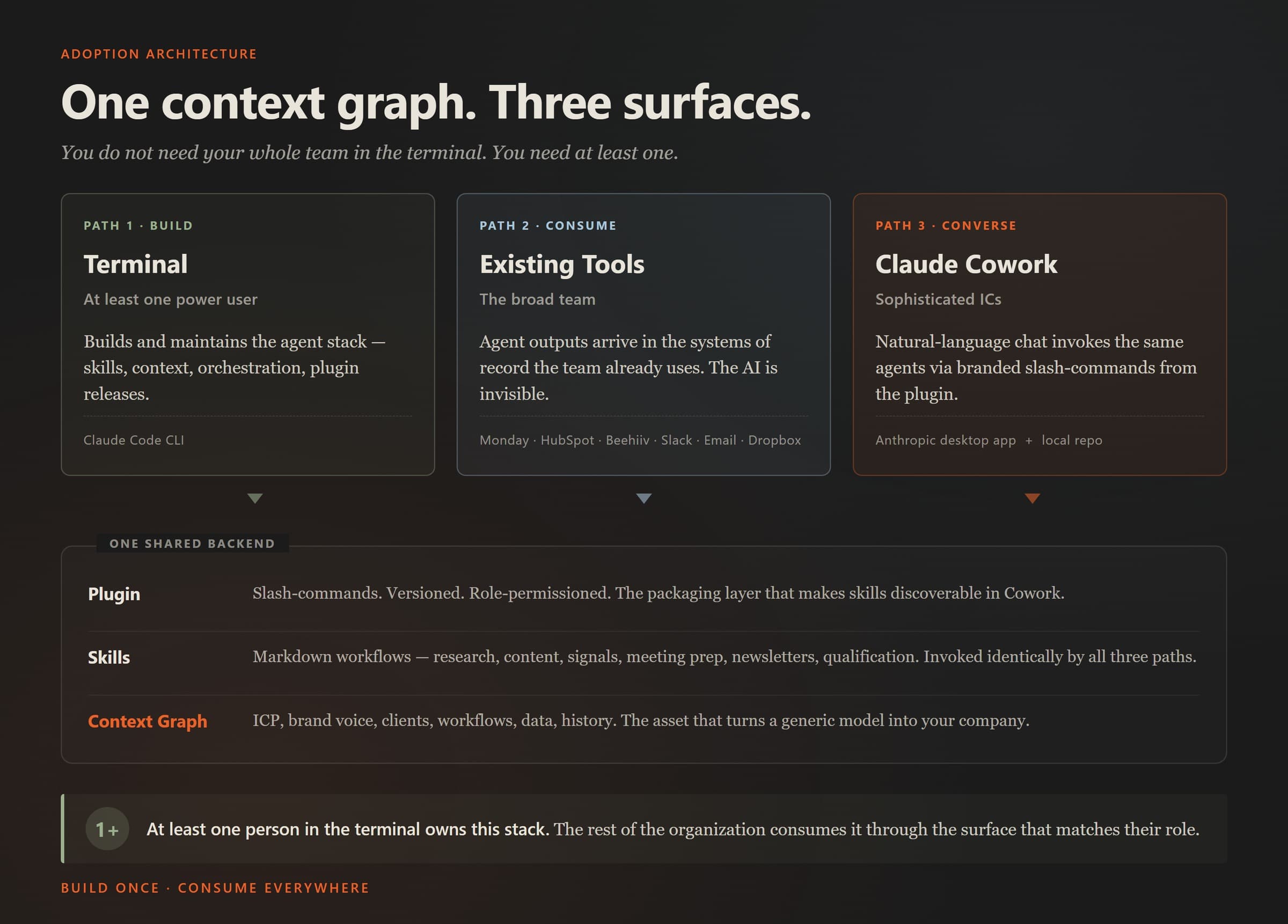
Here is the frame. One shared knowledge graph. Three surfaces into it.
| Path | Who uses it | Interface | What they do |
|---|---|---|---|
| 1. Terminal | At least one power user | Claude Code CLI | Build agents, skills, context. Debug. Customize. Ship the plugin. |
| 2. Existing tools | The broad team | Monday, HubSpot, Salesforce, Beehiiv, Slack, email, Dropbox | Consume completed artifacts in the systems they already use. |
| 3. Claude Cowork | Sophisticated individual contributors | Anthropic desktop app + local repo | Natural-language chat → trigger the same agents → structured output. |
The key property: all three paths invoke the same skills against the same context graph. There is one backend.
Now let me walk each path with enough tactical detail to make the pattern concrete.
Path 1: The Terminal
Somebody has to build the system.
The person in the terminal is doing a specific set of things, and you should understand them before you commit:
- Maintaining the context graph. The repo of markdown files describing your ICP, positioning, brand voice, competitive intelligence, workflow definitions, client data, and accumulated history. This is the asset. Most of the tactical craft is keeping it organized, accurate, and navigable.
- Writing and iterating on skill files. A skill is a markdown file that teaches Claude how to do a specific workflow — account research, meeting prep, content review, newsletter generation. Good skills are not one-shot prompts. They encode methodology, reference files, examples, and edge-case handling. They get better through usage and revision.
- Building multi-agent orchestrations. The highest-leverage workflows chain skills together. Our weekly newsletter pipeline runs a multi-agent debate, scores consensus across personas, and produces a draft from the transcript — all via a single command. You do not get there with prompts. You get there by designing the system.
- Debugging when agents misfire. Which they will. Classification errors, hallucinated citations, wrong-format outputs, tools that fail silently. Somebody has to notice and fix.
- Packaging skills into the plugin. More on this in a minute.
The investment is real. Weeks to fluency. Again there is no training course that substitutes for reps. It is a craft learned through doing.
The alternative that does not work — and I have watched this fail repeatedly — is distributing Claude Code seats to the whole team, running a half-day workshop, and hoping adoption sticks. It does not. Forcing it on an org that isn't built for it and hasn't equipped it with trusted context burns trust faster than it builds leverage. You get a handful of enthusiasts who push through, a much larger cohort who bounce off, and a residue of "we tried AI and it didn't work for us" that poisons the next attempt.
The alternative that does work is deciding who the power user is and giving them the runway to become fluent. Sometimes it's a technical founder. Sometimes it's an ops leader with engineering instincts. Sometimes it's a sales engineer moonlighting on the problem. Sometimes it's an embedded consultant.
Path 2: Abstracted Outputs
The core pattern is simple. Agents write directly into the tools the team already uses. There is no new UI to learn. A rep sees a populated field, a filed brief, a draft email. The artifact is where they expected it to be. The AI is far less visible.
By the way, that pattern is nothing new. This has long been a first principle for designing strong RevOps tool stacks.
Concrete examples from deployments I've run:
Account research for SDRs. An agent runs the account-research workflow — website scrape, tech stack detection, LinkedIn executive pull, blog and newsroom scan, recent news — and writes the structured brief directly into the CRM's "Research" field on the account record. The rep opens the account before a call, reads the brief, runs the call. They do not invoke anything. The research is already there. The only thing that changed in their workflow is the quality of the data they can use.
Competitive signals. An agent monitors a defined set of tracked accounts and writes a weekly digest of what changed — new hires, product announcements, public statements, acquisitions — into a private Slack channel. Nobody invokes anything. The signals arrive. People already read slack.
Content drafting. Agents produce blog drafts from SEO briefs and write them to a Dropbox folder clearly marked "AI draft" with a review checklist attached. The writer polishes and publishes. The writer sees the draft. They do not see the skill file that produced it.
What this path does well:
- Zero new UI for the broad team. The tool they're learning is the one they already use.
- Works with existing access controls. Whatever the tool's permissions model is becomes the AI's permission model by default.
- Disappears into workflow. There is no change-management resistance, because nothing visibly changed.
What this path doesn't do well:
- Requires up-front engineering for each connector wired in.
- It can be inflexible once built like if it is a one-way delivery.
- It's not conversational. If the rep wants to refine the brief, they have to go back to the source — and feedback loops are harder to get right too
Path 3: Claude Cowork
For the people who want conversation, not just delivery.
Claude Cowork is Anthropic's desktop app. It runs on the user's machine, points at a local repository — the same knowledge graph the power user builds — and presents a chat interface that feels, to the user, like a more powerful ChatGPT. Under the hood, it is invoking the same agents and skills the CLI does (with a little finagling). The surface is chat; the backend is the full context stack.
The Honest Limits
Every tactical article earns its trust in this section. Here is what does not work, or what the architecture does not solve.
The power-user layer is load-bearing, and losing it is costly. If the person in the terminal leaves, the system degrades in ways the team will feel within weeks. This is not a unique risk — your sales engineer, your DBA, your data lead all carry it — but pretending it doesn't exist is dishonest.
Cowork does not let you build. Sophisticated users will eventually want to propose a new workflow, a new skill, a new orchestration and there should be a method to get them to the full Claude Code experience.
Data sensitivity and access permissions remain unsolved at the tooling layer. The three-path architecture does not, by itself, determine:
- Which connectors each user's Cowork install has authenticated access to
- Whether an SDR's research query can pull from the CFO's deal data
- Whether a Path 2 agent writing into HubSpot is respecting object-level permissions
- Whether the audit trail when an agent writes to a regulated system is adequate
These are connector-layer problems — MCP server design, API permission scopes, workspace-level SSO, audit logging. The agent stack does not make them worse, but it does not make them go away either. If you are rolling Cowork to a broad team, map the permissions story before you ship. Leveraging user-based access permissions in the underlying connectors is the practical answer. Role-based gating at the plugin layer is the complement. Both are work.
Not every skill belongs in every path. Some skills are consulting-grade — they want a human in the loop at several points, iterative review, judgment calls that cannot be automated. Those do not belong in Path 2. Some skills require long-running state or deep repo access and don't fit a conversational Path 3 session (e.g. you want someone to know how to build a PRD and run ralph loops). Part of the power user's job is matching skill to path.
The Principle, Restated
A robust context-engineering system can be run by at least one power user. Its benefits cascade to the organization through three surfaces. The terminal is not the product. The context graph is.
If you are a founder or CEO or reveue leader evaluating whether to build on Claude Code at the organizational level, the practical implications are:
- Find at-least-one power user first. Before you evaluate seats, before you talk to vendors, before you budget for training. If that person does not exist inside your org, hiring for it or embedding a consultant to hold it is the first investment, not a later one. Where this person sits can vary, but the need enough pull to get data access/APIs and have some organizational trust cross functionally
- Design the context graph intentionally. ICP, brand voice, workflows, client data, accumulated history. This is the asset that compounds. Treat it like the most important artifact your go-to-market team owns, because it is.
- Pick the paths in order of leverage. I used to say Path 2 (scheduled agent outputs into the tools you already use) was the first real unlock — broad reach, minimal UX change, org-wide data enhancements). Path 3 (Cowork with a plugin) has gotten more compelling as Anthropic has improved that product for immediately making your people individually more effective.
Approaches like this are part of a broader AI GTM strategy — where systems replace manual repetition across the go-to-market stack.