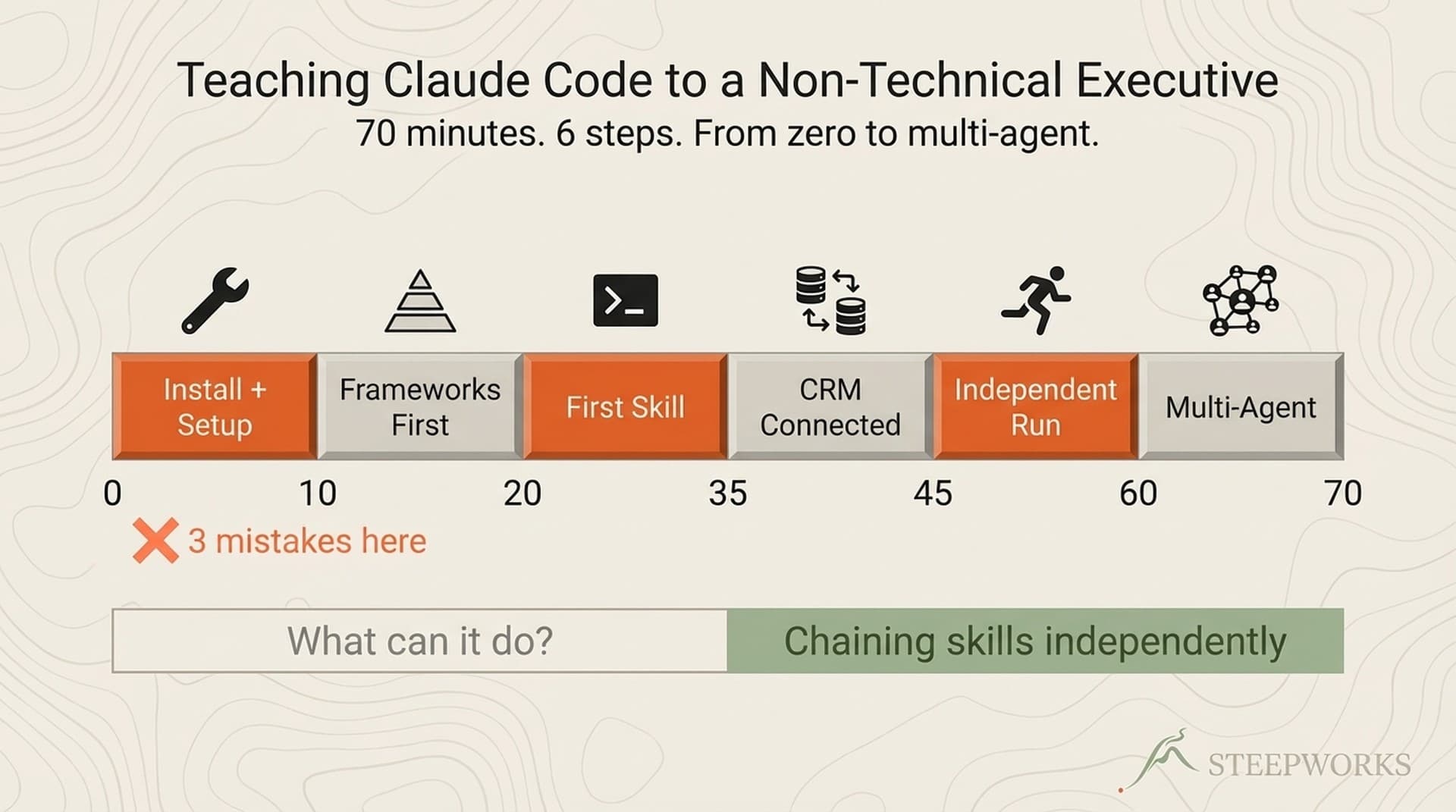
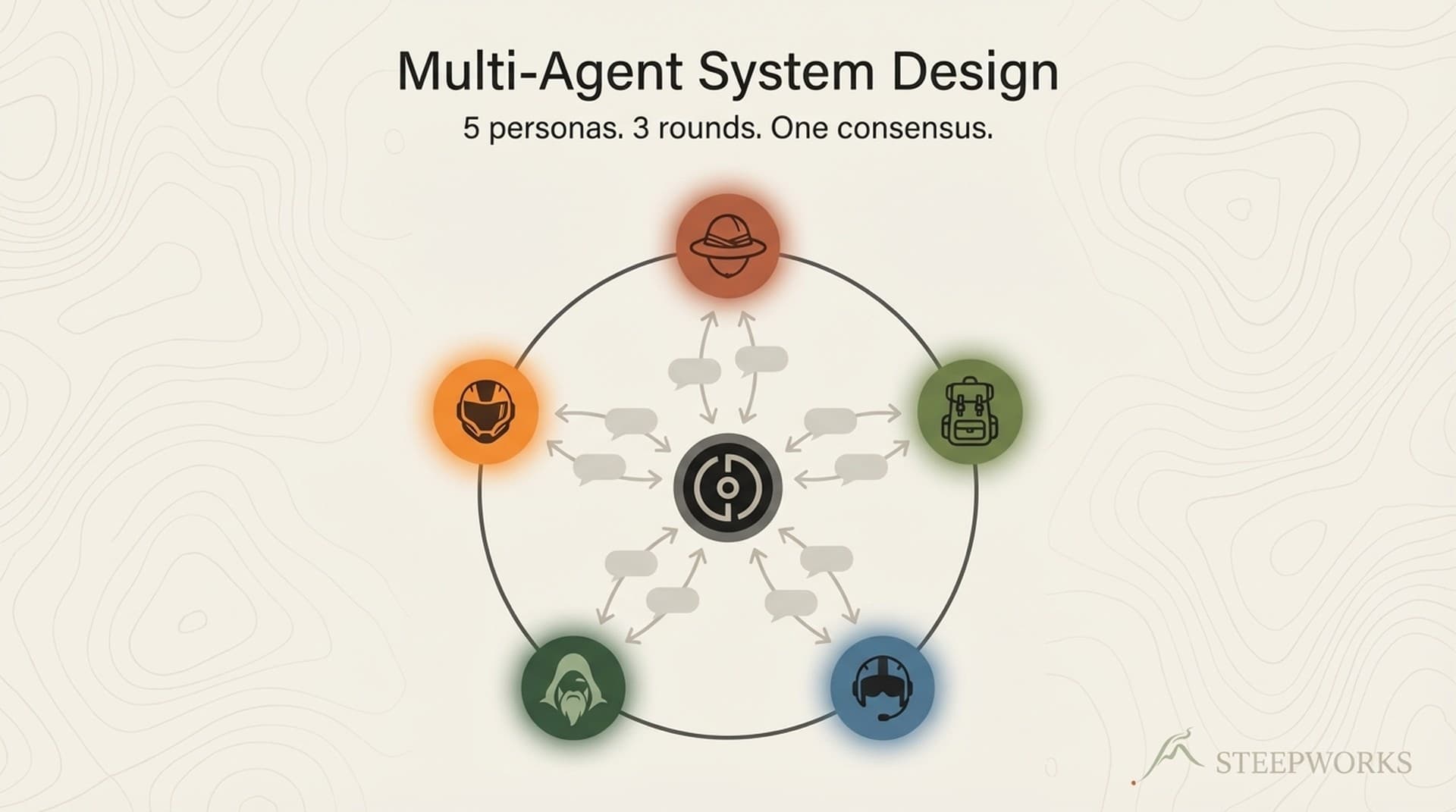
I recently wrote about teaching a non-technical executive Claude Code -- a 70-minute session where the CCO of a PE-backed industrial company went from "not a power terminal person" to running multi-agent planning sessions independently. That article covered the translation problem: finding the mental model that maps to how one person already thinks.

At the end of that call, the CCO said something I wasn't prepared for: "My plan is also to train lots more people within the organization."

That statement changed the problem entirely. Teaching one executive is translation. AI tool onboarding for a team is systems engineering. Five people, five different roles, five different levels of resistance, and every infrastructure decision you made for person 1 either accelerates or blocks person 5.

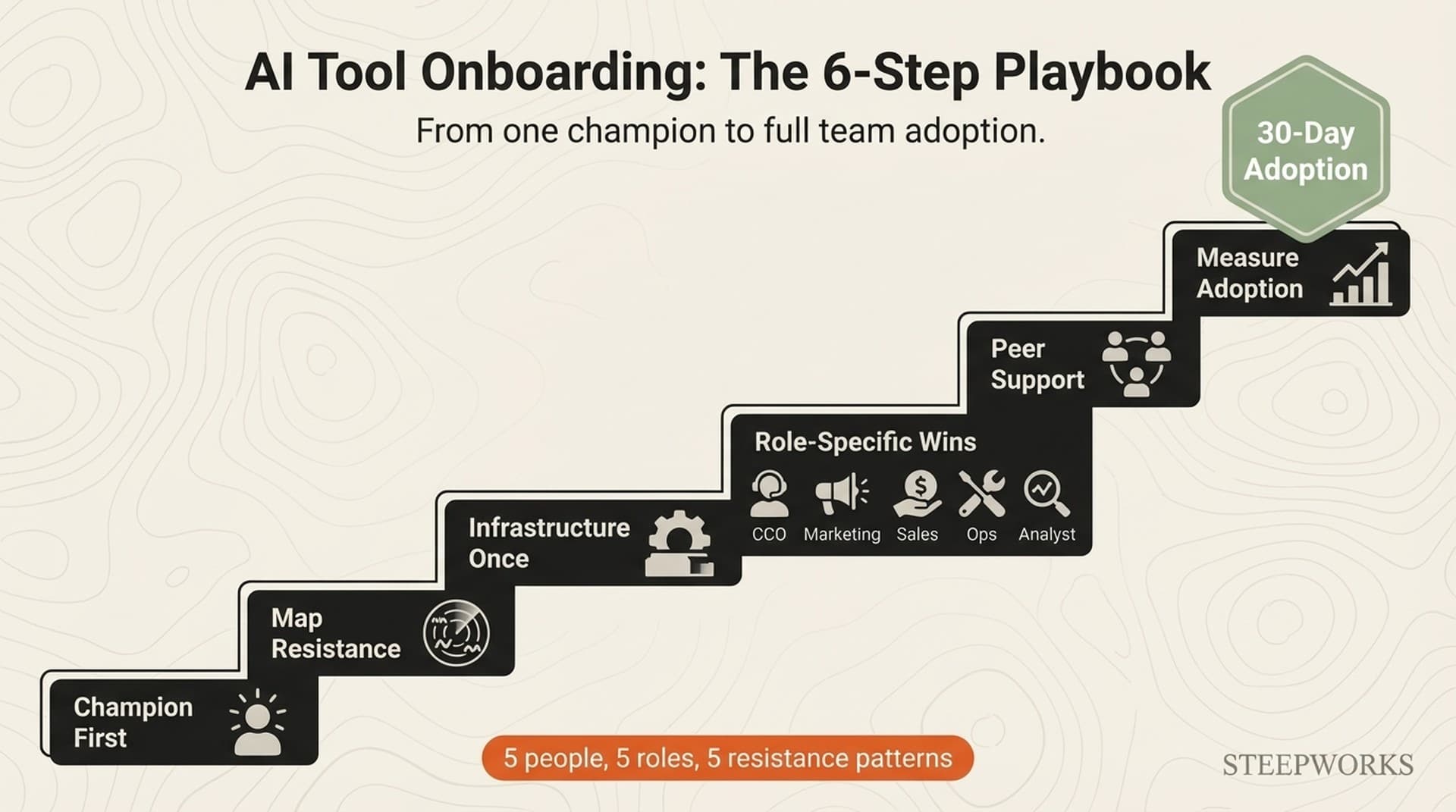
This is the playbook I built from that team rollout. Six steps. Not theoretical -- distilled from what happened when a non-technical GTM team at a PE-backed industrial company tried to adopt Claude Code across multiple roles. Some steps worked immediately. Others I had to rebuild after watching them fail. The playbook is what survived.

If you're the implementer -- the consultant, ops lead, IT director, or AI-savvy team member who's been told "get the team on this tool" -- this is for you. If you're the executive who wants your team trained, the steps still apply, but your primary job is Step 1.

Step 1 -- Start With the Champion, Not the Team

The mistake I almost made: rolling out to all five people simultaneously with a group training session. It seemed efficient. It would have been a disaster.

Non-technical people learning a terminal-based tool in a group setting creates a support queue, not a learning environment. One person's BitBucket issue becomes everyone's roadblock. One person's "wait, what's a slash command?" pauses the entire room. I've seen this pattern kill tool rollouts at three different companies. The group session optimizes for the instructor's time. It destroys the learner's experience.

What worked instead: the CCO learned first, alone. He built conviction through the frameworks-first approach -- Foundation, Research, Execution -- and his first independent CRM query. By the time team members touched Claude Code, he wasn't asking me questions anymore. He was answering theirs.

The champion's job isn't to become an expert. It's to become a translator. The CCO didn't memorize slash commands. He learned the mental model well enough to explain it in his own words: "Think of it as three buckets -- who we sell to, what we know about the market, and what we're doing about it." That's not my language. That's his translation. And it stuck with his team in ways my consulting-speak never would have.

The adoption proof came fast. When the marketing manager pushed back with "I already have ChatGPT," the response didn't come from an outside consultant. It came from her CCO, who said "this is different -- it's a system, not a chatbot." Peer credibility beats consultant credibility every time. Anthropic's own documentation shows that non-engineering teams -- legal, policy, marketing -- successfully adopt Claude Code when given the right framing. But framing from an internal champion lands differently than framing from the vendor.

The infrastructure the champion builds matters just as much as the credibility. During the CCO's onboarding, we created permissions templates, a shared instruction file with safe defaults, and the first set of role-specific workflows. Those decisions shaped every onboarding that followed.

His stated goal told me everything: "My goal is less about you do and more about me learn because I want this extensible over time." He wasn't buying a service. He was building a capability. That's the champion you need before you touch anyone else on the team. And the proof it worked: he upgraded from Pro to Max independently after exhausting his credits on deep planning sessions. That's conviction you can't manufacture in a group session.

Step 2 -- Map the Resistance Before You Start

Most AI tool onboarding guides treat resistance as a monolith -- "people resist change" -- and then offer generic change management advice. That's accurate the way "the weather varies" is accurate. Useless at the level where decisions get made.

HBR's research confirms that most AI initiatives fail not because the technology breaks but because people, processes, and politics derail them. At 30,000 feet, that's right. At ground level, resistance has specific shapes depending on who's pushing back. I encountered three distinct patterns during this rollout, and each required a different response.

"I already have ChatGPT." Most common from marketing and content roles. They've been using ChatGPT for months. They've built workflows around it. From their seat, you're asking them to learn a new tool that does what they already do.

Don't argue about features. Show them something ChatGPT literally cannot do. Three concrete demonstrations that broke this resistance for us: First, pull live CRM data into a competitive analysis -- ChatGPT doesn't know your CRM exists. Second, generate a positioning document that references your actual win/loss data from last quarter -- ChatGPT would fabricate the numbers. Third, chain prospect research into a meeting prep dossier with citations from your own knowledge base -- ChatGPT has no context about your company. The gap between "chatbot" and "system" has to be demonstrated, not explained.

"This is a developer tool." Most common from operations and sales roles. The terminal interface triggers immediate disqualification -- "I'm not a coder." The fix: don't start with the terminal. Start with the problem they already have. "You spend 40 minutes before every prospect meeting pulling together research. What if you could describe what you need and get a meeting prep dossier in 4 minutes?" Show the output first. The terminal becomes tolerable when the outcome is compelling.

"We tried Copilot and it didn't stick." Most common from executives and managers who've approved AI tool purchases before. They've been burned. Their default assumption is that this will be another shelfware line item. The fix: name the failure mode of the previous tool honestly. "Copilot didn't stick because it's a code completion engine -- there's no system around it. This is a platform that connects to your CRM, uses your actual data, and compounds over time." Acknowledge their skepticism. It's earned. Use it as a filter for what NOT to promise.

Then there's the constraint that shapes every other step: "I don't have time to learn something new." Everyone says it. It's usually accurate. That's not a resistance pattern you overcome -- it's a design constraint. It's the reason Step 4 is a 15-minute first win, not a training session. Every step that follows has to fit inside the margins of a real workweek. Adding AI tool onboarding to their plate is a cost, not a gift.

FleishmanHillard's data puts a number on this: only 25% of leaders say their AI rollout has been effective, while only 11% of employees agree. That gap is alignment. The resistance patterns above are what that gap looks like on the ground.

Step 3 -- Build Shared Infrastructure Before Person 2

After the CCO's onboarding session, I spent roughly 25 of our 70 minutes on infrastructure friction -- BitBucket instead of GitHub (IT security requirement), a 2GB repo bloated by PowerPoint files, editor agent interference, ad-hoc permissions configuration. Those problems are solvable for one person with a consultant on the call. They're catastrophic at scale.

Five infrastructure decisions cut onboarding from 70 minutes per person to 45.

Permissions template with safe defaults. The CCO and I built his permissions file live on a call -- deny destructive commands, allow reads and web search, require approval for writes. That ad-hoc process works for a champion who wants to understand the system. For team members, it needs to be a template they copy and adjust. "Here are your permissions. These commands are safe. These require your approval. These are blocked." The Claude Code documentation covers the configuration format. What it doesn't cover is how to set defaults that are restrictive enough for non-technical users to feel safe but permissive enough to be useful. We landed on: allow all reads, allow web search, require approval for any file write, block system commands. That balance worked for every role on the team.

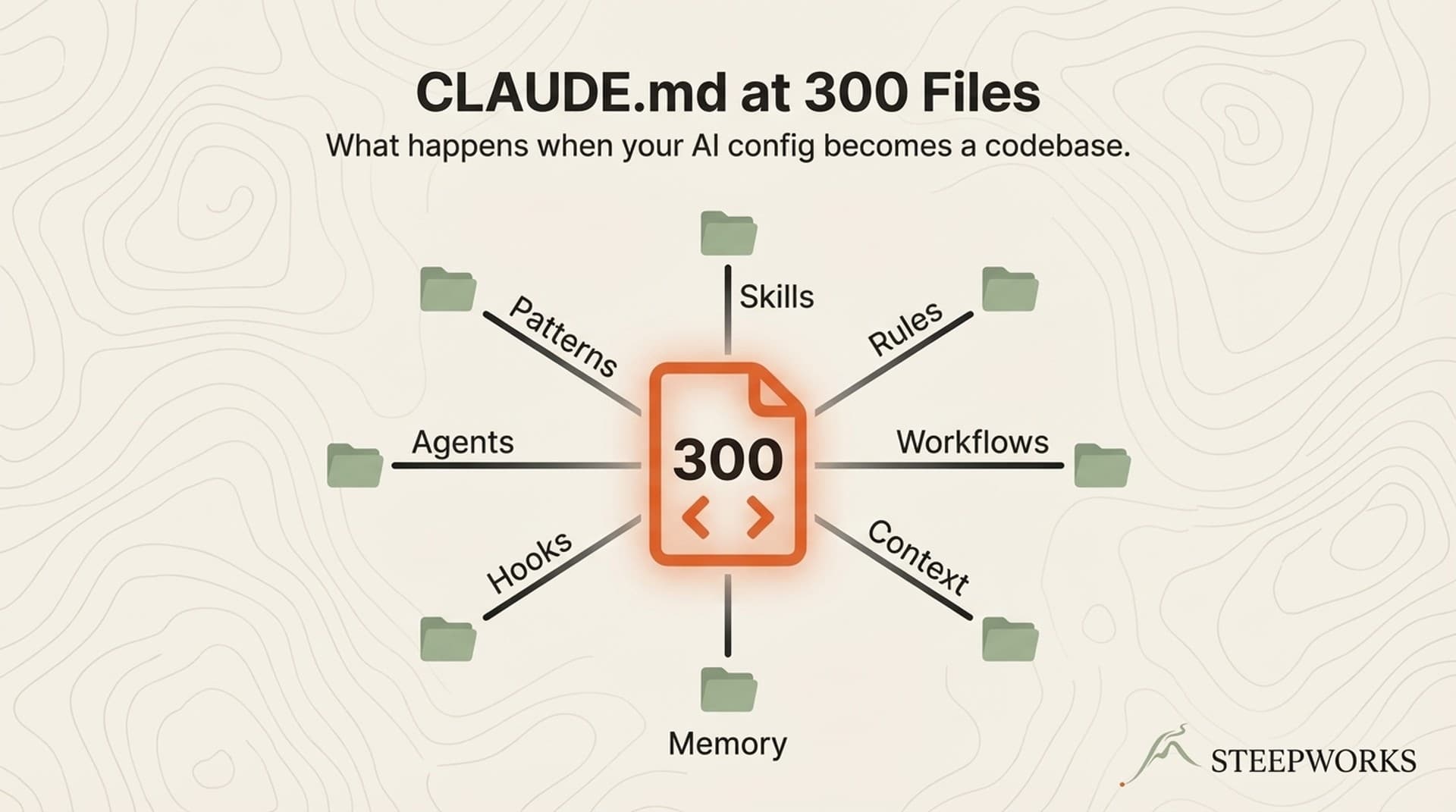
Shared instruction file that encodes the team's mental model. The CLAUDE.md file is the instruction set for the AI agent. For a team, it needs to encode shared vocabulary -- your competitive framework, your ICP language, your data sources, your brand voice. When a marketing manager opens Claude Code for the first time, the system should already know the company's positioning, competitive landscape, and target audience. That context can't live in one person's head. We built a 194-line shared context file covering the company's positioning, ICP, competitive differentiation, and trap questions. One update to that file propagates to every skill and every user.

Role-specific workflow starters. Not 52 workflows. Three to five per role. The marketing manager gets content skills, competitive research, and social post generation. Sales gets meeting prep, prospect research, and deal analysis. The CCO gets planning, strategy, and cross-functional workflows. Giving everyone the full catalog creates the same paralysis the CCO experienced when I showed him 16 skills on the first call -- the "you're rushing me" moment, multiplied across the team.

Binary file hygiene from day one. We learned this the hard way. The CCO committed a growth_strategy folder with PowerPoint files and the repo ballooned to 2GB. Fix: .gitignore for binary files from day one. Convert presentations to markdown before committing. This is invisible to non-technical users until the repo becomes unusable, so it has to be baked into the infrastructure, not taught as a best practice.

Cost tiering by role. Not everyone needs the highest subscription tier. The CCO runs deep planning sessions that burn through tokens -- he upgraded from Pro to Max independently after exhausting credits on his own. Team members running pre-built workflows (meeting prep, competitive research, document parsing) consume far fewer tokens and work fine on the standard tier. Tiering your team -- premium for the champion and power users, standard for workflow runners -- keeps cost proportional to value. For a 5-person team, the difference between "everyone on premium" and "tiered subscriptions" was roughly 40-60% cost savings with no impact on the workflows that actually got used.

The compound effect of these five decisions: every infrastructure investment for person 1 either saves or costs 30 minutes per additional person. A permissions template saves 5 minutes each. A pre-loaded shared context saves 15 minutes each. Role-specific workflow starters save 10 minutes each. For a 5-person rollout, that's the difference between 5 hours of individual setup and 90 minutes of templated onboarding.

Step 4 -- The 15-Minute First Win (By Role)

The CCO's first win was a CRM query: "How many contacts do we have at GM Defense?" He asked, Claude answered, and the energy of the call shifted. But that same demo would have meant nothing to the marketing manager, who doesn't think in CRM contacts. The first win has to match the person's actual workflow, or it proves nothing.

Marketing: competitive positioning in minutes, not hours. The marketing manager needed to see Claude Code generate something she currently spends 2 hours building -- a competitive positioning document that pulls from real competitor data, not generic AI-generated analysis. When Claude Code pulled from the competitive intelligence already loaded into the shared context file and produced a positioning comparison she could immediately use in a sales deck, the "I already have ChatGPT" resistance dissolved. Her reaction: "Wait -- it knows our competitors?" It does, because the shared infrastructure from Step 3 already contained the competitive landscape. ChatGPT can't do that because ChatGPT doesn't have context about her company. The gap between chatbot and system became obvious in a single output.

Sales: meeting prep that doesn't require manual research. The sales team wanted one thing: prep that doesn't eat 40 minutes before every call. Pull the prospect's recent activity from HubSpot, cross-reference with competitive intelligence, surface the most relevant talking points. Four minutes instead of forty. The terminal interface stopped mattering when the output was a meeting prep dossier they could scan before walking into a call. One rep started sending the dossiers to colleagues before joint calls -- the tool went from "something IT asked me to try" to "the thing I send my co-seller before every meeting."

Operations: structured data from unstructured presentations. The ops lead was skeptical until Claude Code parsed a 47-slide sales deck into structured data -- extracting customer names, product lines, revenue signals, and competitive mentions into a clean markdown table. He'd been doing that manually for quarterly business reviews. "Wait, it can just read the deck?" was his moment. The task that used to take an afternoon became a 3-minute extraction.

The pattern across all roles: the first win has to solve a problem they already have, using data they already own, in less time than their current workflow. Not a feature demo. Not a capabilities tour. A before/after on time-to-value for a real task. That's what converts skeptics. Not a pitch deck.

What to avoid in the first 15 minutes: multi-agent orchestration, advanced planning modes, workflow chaining. Powerful but abstract. Start concrete -- a query, a document, a data extraction -- something that proves the tool understands their world. Advanced features earn attention after the first win proves the baseline.

Step 5 -- Measure What Sticks at 30 Days

The dirty secret of most AI tool onboarding: nobody measures what happens after the training session. Companies measure attendance, completion, satisfaction scores. They don't measure 30-day active usage. Here's what 30 days of real usage data showed.

What stuck (used weekly or more after 30 days):

CRM queries and data pulls -- every role found value in asking Claude Code questions about their own data. This was the universal entry point. It worked because the barrier was low (ask a question in natural language) and the payoff was immediate (get an answer from your own CRM without building a report).

Meeting prep dossiers -- the sales team ran these before every prospect meeting. Highest sustained usage of any single workflow. The habit formed because the trigger was built into their existing routine: calendar reminder goes off, open Claude Code, run meeting prep. The output was good enough that skipping it felt like going in unprepared.

Competitive research -- marketing used this weekly, typically before content creation or sales enablement updates. The shared context file meant every competitive query started from an accurate baseline instead of a blank prompt.

Document parsing -- ops used this for quarterly reviews and board prep. Less frequent but high value per use. Every QBR prep cycle saved 3-4 hours of manual extraction.

What got abandoned (tried once, never returned):

Multi-agent orchestration -- too abstract for anyone other than the CCO. The team didn't need to run 4 agents simultaneously. They needed one workflow that worked.

Slash command syntax -- the team never memorized slash commands. They described what they wanted in natural language and the system figured out which workflows to invoke. Teaching slash commands was wasted time.

Model switching -- only the CCO cared about switching between AI model tiers. Everyone else used the default. The cost-awareness pattern that was critical for the champion was irrelevant for team members on a shared subscription.

The 30-day curve: Adoption follows an arc I've now seen on two rollouts. Week 1 is high -- novelty plus training momentum. Week 2 drops sharply -- back to real work, forgot the workflows. Week 3 is the inflection point. Either they've found 1-2 workflows they use regularly, or the tool joins the shelfware graveyard. The teams that survived week 3 had one thing in common: a recurring workflow (meeting prep, weekly competitive scan, monthly report parsing) that was faster with Claude Code than without it. Recurring workflows create habits. One-off demonstrations don't.

The metric that matters: Not "how many people completed training." Not "how many sessions per user." The metric is: how many people have a workflow they'd refuse to give up? At 30 days, that number was 3 of 5 team members. The CCO was a power user running planning sessions weekly. Two found recurring workflows they used regularly -- meeting prep for sales, competitive research for marketing. Two others used it occasionally for specific tasks but hadn't built a recurring rhythm.

An honest note on sample size: five people is not a study. It's a field report. But the patterns -- resistance by role, the week 3 inflection point, the correlation between recurring workflows and sustained usage -- align with what HBR and FleishmanHillard report at enterprise scale. Sixty percent meaningful adoption from a team that had never touched a terminal is a data point worth examining, not a statistic to generalize from.

Step 6 -- Five Principles That Separate Adoption From Abandonment

Step 5 was observational -- what the data showed. This step is prescriptive -- what to do about it. Each principle maps to a specific finding from the 30-day usage data.

Principle 1: Problems before tools. CRM queries and meeting prep stuck because they replaced existing time sinks. Every person who sustained adoption was introduced through a problem they already had, not a feature they hadn't imagined. The meeting prep workflow stuck because the sales team already spent 40 minutes prepping. The competitive analysis workflow stuck because marketing already assembled positioning docs manually. The tool replaced an existing pain. It didn't create a new capability nobody asked for.

Before onboarding each person, ask: "What task do you do weekly that takes longer than it should?" Start there.

Principle 2: One workflow per person, not a platform tour. Multi-agent orchestration, slash commands, and model switching all got abandoned. The team members with sustained adoption each found exactly one workflow they used regularly. Not five. Not ten. One. The CCO used deep planning. Marketing used competitive research. Sales used meeting prep. Ops used document parsing. Trying to teach "everything the tool can do" is the fastest way to teach nothing. Each person needs one workflow that earns their return visit.

Principle 3: The champion has to stay active -- and cultivate a successor. The CCO's ongoing engagement -- answering questions, sharing his own workflows, demonstrating new capabilities as he discovered them -- was the single biggest predictor of team adoption. When the champion goes quiet, the team interprets it as "this isn't important enough for the boss to keep using." The tool doesn't die from technical failure. It dies from social proof withdrawal.

And because champions change roles, get promoted, or lose interest -- you need a second champion before you need one. The first team member who independently adopts a recurring workflow is your successor. Invest in them disproportionately.

Principle 4: Infrastructure compounds, training doesn't. The permissions templates, shared context file, and role-specific workflows we built for person 1 made person 5's onboarding take 45 minutes instead of 70. But the training content -- the slide decks, the walkthrough documents, the recorded demos -- had almost no impact on adoption. Nobody watched the recordings. Nobody re-read the guides.

What worked was a 15-minute pairing session where someone who already used the tool sat with someone who didn't and solved a real problem together. Build infrastructure. Skip the training deck.

Principle 5: Measure workflows, not sessions. The two people without recurring workflows had completed training. They'd watched the demos. They'd read the documentation. Training wasn't the problem. They didn't have a recurring workflow that Claude Code made faster. Find the workflow first. Then onboard.

The moment we stopped tracking "sessions per user" and started tracking "recurring workflows per user," the picture clarified. Three people had at least one workflow they used weekly. Two had none. The metric change didn't fix adoption. It revealed where adoption had actually happened and where it hadn't.

The System Underneath the Playbook

AI tool onboarding for non-technical teams is not a training problem. It's a systems problem. The tool doesn't fail because people can't learn it. It fails because the infrastructure isn't ready, the first win doesn't match their role, and nobody measures what happens after the training session ends.

The six steps distilled:

  1. Start with the champion -- one person who builds conviction and infrastructure
  2. Map the resistance -- different roles push back differently
  3. Build shared infrastructure -- permissions, shared context, role-specific workflows
  4. Deliver a 15-minute first win -- matched to each person's actual workflow
  5. Measure adoption at 30 days -- track workflows, not sessions
  6. Build for what sticks -- problems before tools, one workflow per person, active champion

The permissions templates, the shared context files, the role-specific workflows -- every piece of infrastructure we built for this team became the foundation of the Knowledge OS. It's the system underneath the playbook. If you're rolling out Claude Code to a non-technical team, the playbook tells you what to do. The Knowledge OS gives you the infrastructure to do it -- so person 5 onboards in an hour instead of a 70-minute live call.