You open a new AI chat. You explain your company. You paste in your ICP document. You describe the project context and remind the model what you decided yesterday. The output is fine -- serviceable, generic, fine. Tomorrow morning, same ritual. By month three, your team has collectively spent 200+ hours re-explaining things the AI should already know.
That's an architecture problem. And the structural decisions about how you organize, layer, and connect knowledge so AI agents can find it, use it, and build on it across sessions -- that's what fixes it.
The contrast in practice: without architecture, I open a new session, paste in company positioning, explain the project, re-describe yesterday's decisions. With architecture, I say "I'm working on STEEPWORKS content today," and the system loads positioning, voice standards, recent article performance, and last session's notes. Working within 30 seconds. The difference isn't the model. It's what sits underneath.
BCG found that only 5% of firms achieve AI value at scale. Sixty percent report no material value at all. The 95% are using AI tools. The 5% built AI systems. The gap is architecture.
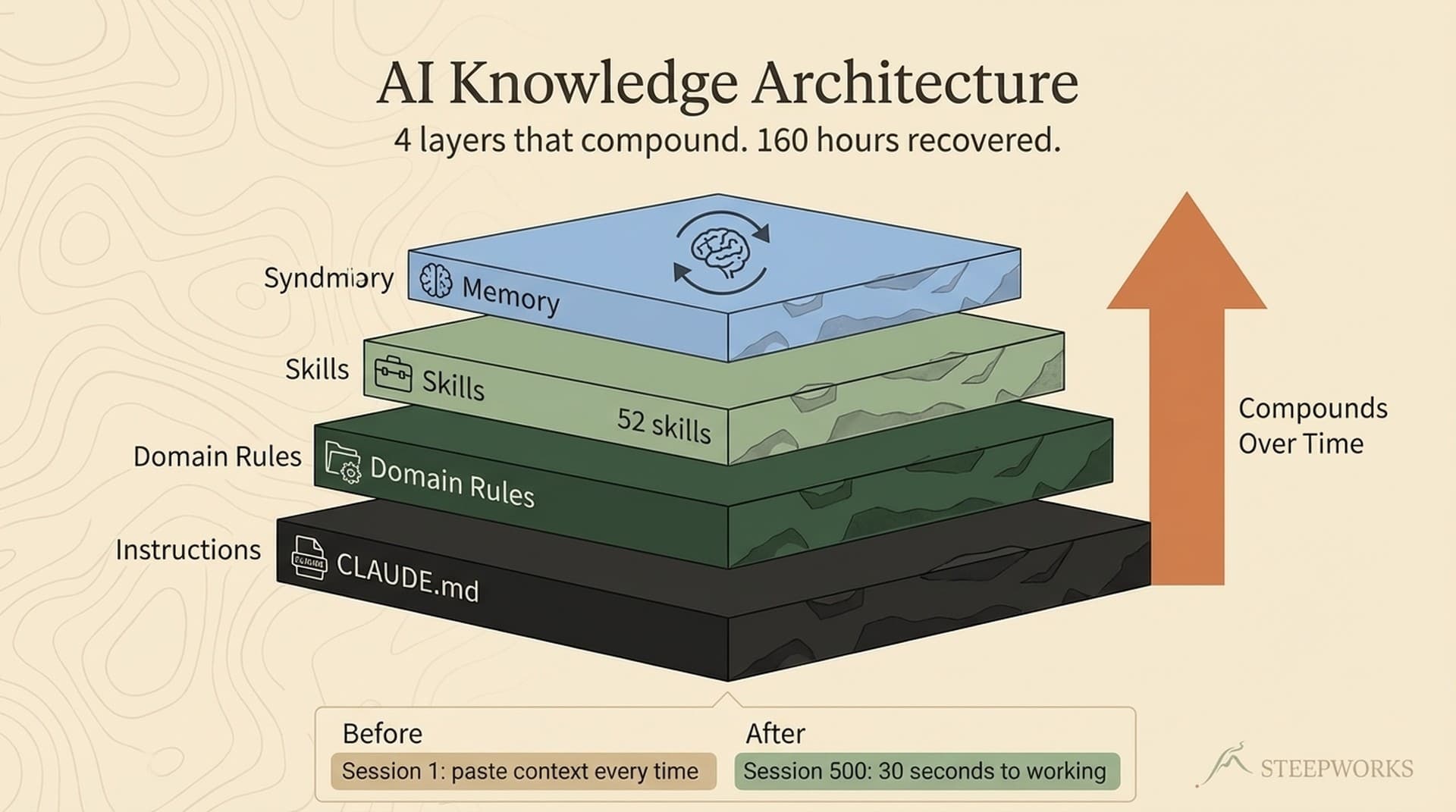
Over 6 months and roughly 500 AI sessions, the architecture I'll describe saved an estimated 160+ hours of context-setting. A full month of productive work recovered -- not from a new tool, but from structural decisions about how knowledge is organized.
Most "AI knowledge management" advice describes tooling -- RAG pipelines, vector stores, knowledge graphs. This article describes the architecture decisions: the human choices about structure, layers, and feedback loops that determine whether your AI gets smarter or stays static. I wrote about the systems-vs-tactics distinction previously. This zooms in on the knowledge layer.
Tools Don't Compound. Architecture Does.
A tool produces an output. An architecture produces compound knowledge. The distinction is economic, not philosophical.
When you use ChatGPT to write an email, session 100 is exactly as good as session 1. The model doesn't remember your voice, your recipients, your results from last quarter. That's a tool. When your AI pulls your positioning doc, references your ICP pain points, checks what messaging worked last quarter, and drafts in your documented voice -- session 100 is dramatically better than session 1. That's compound knowledge.
| Dimension | AI Tool | AI Knowledge Architecture |
|---|---|---|
| Context | Starts fresh every session | Layers accumulate over time |
| Learning | None -- same capability at month 6 | Feedback loops refine what works |
| Value curve | Linear (session N = session 1) | Compound (session N > session N-1) |
| Knowledge fate | Dies with the chat window | Persists, structures, compounds |
The economics: if every session starts from zero, you're paying the same context-loading cost every time. If your architecture pre-loads relevant context, each session's cost decreases relative to its value.
"But I already use Notion AI." I hear this a lot. Notion AI searches your existing docs. So does Glean. So does Guru. That's search -- a tool. Architecture determines what docs exist in the first place, how they're structured for AI consumption, what context loads automatically, and what the AI learns session to session. Search finds information. Architecture makes the AI smarter. Remove Notion AI and your docs still exist. Remove the architecture and every session returns to square one.
I run three different AI agents -- Claude Code, Codex CLI, and Gemini -- on the same architecture simultaneously. All three consume the same instruction files, domain rules, and skills. The compounding is model-agnostic.
The Four Layers (Each One Solved a Real Problem)
I didn't design these on a whiteboard. Each layer emerged because something broke.
Layer 1: Instruction (the always-on foundation)
The problem: Every session started with "I'm a GTM executive, I work across 8 workstreams, here's my company context..." Twenty lines of background pasted into every chat.
The fix: One persistent instruction file that loads automatically. It answers: Who am I working for? What are the ground rules? What should I never do?
Under 500 lines and load-bearing. Every token matters. Too bloated and the AI ignores the important parts. Too thin and it fills gaps with assumptions. Three rewrites before I found the right density. The instruction file isn't a knowledge dump -- it's a navigation hub.
Time to build: 1 hour for a first version.
Layer 2: Domain Rules (context-triggered expertise)
The problem: My instruction file hit 500 lines and the AI started ignoring the important parts. Newsletter rules, finance rules, consulting rules, website deployment rules -- all packed into one document.
The fix: Rules that load based on what you're working on. Working on financial documents? Precision standards, citation requirements, confidentiality protocols load automatically. Working on newsletter content? Voice standards, the Beehiiv HTML template, recently-featured events, scraper safety rules -- all load without me invoking anything. The rules trigger on file path.
I have 21 domain rules. One of them -- newsletter-rules.md -- loads brand voice standards, template patterns, and source configurations whenever I touch a file in my newsletter directory.
Time to build: 30 minutes per rule, as needs emerge.
Layer 3: Skills (reusable capability patterns)
The problem: I kept re-explaining the same workflows. "Generate a newsletter" required 15 minutes of setup every time. "Run a buyer critique on this draft" required pasting in the full methodology.
The fix: Structured procedures with inputs, steps, references, and output formats. Not just prompts -- complete workflows.
My skeptical-buyer skill is a 6-step procedure: gather buyer context, inhabit the ICP, spot weak messaging, attack from three angles, extract buyer language, rebuild with a value-narrative-confidence framework. It references 6 supporting documents. I say "critique this from a VP Marketing perspective," and it runs without me explaining any of it.
I have 45+ skills. Each one represents a workflow that used to require re-explaining every session. The skills don't just save time -- they ensure consistency. The 50th newsletter follows the same production standards as the 1st.
Time to build: 30-60 minutes per skill.
Layer 4: Memory (the compound layer)
The problem: The AI kept making the same mistakes. I'd correct a SQL filtering error on Monday -- PostgREST's neq.expired filter was silently excluding NULL values, causing 63 future events to vanish. By Wednesday, a different session made the exact same error.
The fix: Memory persists across sessions. What worked. What broke. What decisions were made. 21 active learning rules -- each one a scar from a real production failure -- encoded as institutional knowledge. When I start a new session, the AI reads those rules and avoids those mistakes from the first prompt.
Time to build: accumulates naturally. Five minutes per learning rule as failures occur.
The Navigation Principle
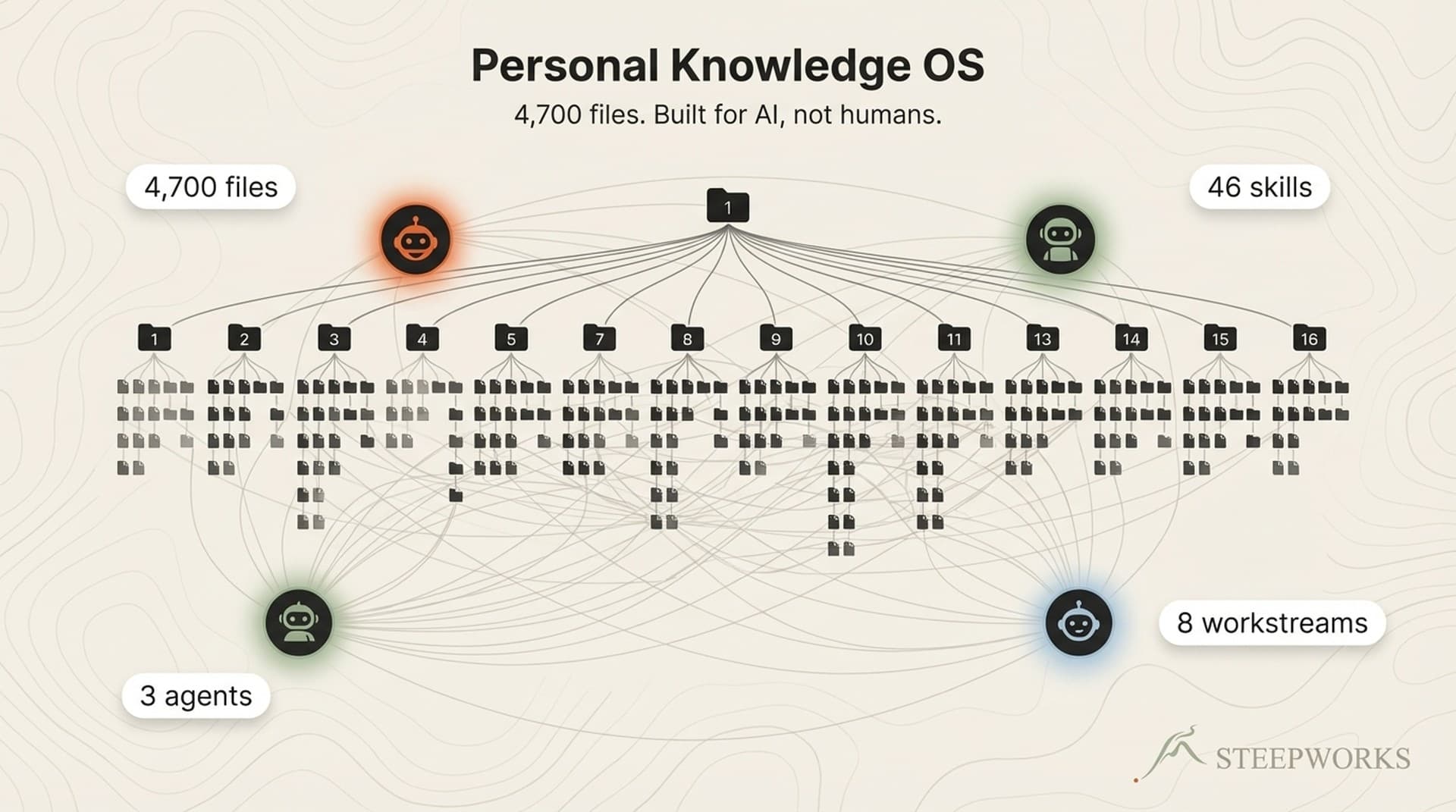
Within each layer, knowledge is structured as a pyramid. README files at the top serve as navigation hubs. Synthesis documents deliver 80% of context in 20% of reading time. Detail files provide depth only when needed.
Without this pyramid, a 4,700-file system would drown any model in irrelevant context. With it, the AI navigates to the right knowledge in 2-3 file reads. This single pattern -- README-first navigation -- cut unnecessary file reads by an estimated 80%.
Layer 4: MEMORY (compounds across sessions)
Learning rules | Workstream briefs | Session memory | Feedback
Layer 3: SKILLS (reusable capability)
45+ structured workflows | References | Output formats
Layer 2: DOMAIN RULES (context-triggered)
21 rule files | Auto-loaded by file path | Right knowledge, right time
Layer 1: INSTRUCTION (always-on foundation)
Instruction files | Ground rules | Identity | Navigation
Feedback Loops -- Where Compound Knowledge Starts
The first three layers give your AI knowledge. The fourth gives it the ability to learn. But memory alone isn't enough. The architecture needs closed feedback loops -- output from one session becomes input for the next.
Learning rules. When the AI makes the same mistake across sessions, I encode a rule. "PostgREST's neq.expired filter silently excludes NULL values -- always account for NULLs." 21 active rules. Each one prevents a repeat failure.
Workstream briefs. Eight workstreams, each with a brief: current state, recent activity, key decisions, cross-workstream connections. Work updates the brief. The brief informs the next session. Closed loop.
Session memory. The AI saves debugging insights, architecture decisions, corrected preferences. Next session, it has everything from the previous one -- not because the model remembers, but because the architecture does.
Skill refinement. Bad output? I fix the skill, not just the output. Next invocation is better. The architecture improves at the capability level.
The closed-loop test: Remove all memory and feedback. Start fresh. Would session quality drop? If yes, you have a compound architecture. If no, you have a tool.
Enterprise Knowledge describes this as the shift toward "connection and interoperability." CIO frames it as "cognitive data architecture." The principle holds whether you're a solo operator or a 500-person org.
What This Looks Like at Different Scales
At 50 files (the starting architecture)
- Layer 1: One instruction file, ~100 lines.
- Layer 2: Zero rule files. Everything fits in the instruction file.
- Layer 3: 2-3 skills for your most repeated workflows.
- Layer 4: One memory file.
An afternoon to set up. Already more architecture than 95% of AI users have.
At 500 files (the scaling inflection)
Layer 1 stays lean at ~300 lines. Domain rules emerge -- 3 to 5 of them. 10-15 skills. Separate memory files per workstream. Learning rules accumulate. Sessions start faster. The AI catches things you missed because its memory now spans more sessions than yours.
At 4,700+ files (the production system)
21 rules, 45+ skills, persistent memory across 8 workstreams. Three AI agents consuming the same architecture simultaneously. The principles haven't changed since 50 files.
On a team
The instruction file becomes shared AI context. Skills become shared playbooks. Domain rules become codified expertise. When a new hire joins, their AI sessions start with the same institutional context as a three-year veteran's. Learning rules go through review like code. One person improves a skill, everyone benefits next invocation.
The migration path is gradual. Start with Layer 1. Add Layer 3 when you catch yourself re-explaining a workflow the third time. Layer 2 when the instruction file gets bloated. Layer 4 accumulates naturally. I wrote the full migration story if you want the unfiltered version.
Three Shifts You Can Make This Week
Three signs your AI knowledge isn't compounding: you re-explain context every session, your AI makes the same mistakes twice, you can't hand your setup to a teammate.
Shift 1: Write the instruction file. One hour. What your AI needs to know about you, your work, your rules. Immediate compounding from the next session forward.
Shift 2: Encode your first skill. Find the workflow you explain most often. Inputs, steps, references, output format. You never explain it again.
Shift 3: Start a memory file. After each session, note what the AI learned. What broke. What worked. Five minutes per session. Returns accumulate faster than you'd expect.
| Layer | Time Investment | When to Build |
|---|---|---|
| Layer 1: Instruction file | 1 hour | Day one |
| Layer 2: Domain rules | 30 minutes each | As needs emerge over 2-4 weeks |
| Layer 3: Skills | 30-60 minutes each | Build as repeated workflows surface |
| Layer 4: Memory | 5 minutes per learning rule | Accumulates naturally through use |
I built this system over 6 months of constant iteration. A lot broke along the way. The architecture described here is the version that survived all those failures.
AI tools are static. AI knowledge architecture compounds. The difference between the team that abandoned AI at month 3 and the team that can't work without it isn't the model. It's the architecture underneath.