The thing nobody tells you about PARA is that it breaks at around 500 files — not because the taxonomy fails, but because it was designed for humans searching their own notes. Once AI agents become the primary consumers of your knowledge, actionability is the wrong organizing axis. A consulting framework isn't a "project" or a "resource." It behaves differently depending on context: high-confidentiality when I'm in a client session, read-only when an agent grabs it for a content draft. PARA can't express that.
I learned this the slow way. Obsidian vaults with backlinks, Notion databases with relations — each one hit the same wall. The system optimized for human search but broke when a Claude Code session tried to find a relevant framework buried three folders deep with no navigation path. The agent had to grep blindly, and blind grep at 4,700 files wastes context window and misses nuance.
But findability was only half the problem. Even when agents found the right files, every session started from zero. No memory of what worked last time. The system had knowledge but no memory.
So I spent 18 months building something different: an architecture that AI agents can traverse without drowning, and a memory layer that makes sessions start with orientation instead of amnesia. If you've abandoned an Obsidian vault or watched an AI assistant hallucinate because it couldn't find context you know exists — this is what I built instead.
Domain-First Folder Structure
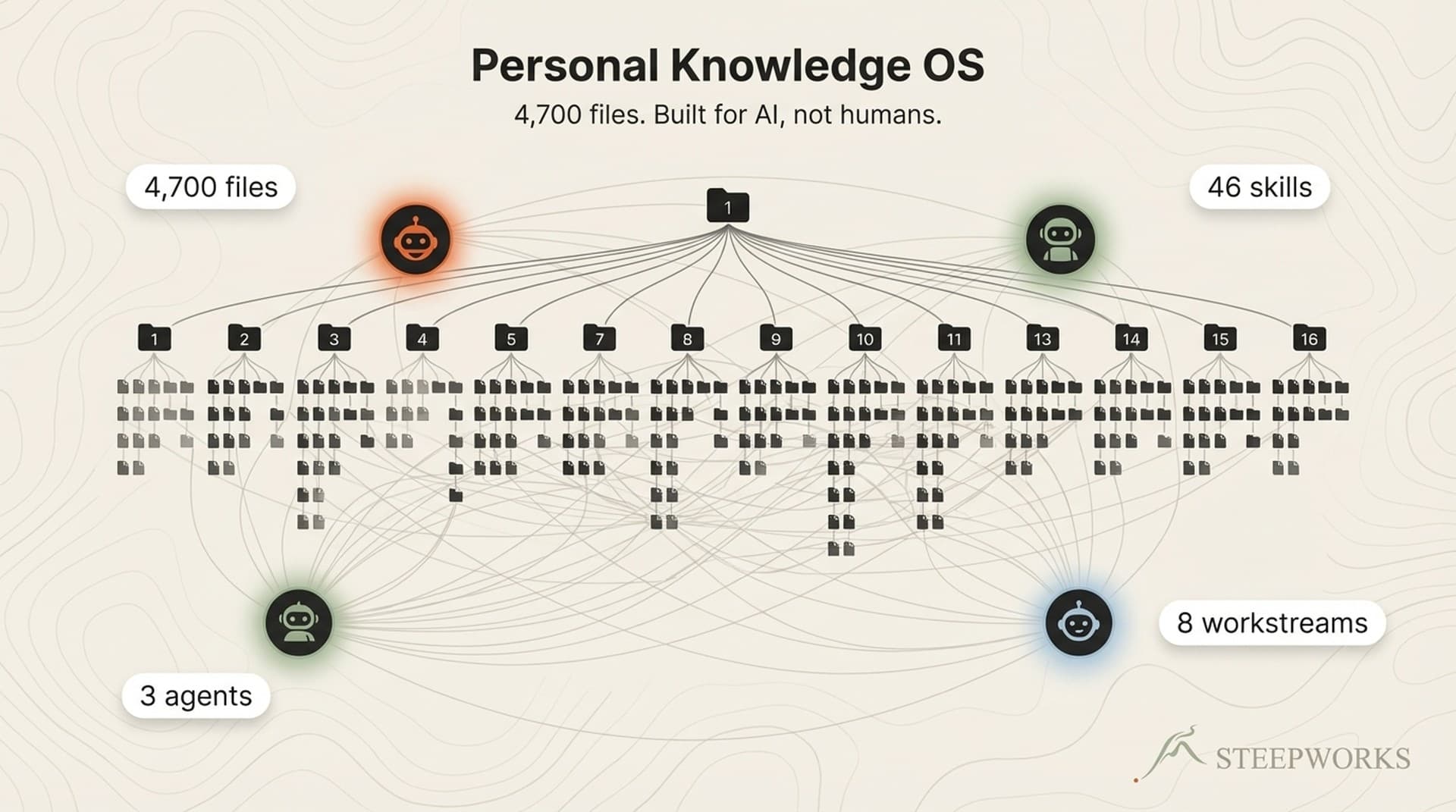
Seventeen numbered top-level folders, each representing a knowledge domain:
00_foundation/ # Identity, values, background — the "who am I" layer
01_professional/ # Consulting engagements and GTM principles
10_automations/ # Scripts, pipelines, data workflows
14_newsletters/ # Multi-brand newsletter ops (2 brands, shared data pipeline)
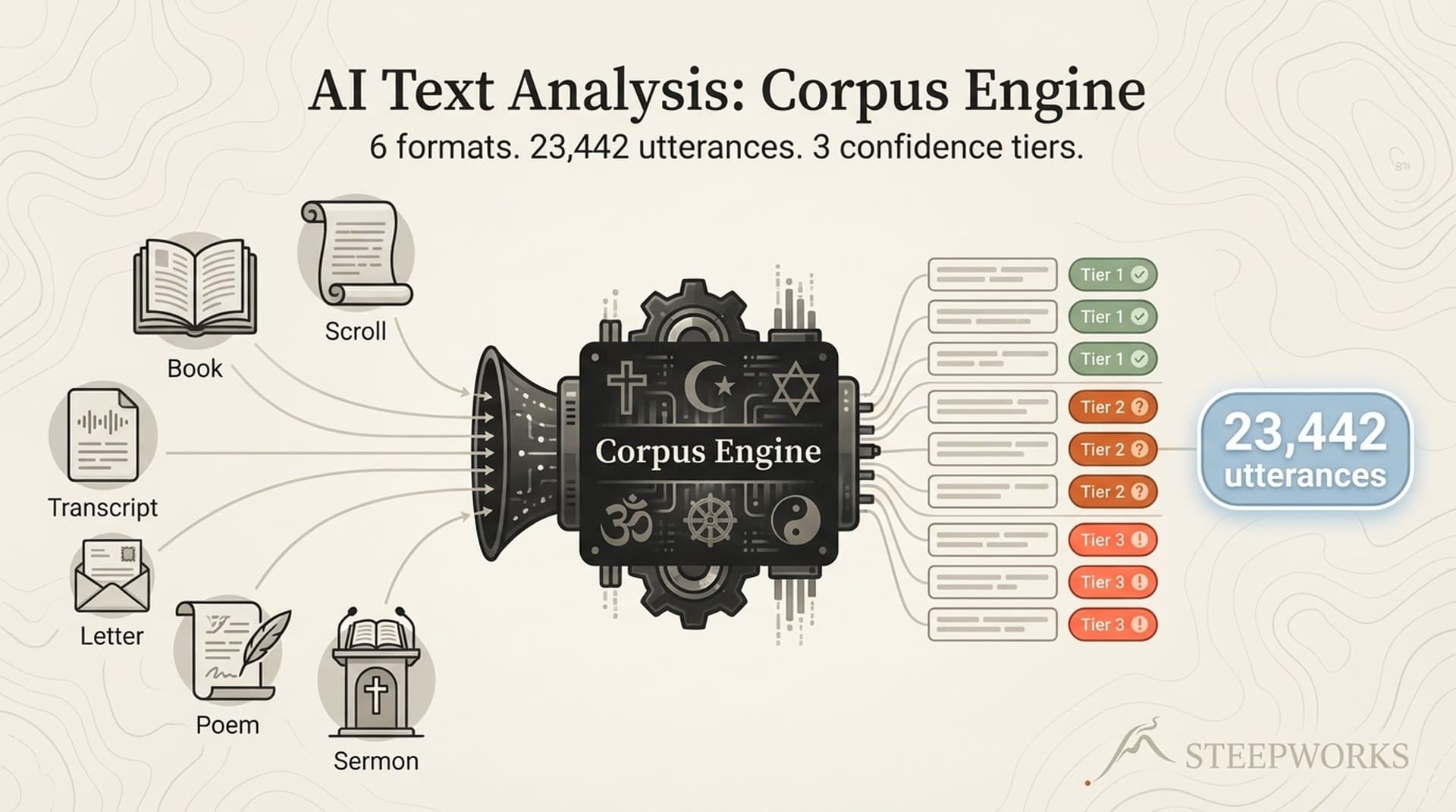
16_spirituality/ # Multi-tradition research corpus (23,000+ utterances)
The spirituality corpus tends to get a double-take. Twenty-three thousand utterances across six prophetic leaders, with confidence-tier metadata and query infrastructure. It lives alongside consulting and finance because domain separation means each folder carries its own behavioral contract. Touch a finance file, confidentiality rules auto-load. Open a newsletter file, brand separation rules activate. Touch an archive file, preservation mode kicks in. Twenty-one rules total, all triggered by file path — no manual context-setting required.
Before I built this rule system, I'd regularly start a consulting session and realize 30 minutes in that I hadn't mentioned client confidentiality requirements. Now the constraints load by file path, matching the right context to the right moment without me remembering to specify it. That alone probably saved me from a client-facing error at least twice.
Numbered prefixes (00_ through 16_) enforce sort order and create predictable paths. An agent never guesses whether consulting lives under "work" or "clients" — it's always 01_professional/consulting/. And because domain anchoring is the organizing principle, files don't migrate between folders as their status changes. A consulting framework stays in consulting whether it's active, archived, or referenced. The system tracks status through metadata, not location.
How AI Agents Navigate 4,700 Files Without Drowning
Every folder has a README.md that acts as a navigation hub — 19 of them across the repo.
The pattern works like progressive disclosure. The README gives a two-minute overview and points to synthesis documents. A synthesis doc captures 80% of domain context in 20% of the reading time — my consulting README links to a synthesis that distills 15 GTM principles into 800 words, enough for an agent to understand my consulting philosophy without reading 40 individual framework docs. Synthesis docs point to detail documents, loaded only when specifics are needed.
One README per folder, no exceptions. Without this layer, agents drown. With it, a session orients itself in any of 17 domains within seconds, loading only the context it needs.
This architecture is the foundation of what we build at STEEPWORKS — patterns extracted from 18 months of running the system in production.
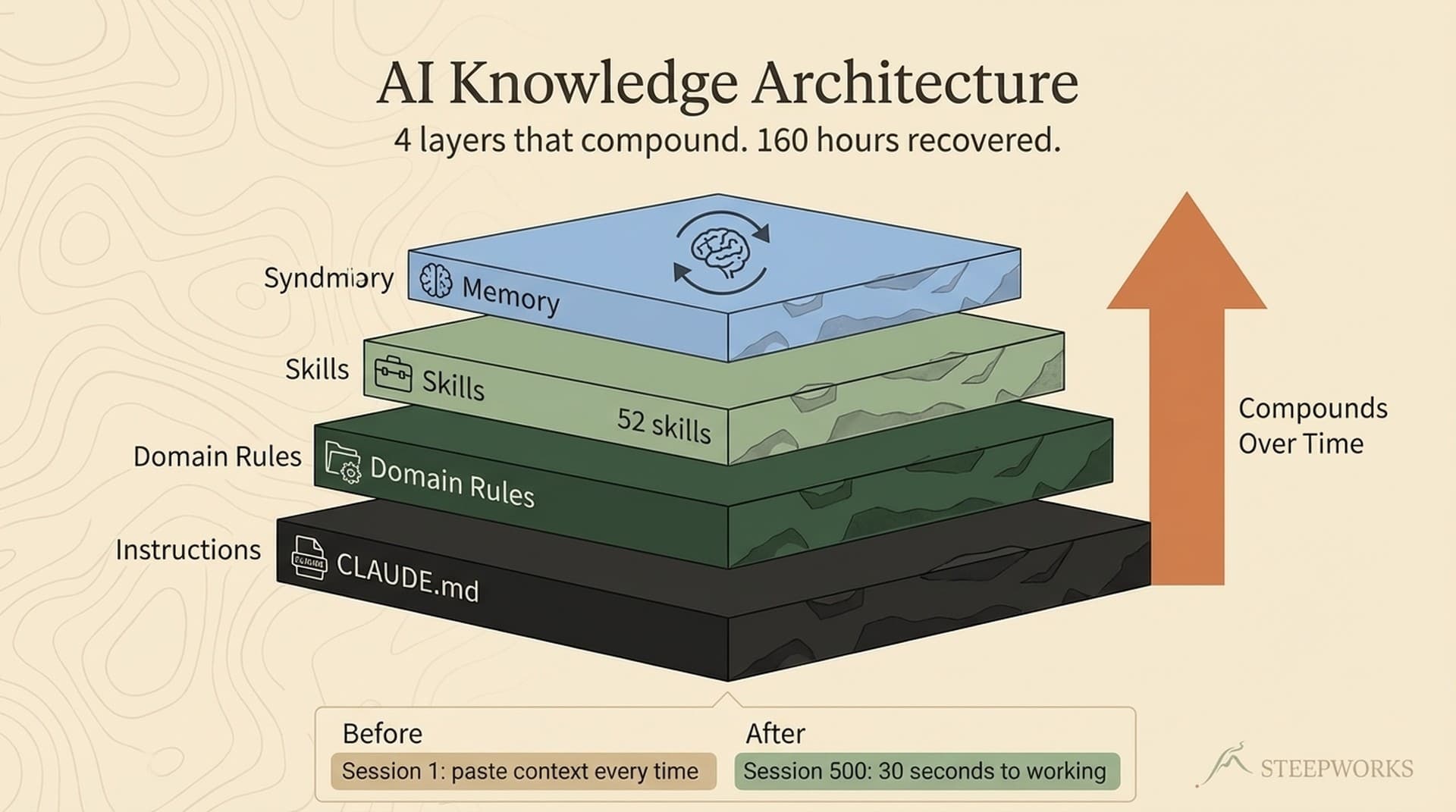
A single root instruction file — CLAUDE.md — gets read on every startup. It's the orientation doc: repo structure, folder behaviors, workstream routing, session recovery protocol, skill catalog. Agents read it first and know where things live. Currently about 400 lines of institutional knowledge that took 3.6 versions to get right.
But CLAUDE.md provides static knowledge — things always true about the repo. It can't say "you were working on newsletter consolidation yesterday and got to phase 14" or "the consulting workstream has been cooling for three weeks." That's the memory problem, and static files don't solve it. More on that in a moment.
46 Skills and the Compounding Loop
Skills are directories containing a SKILL.md, reference documents, and templates — following Anthropic's agent skills architecture. Claude discovers them automatically through .claude/skills/. Deep planning, content production, meeting prep, newsletter generation, knowledge synthesis, editorial review — 46 skills spanning everything from consulting research to social media distribution.
The first newsletter generation skill took two weeks to build. The third took two days. The architecture, templates, and patterns from earlier skills compressed the work. From 0 to 46 across 8 workstreams in 12 months, with each new skill easier than the last. By skill 30 or so, I stopped noticing the acceleration because it just felt like how the system worked.
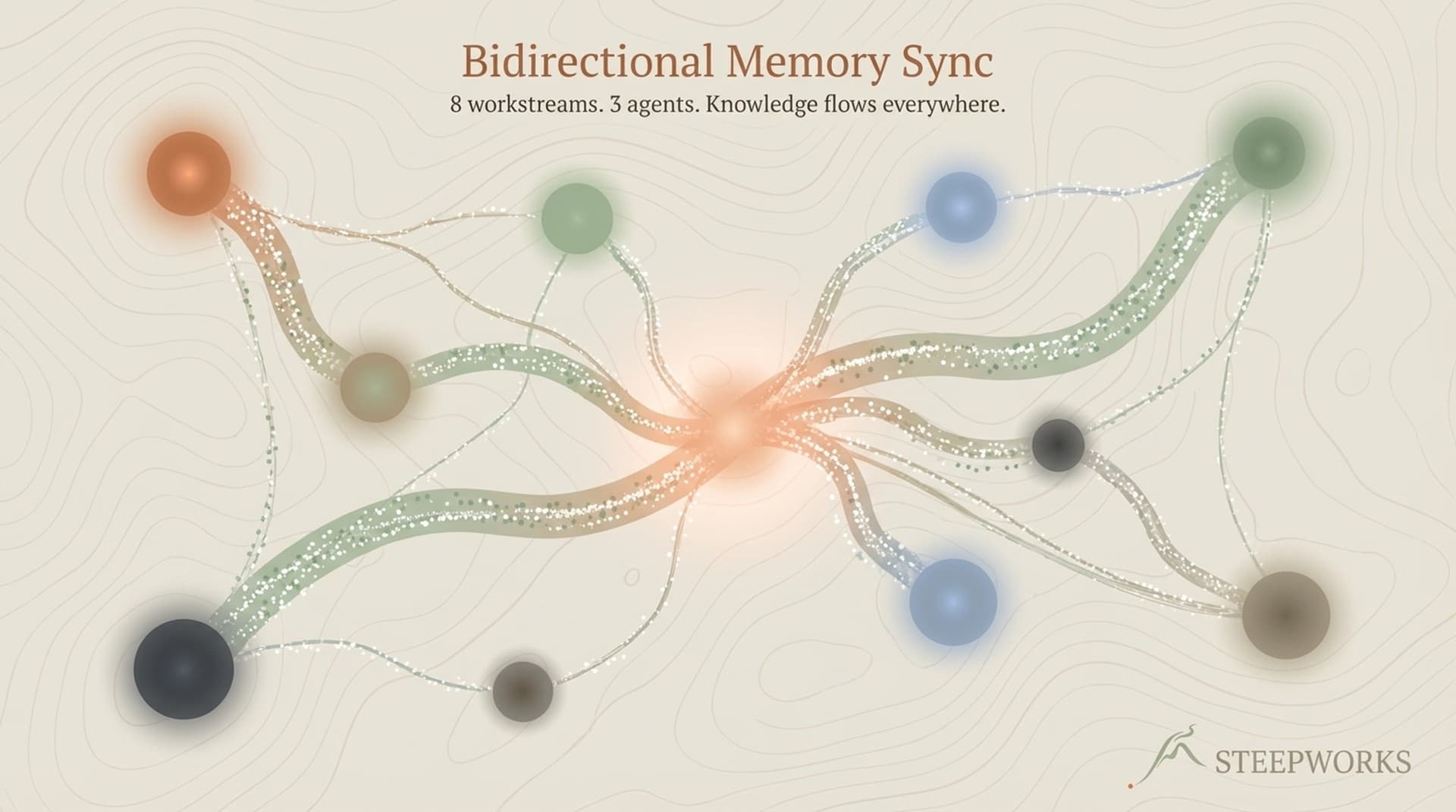
Here's what makes this compound faster than expected: three AI agents — Claude Code, Codex CLI, and Gemini — all read the same instruction file, the same skills, the same domain rules. A skill built during a Claude Code session is immediately available to Codex CLI. A rule added after a Gemini mistake prevents the same mistake in Claude Code next Tuesday. They don't coordinate in real time. They compound through shared infrastructure.
Month 1, every session required constant re-explanation. "No, the consulting files are over here. We already have a template for that." Month 6, the README pyramid was in place, 15 skills built, sessions started productive immediately. Month 12, 46 skills, 21 auto-loaded rules, three agents sharing the repo. Month 14, the hook system and pattern detectors went live and sessions needed zero manual orientation. The gap between "what I know" and "what the system knows" kept closing.
The part I didn't expect was cross-domain compounding. Consulting patterns started feeding content production — frameworks I documented for client engagements became source material for articles. Newsletter event data informed product decisions. The domains aren't isolated silos; once agents can traverse across them, patterns emerge that no single-domain system would surface.
Building Memory Into a Stateless System
The folder structure and skills give agents navigation and behavior. What they don't give is memory. An agent with 46 skills and 17 domains of context still doesn't know that I was deep in newsletter consolidation yesterday and got to phase 14. It doesn't know the consulting workstream has been cooling for three weeks. Static instruction files can't capture dynamic state.
I built five hooks that fire at key moments in the session lifecycle.
The session start hook loads learning rules, active plan files, workstream activity, and pending insights. On startup, an agent sees something like: "3 active learning rules. Newsletter workstream hot. Plan file active at phase 14. 2 pending insights to review." Five seconds, fully oriented.
The subagent hook injects skill awareness into spawned sub-agents, so they don't reinvent workflows that already exist.
The post-tool-use hook logs every file touch — path, action type, domain — to a changelog. This builds an audit trail of what the system actually does versus what it was asked to do. I've caught agents silently skipping files this way.
The stop hook captures skill usage and tool metrics. The pre-compact hook saves a session summary before context compaction — checkpointing files modified and skills used so the next session picks up where this one left off.
On top of the hooks, six pattern detectors run weekly: skill usage chains, stale references, cooling workstreams, file clustering, cross-workstream connections, orphan detection. They surface things no single session would notice — "consulting hasn't been touched in three weeks" or "these two skills are always invoked together, consider merging."
Eight hundred knowledge graph edges track relationships between documents. Ontology typing on those edges reduces unnecessary document reads by 30-50% during traversal.
Three Failures That Reshaped the Architecture
I trust the failure stories more than the architecture descriptions. Every structural decision came from something breaking.
The Frontmatter Crisis
75.5% frontmatter coverage sounds adequate until you realize the other 24.5% are invisible to every automated system. No domain tag, no status field, no creation date. A file without YAML frontmatter exists on disk but not in the system's awareness.
Migrating 4,744 documents to a v4 metadata schema took 75 planned iterations through a structured PRD process. Each iteration touched 50-100 files, validated schema compliance, and logged results before proceeding. Multi-week work with its own plan file, checkpoints, and rollback procedures. Not a weekend project — the kind of architectural remediation that makes you regret every "I'll add metadata later" decision.
If a file doesn't have frontmatter, it doesn't exist to the system. Treat metadata as load-bearing infrastructure.
The Orphan Problem
94.2% orphan rate at baseline. Ninety-four percent of files had zero incoming links. The knowledge was there, but nothing pointed to it.
I started with a hub-first linking strategy — connect READMEs to their children first, then synthesis docs to detail docs, then cross-domain references. Link health improved from that 15.8% baseline, but the work continues. Still chipping away at it. The lesson: linking should be part of the creation process, not a cleanup project you get around to a year later. Files without connections are files that won't be found.
The Branch Safety Incident
Multiple AI terminals sharing one working tree. One terminal switches branches, another terminal's unstaged work vanishes. I lost 14 phases of newsletter consolidation work — weeks of accumulated effort — in a single branch switch. Thirty-six stale stashes from the old "preserve state before switching" protocol told me the approach was fundamentally broken.
The fix wasn't better preservation. It was a hard constraint: never switch branches, period. Baked into the instruction file, read on every startup. When AI agents share an environment, safety rules need to be explicit and non-negotiable. I tried "be careful" for months. It doesn't work.
Building This at Your Scale
You don't need 4,700 files. These principles work at 50.
Three folders, three READMEs:
knowledge/
README.md → "Domain knowledge: consulting frameworks, industry research, principles."
active-work/
README.md → "Current projects and weekly execution. Check here for what's in progress."
reference/
README.md → "Templates, tools, reusable assets. Read-heavy, write-light."
One instruction file (CLAUDE.md, 10 lines):
# How This Repo Works
Read the README in each folder before searching for files.
- knowledge/ = domain expertise, read first for context
- active-work/ = current projects, check status before starting new work
- reference/ = templates and tools, copy don't modify
## This Week
Working on: Q2 pipeline review, content calendar draft
Active project: Series B board deck in active-work/board-deck/
That's a working knowledge OS. The agent stops guessing and starts following a map.
Build one skill. Take a repeating task — meeting prep, weekly report, research synthesis — and turn it into a reusable workflow with a SKILL.md, a template, and reference context. The second skill takes half the time.
Add one memory hook. A session-start script that reminds the agent what you were working on. You don't need six pattern detectors. You need one file that says "here's what's active" and a mechanism to load it on startup.
Let failures drive architecture. Don't over-design upfront. Build the minimum structure, use it until it breaks, then fix the break with a system-level solution. The 94% orphan rate taught me about linking. The branch safety incident taught me about hard constraints. The frontmatter crisis taught me about metadata. Every piece of architecture in this system exists because something went wrong without it.
See production skills built on this architecture at the STEEPWORKS Skills Library.
What I'd Do Differently
Enforce metadata from file one. A pre-commit hook that rejects files without YAML frontmatter would have prevented the 75-iteration migration entirely. One hour of setup, weeks of remediation avoided.
Build memory hooks in month one, not month eight. I sequenced structure first, memory second. Even ten lines of bash that reads a "current status" file on startup would have saved weeks of manual re-orientation. Structure and memory should co-evolve.
Fewer folders. Seventeen is manageable but close to the ceiling. "Shop" and "prototype" could have been one folder. I'd lean more on metadata tags to distinguish content types within fewer containers.
Link on create, not later. An orphan rate of 94% means the first year of files were accumulated, not connected. Every new file should immediately answer "what points to me, and what do I point to?" Build that into your file creation template so it happens by default, not by remembering to do it later.
What I'm building next: I want the repo to tell me what needs attention before I ask — a morning briefing generated from workstream activity and staleness signals. Semantic search so agents find files by concept, not just keyword. And automated skill generation — when the system detects a workflow performed manually three times, it drafts the skill and surfaces it for review. The system keeps getting smarter about what it should become.
Fourteen months in, new work still gets easier because the system already contains the patterns from prior work. The value isn't the files — it's the rate at which each new session can build on everything that came before it.
Start with three folders and one CLAUDE.md. Run it for a week. Then tell me what broke — because what breaks is what teaches you what to build next.
Victor Sowers builds AI-native GTM systems at STEEPWORKS. 15 years scaling B2B SaaS, two exits, and 2.5 years of production AI-in-GTM.