Most guides on how to use Claude Code for sales and GTM work assume you already know your way around a terminal. The people who'd benefit most from Claude Code are revenue operators, AEs doing deal research, and marketing leads building content systems. Same people who've never opened a command line on purpose.
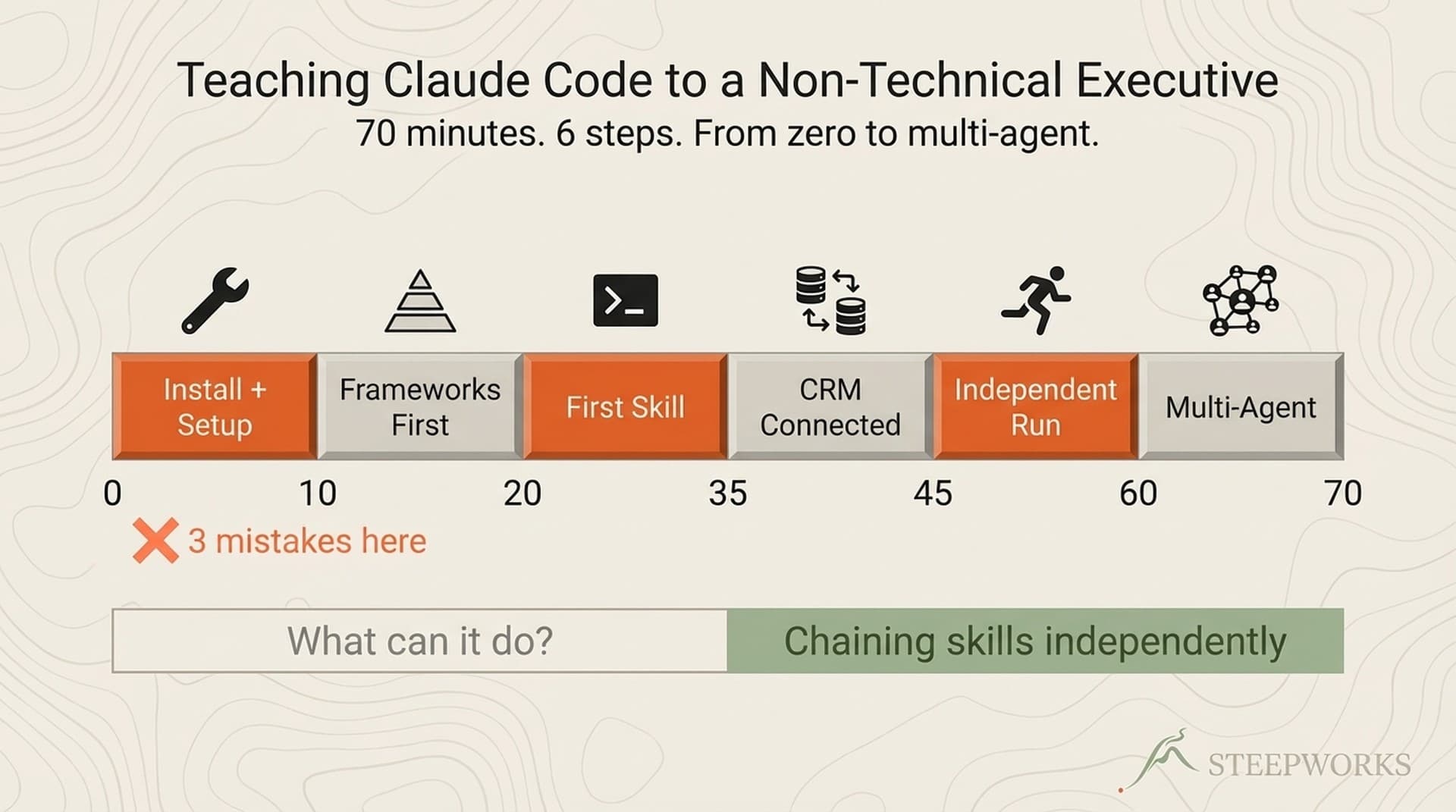
I've onboarded about a dozen non-technical GTM operators onto Claude Code over the past year. Every failure point here is one a real person hit. Every solution is one that actually worked. The whole path takes roughly 90 minutes, and you'll have a working skill that produces real output by the end.
Why Claude Code for GTM Teams, Not Just Developers
Open any Claude Code tutorial and you'll find the same problem. It starts with npm install and expects you to know what that means. Anthropic's own internal data shows non-engineering teams (lawyers, marketers, designers) using Claude Code productively at Anthropic itself. The tool was built for developers. The use cases went past them.
What Makes Claude Code Different from ChatGPT for GTM Work
ChatGPT isn't empty. If you've set up Custom Instructions, organized context into Projects, and trained Memory to learn your preferences, those features work. Keep using them.
But there's a ceiling I kept hitting: ChatGPT's persistence is per-project. Each Project is a silo. (For a deeper comparison, see Claude Code vs ChatGPT for Business.) Your "Outreach" project doesn't know what's in your "Meeting Prep" project. Your ICP, positioning, and voice preferences end up duplicated across every project. When something changes, you're updating six places instead of one.
Claude Code's persistence is architectural. One file called CLAUDE.md sits at the root of your workspace. Every session, every skill, every task inherits it. You describe your ICP once, document your voice once, and everything Claude Code does reflects that context going forward.
The three things that actually matter for GTM work:
Shared context across everything. Your CLAUDE.md contains your ICP, messaging, deal stages, voice, and working preferences. Every session reads it. You explain yourself once, not per-project.
File system access. Claude Code reads and writes files on your machine. It connects to tools like HubSpot, databases, and browsers. It operates on real artifacts, not just chat outputs.
Reusable skills. A skill is a saved workflow you trigger with a slash command. "Generate a meeting dossier" chains research steps, cross-references against your ICP, and produces structured output every time. Once you have a few skills, you can chain them in a single prompt. More on that below.
The learning curve is maybe two sessions of setup. But which approach is actually more work over six months: re-explaining yourself every project, or explaining yourself once?
What You'll Need Before You Start
- A Claude subscription. Pro ($20/month), Max, or Teams. An API key (pay-as-you-go) works too.
- A computer. Mac, Windows, or Linux.
- About 90 minutes. Installation takes 15-20 minutes. The rest is where the value lives.
- A real GTM task. A meeting coming up, a prospect to research, a content piece to draft. Use real work from minute one.
What you do NOT need: coding experience, terminal experience, or an IT department.
Minutes 0-20: Install Claude Code Without a CS Degree
Two Paths: Desktop App or Terminal
Path A: Desktop App (start here). Download from Anthropic's site. Click "Code" in the left panel instead of "Chat." You get full Claude Code capabilities, file system access, skills, CLAUDE.md, without touching a command line. This is the same tool with a visual interface.
Path B: Terminal (more control, more speed). Open your system's native terminal, not an IDE terminal. Terminal.app on Mac, PowerShell or Windows Terminal on Windows. Run the installer from the official quickstart. Anthropic's terminal guide covers the basics.
My recommendation: start with the Desktop App. Build your first skill there. Everything transfers. The terminal is waiting when you want more speed.
The 5 Errors Every Non-Technical Person Hits
These are specific failure points from real onboarding sessions.
1. Installing from Cursor's terminal. Cursor runs a sandboxed environment that blocks system-level installations. You'll get cryptic permission errors. Fix: install from your system's native terminal. After installation, you can run Claude Code from Cursor's terminal fine. The sandbox only blocks installing, not running.
2. claude: command not found. A PATH issue. Fix: restart your terminal completely (close and reopen, don't just open a new tab). If that doesn't work, the GitHub repository has platform-specific troubleshooting.
3. Hidden .claude folder. Your OS hides folders starting with a dot. On Mac: Cmd+Shift+. in Finder. On Windows: View > Show > Hidden items. This folder is where your skills live. Worth noting: GUI zip extractors on Mac and Windows sometimes silently drop dot-folders during extraction.
4. API key not recognized. Most common cause: extra whitespace when pasting. The key starts with sk-ant-. No quotes around it. Verify installation first with claude --version, then test with claude "hello".
5. Permission prompts feel alarming. The first time Claude Code asks "Allow this action?" you'll think you broke something. You didn't. Respond y (yes), n (no), or a (allow all similar). Once comfortable, run claude --dangerously-skip-permissions. The name is alarming on purpose. It's the recommended workflow for experienced users.
Minutes 20-45: Write Your First CLAUDE.md
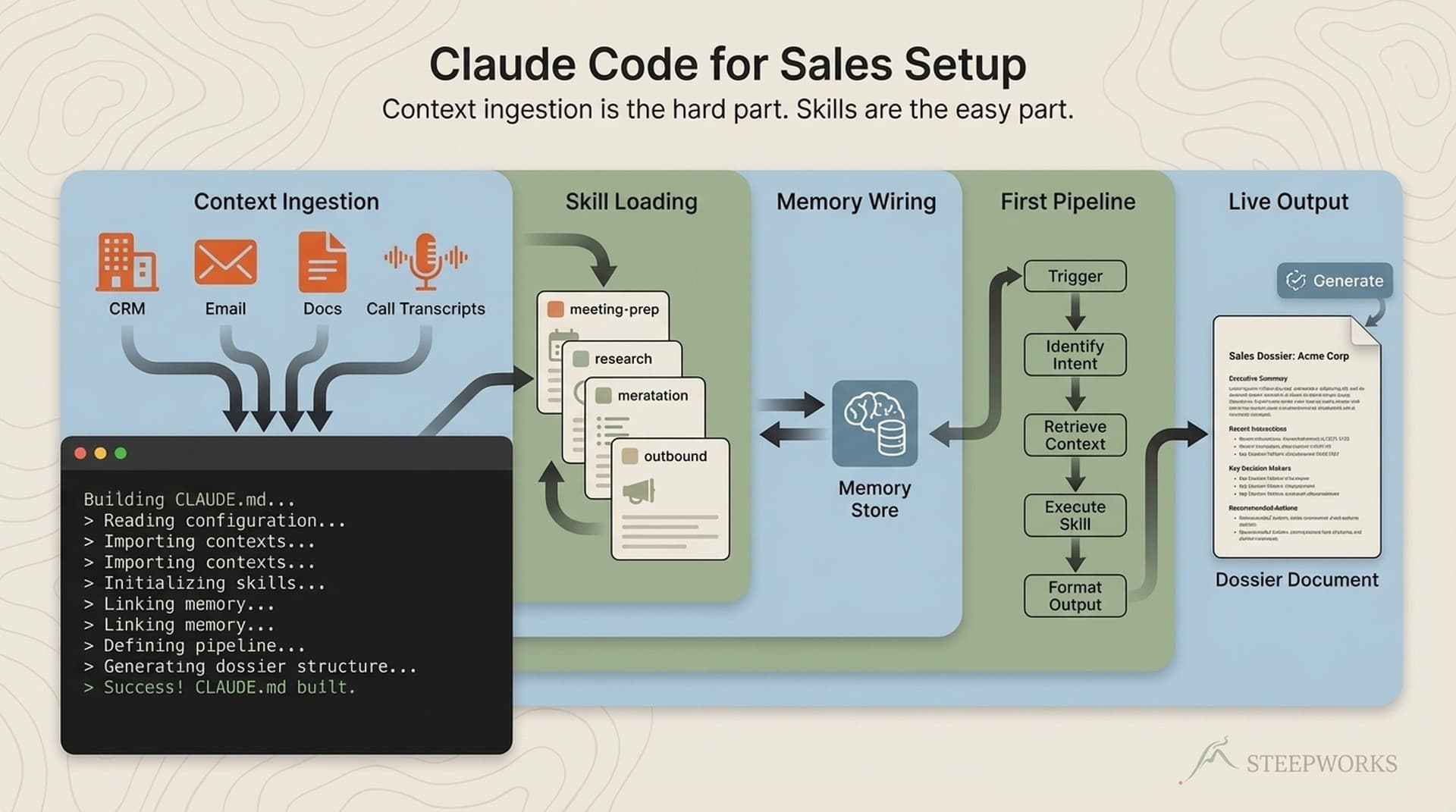
A CLAUDE.md is a plain text file that Claude reads at the start of every session: who you are, who you sell to, your ICP, messaging, deal stages, tools, voice preferences. One file, inherited by everything.
You don't write it from scratch. You tell Claude Code about yourself and it generates the file. Then you edit. If you've been frustrated that AI output sounds different every time -- too formal here, wrong terminology there -- this is the structural fix. Your preferences persist because they're loaded automatically, not copy-pasted into each conversation.
The 5-Section GTM CLAUDE.md Template
Most people skip this and jump straight to asking for output. That's how you get generic AI results that sound like they could come from anyone.
1. Who I Am -- Your role, company, what you sell, how long you've been in GTM. Two to three sentences.
2. Who We Sell To -- ICP description. Titles, company size, industries, key pain points. Five to ten bullet points.
3. How We Sell -- Deal stages, sales methodology, tools in your stack. Five to ten bullet points.
4. My Content Voice -- How you write emails, LinkedIn posts, and decks. What you don't want. Here's a non-obvious tip: negative constraints work better than positive descriptions. "Never use exclamation marks. Never say 'leverage.' Never open with a greeting" shapes output more reliably than "write casually." Three to five bullet points.
5. What I Need Help With Most -- The three to five tasks that eat the most time each week. Meeting prep. Prospect research. Content drafts. Competitive intel.
Start with 20 lines. It'll grow to 200 as you notice what context Claude Code actually uses.
The Prompt That Builds Your CLAUDE.md For You
Open Claude Code and type something like:
"I'm a [your role] at [company]. We sell [product] to [ICP]. Help me create a CLAUDE.md file that captures my GTM context so you remember it every session."
Even faster: share your LinkedIn profile URL. Claude Code extracts your background, role, and expertise and builds the foundation from that. You edit what it missed, add what it didn't know. Done.
Minutes 45-75: Build Your First Skill (How to Use Claude Code for Sales Research in 10 Minutes)
The Three Skills Every GTM Person Should Build First
A skill is a markdown file (SKILL.md) in your .claude/skills/ folder. It's a saved workflow you trigger with a slash command, and it inherits your CLAUDE.md context every time. The official skills documentation covers the architecture. The community skills repository has hundreds of examples to browse after you build your first.
Skill 1: Meeting Prep Dossier (build this now)
Given a company name and contact name, this produces a one-page briefing: company overview, recent news, pain points mapped to your ICP, talking points, and competitive context. The ICP mapping is the part that matters. ChatGPT can summarize a company. It can't cross-reference that summary against your ICP, your positioning, and your deal stages without you re-pasting all of that every time.
Create this file at .claude/skills/meeting-prep/SKILL.md:
---
description: "Generate a meeting prep dossier for an upcoming call. Triggers: 'meeting prep', 'prep for meeting', 'prep my call'"
---

# Meeting Prep Dossier

## Instructions

When the user provides a company name and/or contact name:

1. **Research the company:**
   - Search for recent news, funding rounds, product launches, and leadership changes
   - Identify company size, industry, and growth stage
   - Note their tech stack if publicly visible (job postings, BuiltWith, etc.)

2. **Research the contact:**
   - Find their role, tenure, and career background
   - Check for recent LinkedIn posts, conference talks, or published content
   - Note any mutual connections or shared experiences

3. **Cross-reference against the user's ICP from CLAUDE.md:**
   - Map the company's likely pain points to the ICP pain points defined in CLAUDE.md
   - Identify which of the user's product capabilities are most relevant
   - Flag any disqualifiers or mismatches

4. **Output a structured briefing with these sections:**

   ### Company Overview
   One paragraph: what they do, size, stage, recent trajectory.

   ### Contact Background
   Role, tenure, career path, recent public activity.

   ### Likely Pain Points
   3-5 pain points mapped to the user's ICP. Specific to this company, not generic.

   ### Suggested Talking Points
   3-4 conversation starters grounded in the research. Not generic questions -- questions that show you've done homework.

   ### Competitive Context
   Who else they might be evaluating. What alternatives exist in their space.

   ### Risk Factors
   Anything that suggests this isn't a fit, or timing issues, or objections to prepare for.

5. **Keep the briefing to one page.** Dense and scannable. The user will read this 5 minutes before the call, not the night before.
Create the folder, paste the content, save it. Invoke it:
/meeting-prep Acme Corp, Jane Smith
Claude Code reads your CLAUDE.md, follows the skill instructions, and produces the briefing in about 90 seconds. Some details will be wrong or outdated -- always verify before a meeting. But the structure is right, the ICP mapping is right, and you've got something useful that would have taken 20 minutes of tab-switching. From here you iterate: "Make the competitive section more specific" or "Add their recent product launches."
Skill 2: Deal Research Brief (build next week)
Deeper scope. Given a prospect or account, this produces deal intelligence: company financials, tech stack signals, org chart insights, competitive landscape, potential objections mapped to your positioning.
---
description: "Generate a deal research brief for a target account. Triggers: 'deal research', 'account research', 'prospect brief'"
---

# Deal Research Brief

## Instructions

When the user provides a company name or account:

1. **Research company fundamentals:** Revenue, employee count, funding, growth trajectory, recent news
2. **Map tech stack signals:** Job postings, integrations, public case studies
3. **Build org chart context:** Key stakeholders, reporting lines, decision-makers
4. **Analyze competitive landscape:** Current vendors, alternatives they're likely evaluating
5. **Cross-reference against CLAUDE.md:** Map findings to the user's positioning and ICP pain points
6. **Identify potential objections:** Based on company context, flag likely pushback and suggested responses

Output a structured brief: Company Profile, Tech Stack, Key Stakeholders, Competitive Landscape, Objection Map, Recommended Approach.
Skill 3: Content Draft Generator (build in week three)
Given a topic and format (LinkedIn post, email sequence, blog outline), this produces a first draft in your voice. The draft sounds like you because the system already knows your voice section from the CLAUDE.md.
---
description: "Generate a content draft in my voice. Triggers: 'draft content', 'write a post', 'content draft'"
---

# Content Draft Generator

## Instructions

When the user provides a topic and format:

1. **Read the voice section of CLAUDE.md** for tone, style, and preferences
2. **Research the topic** if current data is needed
3. **Draft in the specified format:** LinkedIn post, email, blog outline, or whatever the user requests
4. **Match voice constraints exactly:** Respect every "never" and "always" in the voice section
5. **Output the draft** with a brief note on choices made and areas to refine
Build Skill 1 today. Skills 2 and 3 are homework for the next two weeks. The template pattern is the same across all three.
Skill Chaining
Once you have multiple skills, you can invoke them together: "Use meeting-prep and deal-research to prepare a full account strategy for my call with Acme Corp tomorrow." One prompt, multiple skills in sequence, all drawing from the same CLAUDE.md context. You're composing capabilities, not retyping prompts.
Minutes 75-90: The Patterns That Make Adoption Stick
The Daily Startup Habit
Open Claude Code before your first meeting of the day. Run meeting prep for every external call. After one week of doing this, you'll have a hard time going back to manual research.
The 5 Commands That Replace the User Manual
Don't try to learn everything. These five cover 90% of what you'll need for the first month:
| Command | What It Does | When to Use |
|---|---|---|
/clear | Resets conversation context | Between unrelated tasks. Don't let meeting prep context pollute a content draft. |
/resume | Recovers previous session | Terminal crashed, browser froze, laptop went to sleep mid-session. |
/model | Switches AI model | Sonnet for daily speed. Opus for complex analysis. |
Shift+Tab twice | Enters planning mode | Any task with three or more steps. Claude plans before acting. |
Escape | Stops Claude mid-response | Output going sideways, taking too long, asked the wrong question. |
Also worth setting up: a terminal alias so you type cc instead of claude --dangerously-skip-permissions. Small thing that adds up.
When Claude Code Gets It Wrong
It will.
- Hallucinated company details. Claude Code will sometimes invent acquisition dates, funding amounts, or product features. The dossier is a starting point, not a source of truth. Always verify before a meeting.
- Ignored voice preferences. Refine the voice section of your CLAUDE.md. Be more specific about what you don't want. Negative constraints shape output more reliably than positive descriptions, as I mentioned above.
- Generic output. The fix is more specific context in your CLAUDE.md, not a better prompt. Context beats prompts. If the output could be for anyone, your CLAUDE.md doesn't have enough detail.
- Confused or stuck in a loop.
/clearand rephrase. Don't fight polluted context.
What Comes After 90 Minutes
The Next 30 Days
Week 1: Use meeting prep daily. Refine your CLAUDE.md based on what's missing from the output. Ask Claude Code to set up a Git repository as your undo button (it takes five minutes and means you can restore anything).
Week 2: Build the deal research skill. If your CRM has an API, connect it. The dossiers get noticeably better when Claude Code can pull real pipeline data instead of relying on web search alone.
Week 3: Build the content draft skill. Feed it your best past content as voice examples. Try chaining: "Use meeting-prep and deal-research to prepare a full account strategy for Acme Corp."
Week 4: Review what's working. Delete what isn't. Your CLAUDE.md should be 50-100 lines by now. At daily usage, expect roughly $20-50/month in usage costs on top of your subscription, depending on model choice and volume.
Rolling This Out to Your Team
Share your CLAUDE.md as a starting template (each team member customizes their own). Share the meeting prep SKILL.md (everyone uses the same skill). Let each person build their own second and third skills based on their role.
Skills are just files in a folder. Share them via Git, Dropbox, or literally copying a file. No IT deployment. No admin console. One person validates, shares their output, and adoption spreads through demonstrated value. That champion model is how most teams I've seen actually adopt this.
When You're Ready for the Full System
For teams that want pre-built skill libraries covering meeting prep, deal intelligence, content production, and competitive analysis, that's what Knowledge OS was built for. About 50 production-tested skills across three tiers at STEEPWORKS pricing.
But the 90-minute path in this article is real and complete on its own. You need a CLAUDE.md, a few skills, and the discipline to use them daily.
The 90-Minute Investment
Pick your next meeting. Open Claude Code. Build the meeting prep skill. Use it before the call. That single experience will tell you more about whether this tool fits your workflow than any feature comparison.
Victor Sowers is the founder of STEEPWORKS, where he builds AI-native GTM systems for revenue teams. Previously 15 years scaling B2B SaaS GTM at CB Insights and BurnAlong.
This workflow runs on Claude Code for GTM — the same stack that powers every STEEPWORKS skill and agent.