By Victor Sowers | STEEPWORKS


If your marketing site has 50 pages and changes quarterly, close this tab. Your static sitemap is fine. This article is for a different situation: when your content pipeline pushes new pages into a database every week, and your dynamic sitemap has no idea they exist.

I watched a content site's indexed page count sit at 40% for months. The pages were live. The content was good. Google just didn't know they were there. The static sitemap pointed to 200+ URLs that no longer existed, and Google was spending crawl budget on 404s instead of discovering new content. After deploying a dynamic sitemap — one that queries the database for every published page at build time — indexed coverage climbed to 85% within weeks. The sitemap didn't improve the content. It stopped lying to Google about what existed.

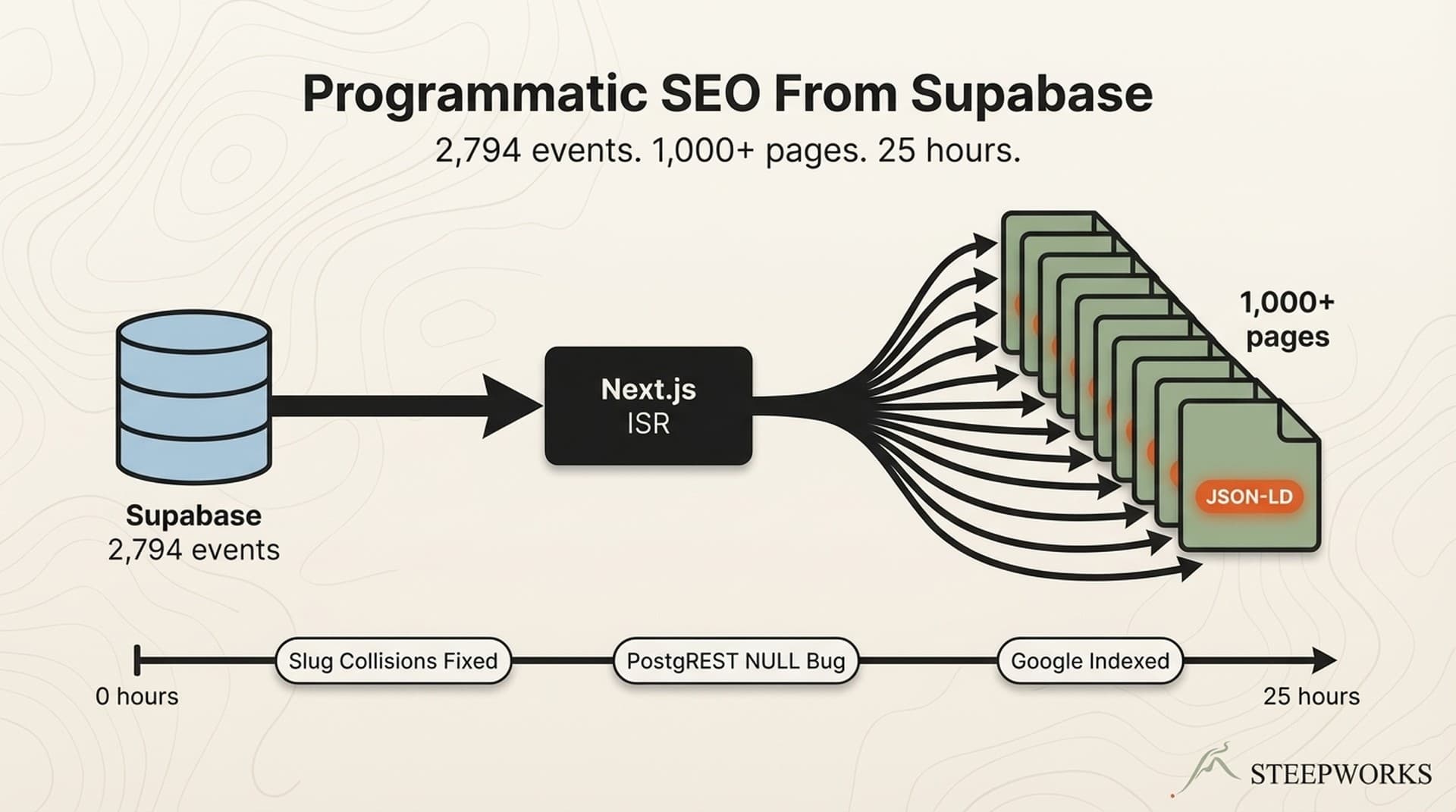
This pattern matters when your site publishes content from a database — whether that's a product catalog, an event directory, a documentation site, or a content hub with multiple types (articles, feed items, newsletter issues) published on different cadences. I run two sites built this way: a STEEPWORKS insights hub serving original articles, curated feed items, and newsletter issues, and a local family events directory built on 1,000+ programmatic SEO pages from a Supabase database. Both use the same dynamic sitemap pattern. Both stopped losing pages the day I deployed it.


The Problem With Static Sitemaps When Your Content Lives in a Database

A static sitemap is a hardcoded list of URLs checked into your repository. It works when your page count is stable. It breaks the moment your database starts generating pages faster than a human can update XML.

Here is what happens when sitemaps go stale:

  • New content sits unindexed for days or weeks. The page is live, the content is good, but no crawler knows it exists until organic link discovery catches up — which, for a small or new domain, can take weeks.
  • Google crawls pages that no longer exist. Expired events, deleted products, archived articles. Every 404 response wastes a crawl request that could have been spent on a real page.
  • Crawl budget bleeds into noise. For sites under 10K pages, crawl budget rarely constrains indexing. But for database-driven sites growing toward 50K+ pages, every wasted crawl request delays discovery of pages that actually matter.

The difference between a static sitemap and a dynamic one is the difference between a snapshot and a pipeline. A static sitemap is a file. A dynamic sitemap is infrastructure — it reads from the same database your pages read from, and it stays current without anyone touching it.

Manual sitemap management breaks at scale for a simple reason: adding a single URL requires a code change, a commit, and a deploy. When your database adds 10 URLs per day, that cadence is unsustainable. Google explicitly recommends sitemaps for sites with "a lot of content that is frequently updated." The recommendation assumes the sitemap keeps up.

The time investment is modest. This is a 2-4 hour task for any engineer who already works in Next.js. 50-80 lines of code, zero ongoing maintenance. Compare that to the cost of 40+ pages per month sitting undiscovered.


The Next.js sitemap.ts Convention — One File, Zero Maintenance

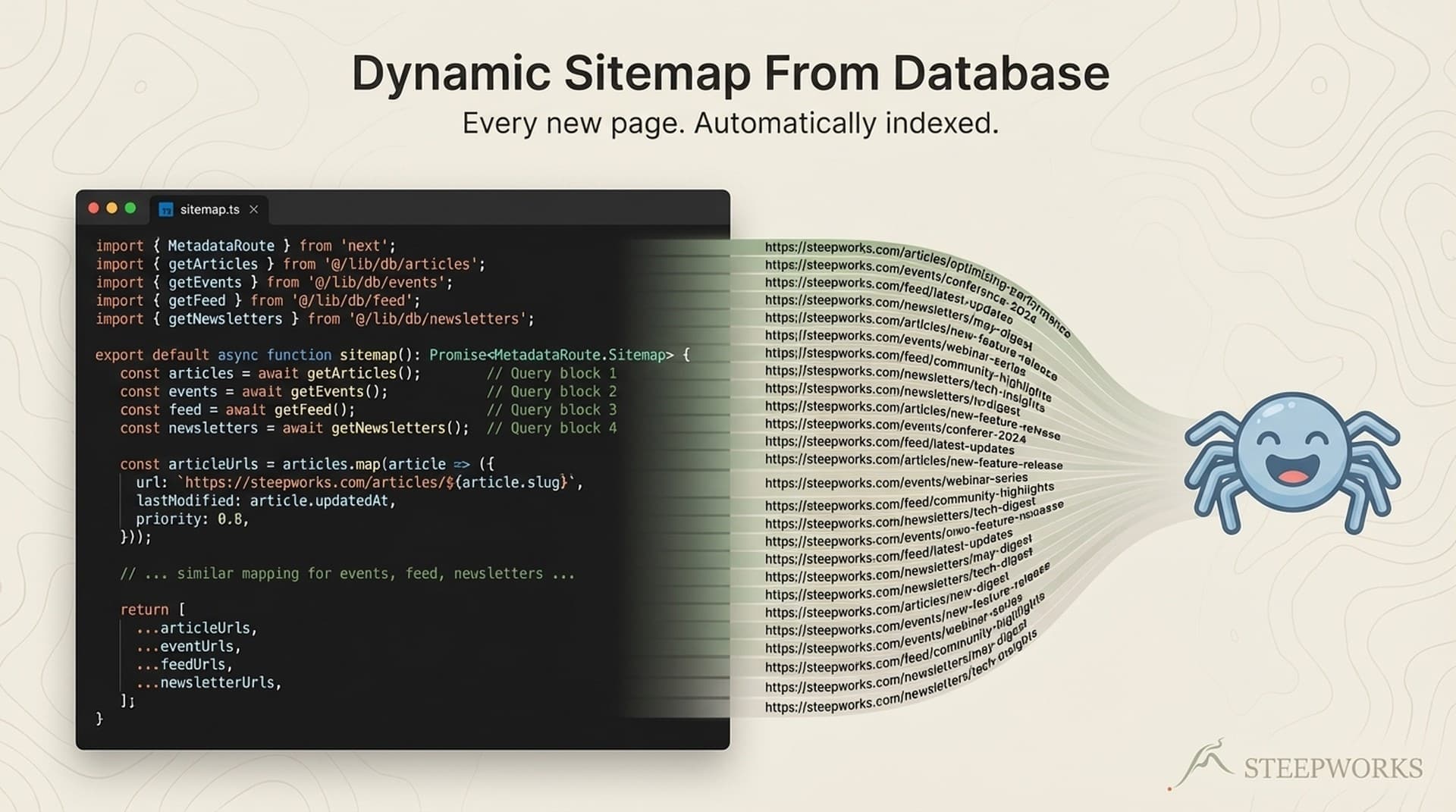
Next.js App Router provides a file convention that eliminates XML templating entirely. Drop a sitemap.ts file in your app/ directory, export a default async function, and the framework handles serialization and serving.

How the Convention Works

The function signature is minimal:

import type { MetadataRoute } from 'next'

export default async function sitemap(): Promise<MetadataRoute.Sitemap> {
  // Return an array of { url, lastModified, changeFrequency, priority } objects
}

Next.js automatically serves the output as /sitemap.xml with valid XML headers. No XML templating libraries. No third-party packages. Because the function is async, you can fetch data from any source before generating the array — database, CMS, API, filesystem.

The Next.js sitemap.ts documentation covers the full API surface, but in practice you only need the four fields: url, lastModified, changeFrequency, and priority.

When to Use a Plugin vs. Build Your Own

Before writing custom code, a quick decision:

ScenarioRecommendation
Static marketing site, < 100 pages, single content typeUse next-sitemap or a CMS plugin. Done in 10 minutes.
Database-driven site, multiple content types, growing page countUse the built-in sitemap.ts convention. 2-4 hours, zero dependencies.
50K+ URLs or need server-side generation on every requestUse next-sitemap with server sitemap or build a custom API route.

next-sitemap is a solid package — 2M+ weekly downloads, generates sitemaps at build time via a postbuild script. It works well. But it adds a dependency, a config file, and a build step. For a Supabase-backed site where content changes constantly, I wanted the sitemap to regenerate on every build without a separate pipeline. The built-in convention has zero config, zero dependencies, and integrates with Next.js caching and ISR natively.

Tradeoff acknowledged: next-sitemap offers more advanced features — server-side sitemap generation, automatic robots.txt. For most database-backed sites, the built-in convention is sufficient.

If you are a VP Marketing trying to pitch this to your engineering lead: the ask is "add a sitemap.ts file that queries our content database, 2-4 hours max, no new dependencies." That is a half-day ticket, not a sprint.


Fetching Slugs From Supabase at Build Time — The Dynamic Sitemap Pattern

The core pattern: query Supabase for published content slugs, then map them into sitemap entries with appropriate metadata. Each content type gets its own data function, its own URL pattern, and its own priority logic.

The Data Layer — What the Sitemap Needs From the Database

Each content type has a function that returns slugs and dates:

  • getAllArticleSlugs() — curated feed items from a Supabase view
  • getAllOriginalArticleSlugs() — long-form original articles
  • getAllIssueSlugs() — newsletter archive issues

These functions query Supabase views that only expose published content. The sitemap never includes drafts or unpublished pages. The view architecture enforces this — an explicit column allowlist in the database means the sitemap cannot accidentally expose draft or rejected content, even if the base table contains it.

Key fields per content type: slug (for URL construction) and published_at or date (for lastModified). That is the entire contract. The sitemap does not need titles, descriptions, or full content. Slugs and dates.

These are the same functions used by generateStaticParams() for page generation. One source of truth for what pages exist. When a new article is published in Supabase, both the page route and the sitemap discover it simultaneously through the same data function. No synchronization step, no webhook, no manual update.

Error handling pattern: if the Supabase query fails, return an empty array. The sitemap still generates with static pages. A database hiccup should never take down the entire sitemap.

Mapping Content Types to Sitemap Entries

Each content type gets different SEO treatment. This is not arbitrary — the values reflect how frequently content changes and how important each type is for the site's goals.

Content TypeURL PatternchangeFrequencypriorityRationale
Homepage/weekly1.0Highest value, updated regularly
Product/pricing pages/products, /pricingmonthly0.8-0.9High commercial value, infrequent changes
Insights hub/insightsdaily0.9New content added frequently
Original articles/insights/articles/{slug}monthly0.8High-value evergreen content
Curated feed items/insights/feed/{slug}monthly0.6Lower priority, higher volume
Newsletter archive/newsletter/archive/{slug}monthly0.7Mid-priority, content locked after publish

Assigning the same priority to everything is the same as assigning no priority at all. Priority is a relative hint — it tells crawlers what matters most within your site. Your pricing page matters more for conversions than a curated feed item. Your original articles carry more link equity than a newsletter archive issue. The values should reflect that hierarchy.

changeFrequency affects crawl scheduling. A daily-updated insights hub warrants daily. A published article that rarely changes warrants monthly. Getting this wrong wastes crawl budget — Google rechecks pages that haven't changed and ignores pages that have.

Production lesson — lastModified is more important than it looks.

I discovered a gotcha in my own implementation: using new Date() for lastModified on static pages means every build reports every static page as "just updated." This is technically accurate (the sitemap regenerated), but it sends a misleading signal. Google sees 13 static pages all modified at the same timestamp and may waste crawl budget re-checking pages that haven't actually changed.

For static pages, hardcode a real last-modified date. For database-driven pages, use the actual published_at or updated_at field from your data. The signal should be honest. I still have new Date() on my static pages — it is on the fix list, and I am documenting this so you skip the same mistake.


Handling Multiple Content Types Without Losing Your Mind

The real value of a dynamic sitemap is not generating XML. It is the merge. Static pages, database-driven articles, curated feed items, and newsletter issues all need to coexist in a single sitemap without collisions or staleness.

The production implementation is 73 lines of TypeScript. The final return looks like this:

return [
  ...staticPages,
  ...articlePages,
  ...articlesListingPage,
  ...originalArticlePages,
  ...issuePages
]

Each content type is its own array, generated independently, merged at the end. This is better than a single monolithic query for the same reason microservices are better than monoliths for certain problems: each content type has different source tables, different slug patterns, different priority logic. Separate functions keep the logic clean and testable.

Adding a new content type takes three steps:

  1. Write the data function (query Supabase for slugs and dates)
  2. Map to sitemap entries (URL pattern + priority + changeFrequency)
  3. Spread into the return array

No XML editing. No config changes. No build pipeline modifications. The pattern scales with your content model.

The anti-pattern to avoid: building the sitemap from route introspection (scanning the filesystem for pages). This misses dynamic routes entirely and may include dev-only pages. Database-first is more reliable because the database is the source of truth for what content exists.

Honest note: the merge pattern can get unwieldy when you have 8+ content types. At that point, consider extracting each type into a dedicated sitemap file and using a sitemap index. Which leads to the next question.


Sitemap Index for Large Sites — When One Sitemap Isn't Enough

A single sitemap maxes out at 50,000 URLs or 50MB uncompressed (Google docs). Most early-stage sites never hit this limit. But database-driven sites can grow fast — a local events directory with 3,000 events, 24 category pages, and 52 newsletter issues is already at 3,076 URLs and climbing.

When to Split

Three signals that it is time:

  • Growth rate. If your site is growing by 100+ URLs per month, plan for a sitemap index now, even if you are under 50K today. The migration is easier before the sitemap gets unwieldy.
  • Search Console clarity. Google recommends one sitemap per content type. Splitting makes it possible to monitor indexing status per type in Search Console — you can see whether your articles are indexed at 95% while your events lag at 70%.
  • Build time. When your single sitemap's build time starts adding noticeable seconds to your deploy, that is the operational signal to split.

The Next.js generateSitemaps Pattern

Next.js provides a generateSitemaps function that returns an array of sitemap IDs. The framework automatically serves /sitemap/0.xml, /sitemap/1.xml, etc., with a sitemap index at /sitemap.xml.

The implementation approach I recommend: one sitemap per content type (articles, events, newsletter issues, static pages) rather than splitting by count. Content-type splitting is more meaningful for monitoring and debugging than arbitrary 50K-row chunks.

Reference: Next.js generateSitemaps documentation.

I have not needed this yet — neither of my sites has crossed the threshold where a single sitemap is a problem. But the database-first architecture means migration will be straightforward: each content type already has its own data function and its own array. Splitting them into separate sitemaps is a matter of routing, not restructuring.


The SEO Impact — What Actually Changes After Adding a Dynamic Sitemap

I want to temper expectations. A dynamic sitemap is infrastructure, not a ranking factor.

What it does:

  • Ensures every published page is discoverable by crawlers
  • Reduces lag between publishing content and Google discovering it
  • Focuses crawl budget on pages that actually exist and matter
  • Removes 404s from the crawl queue (expired content disappears from the sitemap automatically)

What it does not do:

  • Guarantee indexing. Google decides what to index. A perfect sitemap with thin content will still get filtered.
  • Improve rankings on its own. Sitemaps affect discovery, not ranking signals.
  • Fix content quality problems. If your pages are not worth indexing, a better sitemap will not help.

How to verify it is working: Google Search Console > Sitemaps > check submitted vs. indexed counts. A healthy ratio is 90%+ indexed. If it is below 70%, the problem is not your sitemap — it is your content or your internal linking.

Lumar's crawlability research shows correlation between sitemap freshness and indexing speed. For sites under 10K pages, crawl budget is rarely the bottleneck. For database-driven sites growing toward 50K+ pages, sitemap accuracy directly affects how efficiently Google allocates crawl resources.

The 40% to 85% result I mentioned in the opening was not magic. The old static sitemap was pointing at 200+ URLs that no longer existed. Google was spending its crawl budget on 404s. The dynamic sitemap stopped the bleeding. That is a more honest framing than "dynamic sitemaps boost SEO." They don't boost anything. They remove a self-inflicted obstacle.

A 13-phase SEO audit is where I'd start if your indexing ratio looks unhealthy. Sitemap validation is Phase 1, but it is rarely the only problem.


Build It Once, Let the Database Drive It

A dynamic sitemap is one of those infrastructure investments that feels anticlimactic. You write 50-80 lines of code, the sitemap reflects your database, and you never think about it again. That is the point.

The pattern: your content pipeline writes to the database. Your page generator reads from the database. Your sitemap reads from the same database. One source of truth, three consumers. When new content appears, all three stay in sync without human intervention.

For operators building database-driven content sites — whether that is a local events directory, a product catalog, a knowledge base, or an article archive — this is table-stakes infrastructure. Skip it, and every new page you publish sits in a blind spot until Google discovers it on its own schedule. Build it once, and your content pipeline has a direct line to Google's front door.

The total investment: 73 lines of TypeScript, 2-4 hours of engineering time, zero dependencies, zero ongoing maintenance. The return: every page your database publishes appears in Google's queue within the next crawl cycle. That math works for any site growing faster than a human can update XML.