By Victor Sowers | STEEPWORKS
Why a Postgres Database Became My CMS
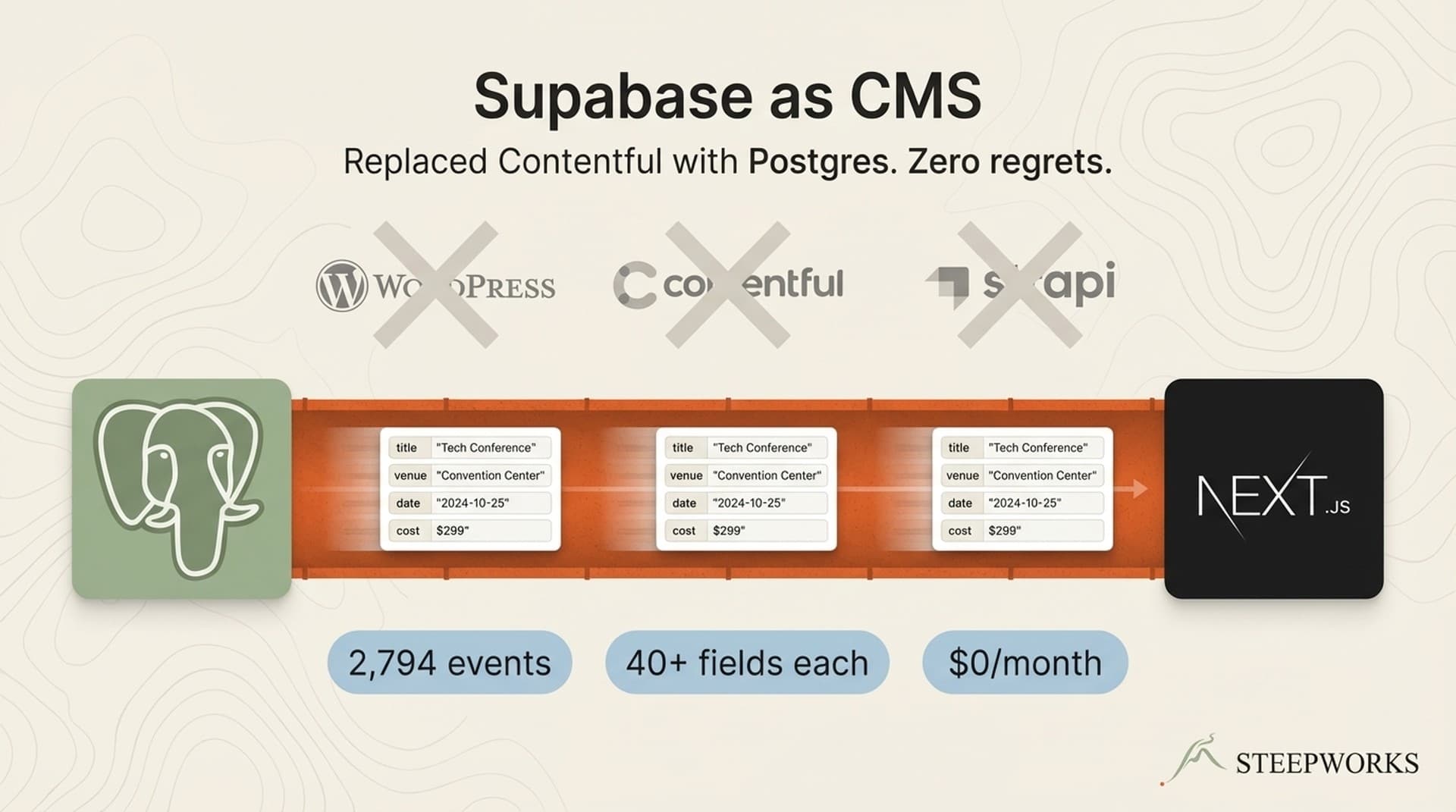
I needed to store, classify, and serve 2,794 structured events — each carrying 40+ fields covering venue, dates, age ranges, cost tiers, content categories, geographic zones, and AI-generated classifications. I evaluated WordPress, Contentful, and Strapi. Then I opened a Supabase project and never looked back.
Let me clarify the claim upfront. "Supabase as CMS" does not mean "without backend infrastructure." Supabase IS the backend — a managed Postgres database, an auto-generated REST API via PostgREST, Row Level Security for access control, and realtime subscriptions if you need them. What it means is: zero custom server code. No Express app. No API routes I wrote and maintain. No ORM mapping objects to tables. The database schema IS the API contract, and PostgREST serves it automatically. I wrote SQL, not server code.
The system today: 2,794 events across two regional editions. 313+ sources feeding the pipeline weekly. 8 content pillars. 6 urgency tiers. 12 geographic zones. 8 age range categories. 5 cost classifications. 9 indexes. Three layers of security. This is not a toy blog with 50 markdown files — it is a structured data system at moderate scale running in production for six months.
If you don't run an events directory, swap "events" for "product pages," "location landing pages," "customer case studies," or "partner listings." The pattern applies anywhere you have structured data that needs to be stored, classified, filtered, and served through a public API. That describes most content operations at scale.
When This Pattern Matters (And When It Doesn't)
Before the architecture, a filter. This approach is not universal. It fits a specific shape of problem, and pretending otherwise wastes your time.
Use Supabase as your CMS when:
- Your content is structured data — fields, categories, relationships — not editorial prose
- You need filtering, search, and faceted navigation, not a WYSIWYG editor
- Your engineering team already uses Supabase for the product (zero additional vendor cost)
- You need programmatic content at scale — 100+ pages generated from database records
- CMS costs are growing past $300-500/month and the content model is simple enough that SQL handles it
Stick with a traditional CMS when:
- Your content team needs a visual editor and editorial workflows
- Content is primarily long-form articles, not structured records
- You have no developer willing to maintain the schema and queries
- You need built-in SEO tooling, preview modes, or scheduled publishing workflows
The biggest gap, and I want to be honest about it: Supabase has no admin UI for non-developers. If your marketing team needs to create and edit content without touching SQL or a developer-oriented tool like Supabase Studio, you need a CMS product — a traditional one, or something built on top of Supabase like Supabase-CMS or Supawald. This article is about using Supabase directly, which means a developer manages the data layer. In my case, a data pipeline of 313 sources fills the database automatically, so nobody edits records by hand. That changes the calculus.
Schema Design for Structured Content
The schema is the content model. That sentence sounds abstract until you see what it replaces.
In WordPress, you install Advanced Custom Fields, configure a GUI, define dropdowns, set validation rules. In Contentful, you build a content type in their visual editor, define enumerated fields, set required/optional. In Supabase, you write a CREATE TABLE statement with CHECK constraints. The constraints ARE the dropdowns. The column types ARE the validation. The indexes ARE the query optimization. You define it once in SQL and get a REST API for free.
The events table carries 40+ columns grouped by purpose:
Core content. Title, description, summary (AI-generated), and content body. The summary field is populated by Claude during classification — a one-sentence description optimized for card displays and social sharing.
Event metadata. Venue name, street address, date range (start and end), time range (start and end). Parsed times — stored as actual TIME types, not strings — enable sorting by start time within a date, filtering for "morning events" or "after 5 PM," and computing duration. Every CMS I evaluated stored times as text fields. Postgres stores them as time values.
Classification fields. This is where CHECK constraints replace CMS dropdown builders:
content_pillar— 8 categories: museums, outdoor adventures, performances, dining, classes and workshops, deals and discounts, seasonal, community. A CHECK constraint on the column means the database rejects any value outside this list at write time.event_type— 10 types covering one-time events, recurring programs, festivals, classes, and camps.age_range_category— 8 tiers frombabythroughadults_only. Not a free text field. Not a tagging system. An enum enforced by the schema.cost_type— 5 classifications: free, paid, donation-based, membership-required, varies.urgency— 6 levels fromthis_weekendthroughexpired, computed daily by the pipeline.venue_type— indoor, outdoor, both, virtual, unknown.
AI classification output. A JSONB column stores the full Claude classification response — the raw reasoning, confidence scores, and every field the model extracted. Alongside it, extracted columns for classification_reasoning (human-readable explanation) and classification_confidence (high, medium, low). The JSONB column means I can re-extract fields later without re-running classification. The structured columns mean PostgREST can filter on confidence without parsing JSON.
Moderation. A moderation_status field with four states: auto_approved, pending_review, approved, rejected. Events from trusted sources auto-approve. New or low-confidence events queue for review.
Key design decision: CHECK constraints over lookup tables. Every classification field uses a CHECK constraint instead of a foreign key to a reference table. This keeps the content model self-contained in the schema. The database rejects invalid data at write time. PostgREST exposes the valid values through its OpenAPI spec. Your frontend can read the allowed options directly from the API schema definition — no separate "get all categories" endpoint needed.
Index strategy. Nine indexes targeting the query patterns the frontend actually uses: event date, urgency, location area, content pillar, age range category, cost type, venue, moderation status, and a composite on region plus date. At 2,794 records, every query runs in single-digit milliseconds regardless. But indexes are cheap at this scale, and they mean I won't hit a performance cliff when the dataset doubles.
The Security Model
Security is where Supabase earns its keep as a CMS backend. The three-layer model is stronger than any permission system I have used in WordPress or Contentful, and it requires zero application code.
Layer 1: Schema isolation. Base tables live in a private schema — not the public schema that PostgREST exposes by default. The pipeline writes to baltimore.events using the service_role key, which never leaves server-side code. The public-facing API literally cannot see these tables. This is not an access control rule. It is architectural invisibility.
Layer 2: Allowlist views. A view in the public schema exposes exactly the columns the frontend needs. The public.baltimore_events view selects 27 columns from the baltimore.events base table. Internal fields — classification_reasoning, AI confidence tiers, source URLs, internal notes — are not in the view. They do not exist from the API's perspective. The view IS the API contract. Adding a column to the base table does not expose it publicly. You have to explicitly add it to the view.
This pattern matters for a specific reason: it prevents accidental exposure. In WordPress, installing a plugin can expose database fields through the REST API unless you explicitly block them. In Supabase with allowlist views, the default is hidden. You opt columns IN, not out.
Layer 3: Row Level Security (RLS). Even through the allowlist view, RLS policies control row-level access. In practice, the read policy is simple — USING (true) for public read access on the view. But RLS is enabled on every table. The deny-by-default model means forgetting to write a policy blocks access rather than leaking data. In every other system I have used, the failure mode of a missing permission is "everything is visible." In Supabase with RLS, the failure mode is "nothing is visible." I prefer that direction.
The anon key misconception. The Supabase anon key is safe to ship in client-side JavaScript when RLS is configured correctly. This is counterintuitive — most developers treat API keys as secrets by reflex. But the anon key is designed to be public. It identifies the client role but grants no privileges beyond what RLS allows. The security boundary is the policy, not the key.
PostgREST as a Zero-Code API Layer
PostgREST auto-generates a REST API from the database schema. Change a column, add a table, create a view — the API updates immediately. No code generation step. No deploy. No GraphQL resolvers to maintain. No OpenAPI spec to keep in sync. The spec IS the schema.
In production, the query patterns map directly to URL parameters:
Filtering by category: ?content_pillar=eq.outdoor_adventures
Date range queries: ?event_date_start=gte.2026-03-24&event_date_start=lte.2026-03-31
Multi-filter (the real power): ?cost_type=eq.free&age_range_category=eq.toddler&location_area=eq.baltimore_city — three filters, zero custom API code, results in milliseconds.
Ordering and pagination: ?order=event_date_start.asc&limit=20&offset=40
Text search: ?title=ilike.*museum* for case-insensitive pattern matching.
Every query the frontend needs maps to PostgREST operators. I kept waiting for the moment I would need custom API routes — a complex join, a computed field, an aggregation the URL syntax could not express. Six months in, that moment has not arrived.
The NULL Gotcha
This is the kind of production detail that no tutorial covers, and it cost me half a day.
PostgREST's neq.expired filter silently excludes rows where urgency is NULL. This is correct SQL behavior — NULL != 'expired' evaluates to NULL in SQL, not TRUE, so the row fails the filter condition. But it caused 63+ future events to vanish from the API because they had not been classified yet. Users reported missing events. I stared at the query for two hours before checking for NULLs.
The fix: ?or=(urgency.neq.expired,urgency.is.null). Two clauses in an OR block. Five minutes to write once you understand the problem, but invisible until real users hit the gap.
If you take one operational detail from this article, it is this: any PostgREST neq filter on a nullable column will silently exclude unclassified records. Account for NULLs explicitly, or your API will lie to you by omission.
Performance
PostgREST serves read queries at sub-50ms latency for datasets under 10K rows. At 2,794 records with 9 indexes, average response time is under 15ms. At this scale, you are not optimizing for speed. You are optimizing for zero maintenance. The API requires no monitoring, no scaling decisions, no deployment pipeline. It runs.
Client-Side Data Fetching in Next.js
The Supabase JavaScript client wraps PostgREST with a typed query builder. In Next.js Server Components, the query runs on the server during rendering — the SQL never reaches the browser, the response streams as HTML, and search engines index the full content. No useEffect. No loading spinners. No client-side fetch waterfall.
The pattern: create a server-side Supabase client, query the view in the Server Component's async function body, render the results directly in JSX. The Supabase client call looks like a database query. It executes as an HTTP request to PostgREST. The developer experience feels like querying a local database, but the data lives in Supabase's managed Postgres instance.
Search and filter UX. Category pages, date pickers, geographic filters, and age range selectors all map to URL search parameters. The frontend translates URL state into Supabase client method chains — .eq('content_pillar', 'outdoor_adventures'), .gte('event_date_start', startDate), .order('event_date_start'). Zero custom API logic. URL parameters in, filtered HTML out.
Caching strategy. For content that changes daily — event listings, calendar views — ISR with 1-hour revalidation. The page serves from Vercel's edge cache until the revalidation window expires, then regenerates on the next request. For hub pages that change weekly — category indexes, geographic landing pages — static generation at build time with on-demand revalidation when the database updates. Supabase's Server Component integration handles the fetch-level caching, while Next.js manages the page-level cache.
This CMS layer is the foundation. The real payoff is what you build on top of it — 1,000+ individually indexable SEO pages, each generated from a single database record, each answering a different search query. The CMS stores and serves. The SEO layer multiplies.
Why Supabase Beats Traditional CMSs for Structured Data
The comparison only makes sense for structured content — records with defined fields, categories, and relationships. For editorial content (blog posts, marketing pages, landing pages), a traditional CMS wins. That is not a concession. It is a different use case.
| Criterion | WordPress | Contentful | Supabase as CMS |
|---|---|---|---|
| Cost at 1,000 entries | $30-50/mo (hosting + plugins) | $300+/mo (Team plan) | $0 (free tier) |
| Custom content model | ACF plugin ($49/yr) | Native, well-designed | SQL schema, unlimited complexity |
| API performance | REST plugin, 200-500ms | CDN-backed, 50-100ms | PostgREST, sub-50ms |
| Filtering and search | WP_Query, limited operators | GraphQL, good | Full SQL via PostgREST operators |
| Non-developer editing | Native WYSIWYG | Native content studio | No admin UI (biggest gap) |
| Vendor lock-in | Low (self-hostable) | High (proprietary API) | None (standard Postgres) |
| Realtime updates | Plugin-dependent | Webhooks | Native via Supabase Realtime |
| Security model | Plugin-dependent, fragile | API key + roles | Schema isolation + RLS (strongest) |
The admin UI gap deserves emphasis. If your content team needs to log in and edit events, Supabase has no admin panel out of the box. You would need to build one, use Supabase Studio (which is developer-oriented), or add a CMS layer on top. For my use case — a data pipeline fills the database, a developer manages the schema, the frontend reads via API — the admin UI gap is irrelevant. For a marketing team that creates content by hand, it is a dealbreaker. Know which problem you have before choosing.
Where Supabase wins clearly: Structured data with complex filtering. Programmatic content at scale. Developer-managed content models. Cost sensitivity at 1,000+ entries. Systems where data enters through pipelines or APIs, not human editors.
Where traditional CMSs win clearly: Editorial workflows. Visual editing. Non-technical content teams. Blog-style long-form content. Preview and scheduled publishing.
The build vs. buy question. If you are choosing between Supabase-as-CMS and Contentful, ask: "Does my content enter the system through a form or through a pipeline?" Form-driven content needs a CMS product. Pipeline-driven content needs a database with an API. Supabase is the second thing.
What I Would Do Differently — Lessons From 6 Months in Production
Worked better than expected: PostgREST as a zero-code API. I kept waiting for the moment I would need custom API routes. After six months, 2,794 events, and two regional editions, every query the frontend needs still maps to PostgREST operators. No middleware. No API layer to maintain. No deploy step between a schema change and a live API update.
Would do differently: full-text search indexes from day one. The ilike operator works at 2,794 records. It will not scale to 20,000. Postgres tsvector columns with GIN indexes are the right answer for search — I just have not needed them yet. But adding search indexes to a live table with 40+ columns is more migration work than building them into the original schema. Next time, day one.
Surprised me: the security model. Schema isolation plus allowlist views plus RLS is more robust than any CMS permission system I have used. In WordPress, a single plugin vulnerability can expose the entire database. In Supabase, the anon role literally cannot see tables outside the public schema, and the public schema only contains views that expose whitelisted columns. The attack surface is a view with 27 read-only columns. There is nothing else to reach.
Would do differently: multi-region from the start. The system grew from a single-region Baltimore directory to a two-region platform (Baltimore + DMV). That meant a migration chain — adding a region column with a CHECK constraint, creating region-scoped views, updating every downstream query. It works. It would have been cleaner built into the original schema. If you suspect your data will partition by geography, tenant, or brand, build the partition column in from day one.
The cost reality. Six months of serving 2,794 events through Supabase: $0. The free tier — 500MB database, 1GB storage, 50,000 monthly active users — is more than sufficient. I will hit the $25/month Pro tier eventually, probably when the database crosses 500MB or I need point-in-time recovery. That is a good problem to have.
The systems-level takeaway. A CMS is not a product category. It is a capability: storing, managing, and serving content. For structured data at scale, Postgres IS the CMS. Supabase removes the plumbing — hosting, API generation, auth, security policies — so you focus on the schema and the content model. Everything else is infrastructure you did not build and do not maintain.