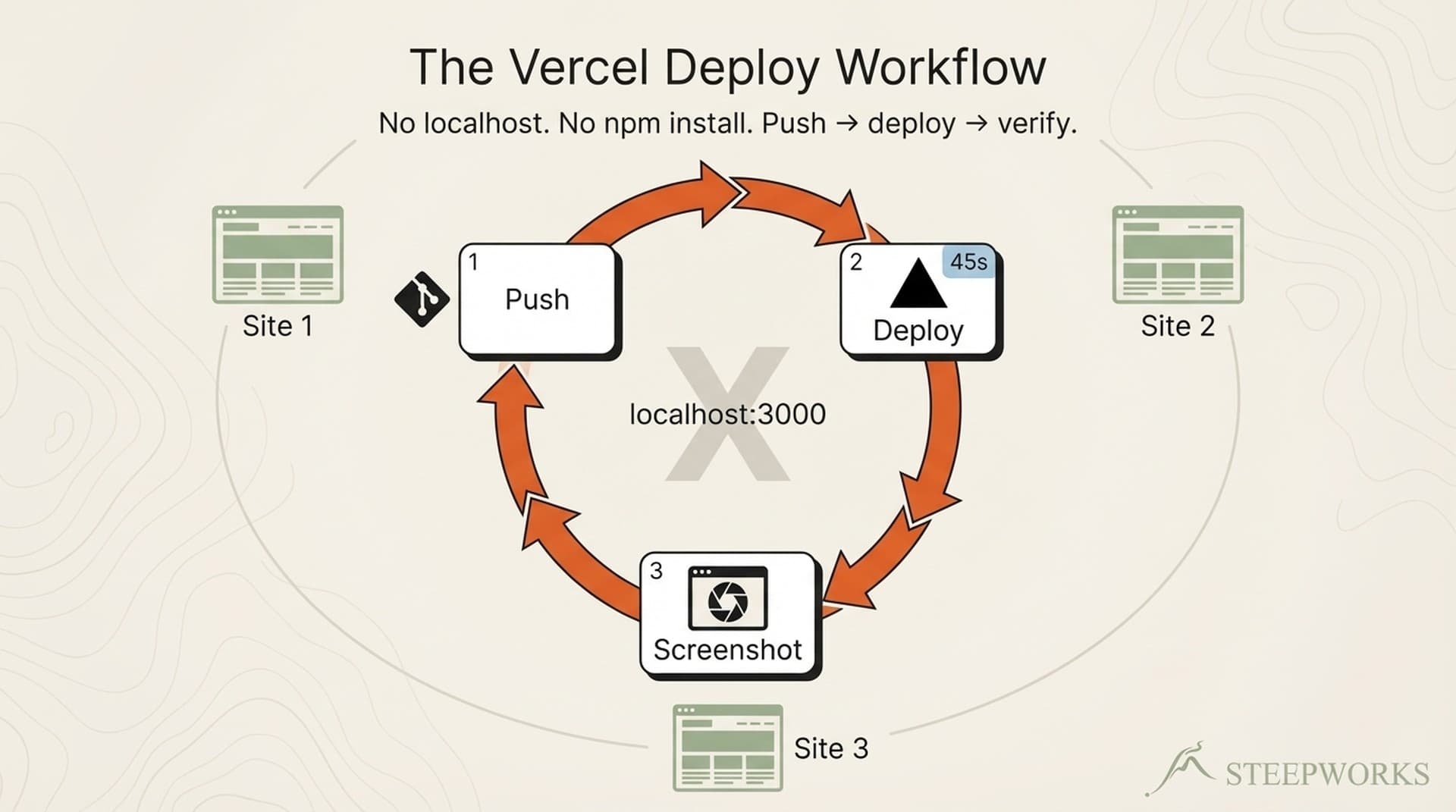
Vercel deployment changed how I build websites — not because it's fast (it is), but because it made me realize I don't need a local dev server at all. I build the STEEPWORKS website and two newsletter sites entirely through a push-deploy-verify loop: an AI agent writes the code, I push to git, Vercel deploys in 30-60 seconds, and Playwright screenshots show me the live result. No npm install. No localhost:3000. No environment parity problems. This is how I've shipped every component, every page, and every design system change for the past four months — across three separate production sites. Here's the workflow, the productivity math, and where it falls apart.
The Standard Workflow Everyone Assumes You're Running
The default Next.js development workflow goes like this: git clone, npm install, npm run dev, iterate on localhost, push when ready. Every Vercel deployment guide starts here. The official documentation walks you through connecting a git repo, configuring build settings, and treating the cloud deploy as the final step — the thing that happens after development is done.
For a developer who writes code directly, this makes sense. Hot module replacement gives you sub-second feedback. You type a CSS change, save, and see the result instantly. The local dev server is a tight feedback loop optimized for human fingers on a keyboard.
But this workflow carries costs that don't show up in the getting-started guide. Dependency conflicts across projects. Node.js version drift between machines. The node_modules folder that weighs more than the actual application. Environment variables that work locally but not in production. The "works on my machine" conversation that every team has had at least once.
Most critically, this workflow assumes you are the one writing the code. You need instant visual feedback because your fingers are the input device. The sub-second hot reload loop is designed for a human author iterating character by character.
For two years, I ran this workflow. Then I started building websites with AI agents, and the whole model stopped making sense.
Why AI-Built Websites Break the Local Dev Model
When Claude Code writes my TSX components, it doesn't need a running dev server. It writes files to disk. That's it.
The AI agent doesn't benefit from hot reload — it can't see a browser. It reads error output and file contents. It generates a complete component, writes it to the filesystem, and waits for me to tell it whether the result is right. A running localhost:3000 serves no one in this interaction.
Setting up Node.js, managing node_modules, and resolving dependency conflicts adds friction that produces zero value when the code author is an AI agent. The agent doesn't run the code locally. It doesn't test in a browser. It doesn't check responsive breakpoints by resizing a window. Every minute I spend troubleshooting a local environment is a minute spent maintaining infrastructure for a workflow participant that doesn't use it.
Environment parity becomes a non-issue. The code runs on Vercel's infrastructure identically every time — same Node version, same build process, same edge network. There's no gap between "my local environment" and "production" because there is no local environment. The first place the code runs is the place it ships.
The operator — me — needs to see the result. But I don't need to run the result locally. That distinction is the entire insight. I need verification, not execution. And Vercel hands me verification on every push.
The Push-Screenshot-Verify Cycle
Here's the actual loop, the one that replaced npm run dev in my workflow:
EDIT → PUSH → WAIT → SCREENSHOT → VERIFY → ITERATE
AI git ~45s Playwright human repeat
writes push Vercel captures reviews if needed
code to repo builds live site output
Step 1 — Edit. The AI agent modifies TSX components, Tailwind classes, layout files, or page routes in the codebase. It writes to disk. No server needed.
Step 2 — Push. git add, git commit, git push. This triggers Vercel's auto-deploy. Every push to any branch generates a unique preview URL — work-in-progress never touches the live site.
Step 3 — Wait. Vercel builds and deploys in roughly 30-60 seconds for a typical Next.js site. During this window, I review the diff or plan the next change. The wait is not idle time.
Step 4 — Screenshot. Playwright MCP takes a screenshot of the live preview deployment URL. Not localhost. Not a staging environment. The actual infrastructure that will serve real users.
Step 5 — Verify. The screenshot shows exactly what users will see. Font rendering, responsive layout, image loading, third-party script behavior — everything rendered by the same CDN, the same edge functions, the same build pipeline as production.
Step 6 — Iterate. If something's off, the agent edits and pushes again. The cycle repeats.
This loop is simple to describe but recursive in practice. A single page redesign might run through this cycle fifteen or twenty times. And those iterations aren't mechanical code fixes — they're design decisions.
The Recursive Design Loop Nobody Talks About
The push-screenshot-verify cycle sounds like a technical workflow. Edit, push, check, repeat. What that description hides is how much of the iteration is design work — and how many different skills feed into each cycle.
A typical sequence for building a new page section looks like this: I describe what I want to the AI agent. It generates the component. I push, screenshot, and look at the result. Something's off — the spacing feels wrong, or the visual hierarchy doesn't guide the eye where it should. I don't know what CSS value to change. I know it doesn't feel right.
So I describe what's wrong. "The heading is competing with the subtext. Give the heading more breathing room and drop the subtext down in visual weight." The agent interprets that into Tailwind classes and layout adjustments. Push. Screenshot. Better — but now the mobile breakpoint looks cramped. "Check the responsive view at 375px." Push. Screenshot. The single-column layout needs different spacing than the desktop grid.
This is where the workflow becomes recursive. Each screenshot triggers a design judgment that feeds back into the next edit. I'm not following a mockup pixel by pixel. I'm designing in production, responding to what I see on the live site, and the AI agent is translating my design intent into code on each pass. The loop isn't edit-push-verify. It's see-judge-describe-edit-push-verify-see-judge-describe — an ongoing conversation between operator vision, AI execution, and production reality.
The skills involved in one cycle bleed into each other. UI design intuition tells me the layout is wrong. Frontend development knowledge helps me describe what's wrong precisely enough for the agent to fix it. And then there's the layer I didn't expect: I often evaluate the result through the lens of a skeptical buyer. Would a VP of Marketing landing on this page trust it? Does the visual hierarchy communicate authority or does it look like a template? That buyer-eye critique changes what I ask the agent to fix next.
Over four months of building this way, I've found that a single component — a hero section, a pricing card, a feature grid — takes eight to twelve push-deploy-verify cycles. The first three get the structure right. The next four or five handle visual polish, responsive behavior, and content hierarchy. The last few are human design feedback: "this doesn't feel confident enough," "the CTA gets lost below the fold," "a senior buyer would bounce here." Each round of feedback requires a different mental mode, and the AI agent has to translate qualitative human judgment into quantitative code changes every time.
The human design feedback isn't optional seasoning on top of the workflow. It's the core of it. Without a human eye evaluating each screenshot against buyer expectations, the push-deploy-verify cycle would produce technically correct pages that nobody wants to look at.
The Productivity Math — Why Slower Cycles Win
A hot-reload cycle: roughly 1-3 seconds. A push-deploy-screenshot cycle: roughly 45-90 seconds. On raw speed, hot reload wins by 30x.
But the comparison is wrong. You're not comparing cycle speed. You're comparing workflow overhead.
Setup cost. Local dev requires Node.js installed, npm install completed, dependencies resolved, local environment variables configured, and a running process you have to babysit. The push-deploy workflow requires git. That's it. I switch between three production websites — the STEEPWORKS marketing site, a Baltimore family events site, and a DMV family events site — without installing a single dependency for any of them. On a fresh machine, I'm productive in the time it takes to clone the repo.
Context switching cost. When I'm reviewing AI-generated code, I'm reading diffs and evaluating design output. I'm not typing CSS in a live editor. The 45-second deploy window is time I spend reviewing the next change, writing the next design note to the agent, or evaluating the previous screenshot in more detail. In practice, the deploy wait disappears into the review rhythm. I've timed my actual idle-waiting time across a typical session: it's under 5 minutes per hour. The rest of the deploy time overlaps with work I'd be doing anyway.
Environment fidelity cost. Every local dev bug that doesn't reproduce in production is debugging time wasted. Every "it looks different on Vercel" surprise after merge is a context switch that costs 15-30 minutes. The push-deploy-verify workflow shows you exactly what ships. The first screenshot is the production result. There is no fidelity gap.
Machine independence. I run this workflow from a Windows desktop, and I could run it from any machine with git and a terminal. No project-specific Node.js setup. No nvm use for version pinning. No node_modules that take four minutes to install on a cold cache. The workflow is environment-agnostic by design.
The math works when your iteration pattern is "review, direct, verify" — operator mode — rather than "type, save, check" — developer mode. If your hands are on the keyboard writing CSS, hot reload wins every time. If your hands are directing an AI agent and evaluating output, the deploy wait is background noise.
When This Workflow Breaks — Honest Guardrails
I'd be lying if I said this workflow never breaks. It breaks in specific, predictable ways, and knowing them in advance is the difference between a productivity system and a frustration machine.
CSS-heavy iteration. When you're fine-tuning spacing, colors, or responsive breakpoints through manual adjustment — not AI-directed changes, but the kind of pixel-level polish where you want to try gap-4 then gap-6 then gap-5 — 45-90 seconds per cycle is genuinely painful. Hot reload wins here. I've switched to local dev for pure CSS sessions exactly twice in four months. Both times I was debugging a Tailwind responsive variant that I could describe faster by editing directly than by explaining to the agent. The workflow survived because those sessions were brief exceptions, not the norm.
Build failures. If the Vercel build fails, your feedback loop stops completely. With local dev, you see the error instantly. With push-deploy, you wait 30 seconds to discover a syntax error. The AI agent catches most build errors before pushing — it reads TypeScript compiler output and Tailwind class validation — but not all. A malformed import path or a missing environment variable slips through maybe once every 20 pushes. When it happens, the wasted cycle stings.
Rate limits and build minutes. Every push consumes a Vercel build. On a free or hobby plan, aggressive iteration can eat your monthly build allowance in a single afternoon session. Production plans have generous limits — I haven't hit them — but the cost is real. Twenty push-verify cycles per page section, eight sections per page, three sites under development: that's build volume you should account for. Vercel's environment documentation covers plan-specific limits.
Complex state and interactivity. If you're debugging a multi-step form, a stateful UI interaction, or an animation sequence, you need a running app you can click through. Screenshots show one frame. They don't show flow. I haven't needed complex interactivity on the sites I've built this way — they're content-driven marketing sites with minimal client-side state. If I were building a SaaS dashboard, I'd need local dev for the interactive components.
Team development at scale. This workflow is optimized for a solo operator or a small team. If you have 20 engineers pushing to the same repo, every push triggering a build, preview URLs multiplying — the coordination overhead outweighs the simplicity gains. At that scale, local dev environments are not just convenient. They're necessary.
Who This Is For (and Who It Isn't)
This workflow fits you if: You build with AI agents — Claude Code, Cursor, Windsurf, or similar — and deploy to a platform with auto-deploy on push. You're an operator who directs the work rather than a developer who types every line. You value environment simplicity over iteration speed. You run a small number of active projects and don't need 20 parallel development environments.
This workflow does not fit you if: You're a frontend developer who lives in CSS and needs sub-second visual feedback. You have a large engineering team with parallel workstreams where every engineer needs an isolated environment. You're building heavily interactive applications with complex client-side state. You're on a free Vercel plan and can't absorb the build volume.
The hybrid path. Even if you maintain a local dev environment, adopting the push-screenshot-verify step as your final verification before merge improves confidence. Preview deployments plus Playwright CI integration catch environment-specific bugs that localhost never will. You don't have to abandon local dev to gain the benefits of production-environment verification.
For team leads. If your team already uses Vercel preview deployments for stakeholder review, this extends that pattern upstream into development itself. Same infrastructure, different point in the workflow. Your designers and PMs review preview URLs. Why shouldn't your development verification happen against the same URLs? The step from "preview deployments for review" to "preview deployments for development" is shorter than it sounds.
The multi-agent dimension adds another layer. When you run multiple AI agents against one repository, each agent's push-deploy cycle creates its own preview branch URL. Branch safety protocols — never switching to an existing branch, always creating new branches from HEAD — keep the agents from destroying each other's work while the deploy workflow gives each agent its own verification surface.
Setting It Up — The Minimum Viable Workflow
Here's what you need. Not a tutorial — a checklist.
The one hard requirement: A git repo connected to Vercel with auto-deploy on push. That's it. Connect your repository, enable automatic deployments for all branches, and every push generates a preview URL. The setup takes less than five minutes if you have a Vercel account.
Recommended: a screenshot tool. Playwright MCP or an equivalent tool that lets an AI agent capture a screenshot of a URL programmatically. Without this, your verification step is "open the preview URL in a browser and look at it" — which works but breaks the agent's feedback loop. With Playwright, the agent pushes, captures a screenshot, and adjusts without you manually tabbing between terminal and browser.
Git discipline matters here more than anywhere. Every push triggers a build. Use branches to avoid deploying broken code to production. Preview deployments are your safety net — but only if you use them. Commit to a branch, verify on the preview URL, merge when it's right. The branch safety patterns I've written about elsewhere aren't theoretical for this workflow. They're load-bearing.
Commit hygiene: small and atomic. Each push should be a verifiable unit of change. If you batch five unrelated changes into one push, you won't know which one broke. One component per commit. One layout change per push. The 45-second deploy cycle rewards small bets because the verification cost per push is fixed. See a structured workflow example for how phased iteration keeps each push focused.
The workflow I'd encode for a new project:
- Connect repo to Vercel. Enable preview deployments for all branches.
- Set up Playwright MCP (or equivalent) pointed at your Vercel preview URL pattern.
- Establish branch-per-feature discipline. Never push directly to main during active development.
- Configure your AI agent's rules file to include the push-deploy-verify cycle as the standard workflow. Encode it in the instructions, not in your memory.
- Run a test cycle: have the agent create a trivial component change, push, screenshot, verify. Confirm the loop works end-to-end before starting real work.
Total setup time for a new project: under 15 minutes. Total dependencies installed locally: zero (beyond git).
What This Means for How We Build
The Vercel deployment workflow isn't a shortcut. It's a signal that the boundary between "development" and "deployment" is collapsing — especially when AI writes the code.
Local dev servers were built for a world where humans typed code and needed instant visual feedback. The entire localhost architecture — the file watcher, the hot module replacement, the WebSocket connection between process and browser — exists to serve a human author iterating keystroke by keystroke. When AI agents generate code and operators verify results, the feedback loop can afford to be slower because it's higher-fidelity. You trade sub-second speed for production-accurate truth.
What surprised me was how much of the workflow is human judgment, not technical execution. The push-deploy-verify cycle is the skeleton. The muscle is the recursive design conversation: see the screenshot, form a judgment, describe the fix, evaluate the result, repeat. UI design sense, frontend development vocabulary, buyer-eye critique, and an AI agent that can translate all three into code — those are the real dependencies. The technology moves bytes between them.
This isn't the future for all development. It's the present for a specific kind of building: AI-directed, operator-verified, cloud-native from the first commit. The STEEPWORKS website is the proof. Every page you see on it was built this way. Not as an experiment. As the workflow.