Every AI Newsletter Guide Stops at the Draft
I've read every "AI newsletter automation" tutorial published in the last year. They all end at the same place: "And now you have a draft." That's the easy part. The hard part is everything upstream -- finding content worth writing about, classifying it so you can filter by audience, storing it so you don't lose it, and curating it so you're not just summarizing the loudest signals. The draft is Stage 5 of 6. Most guides cover Stage 5 and call it done.
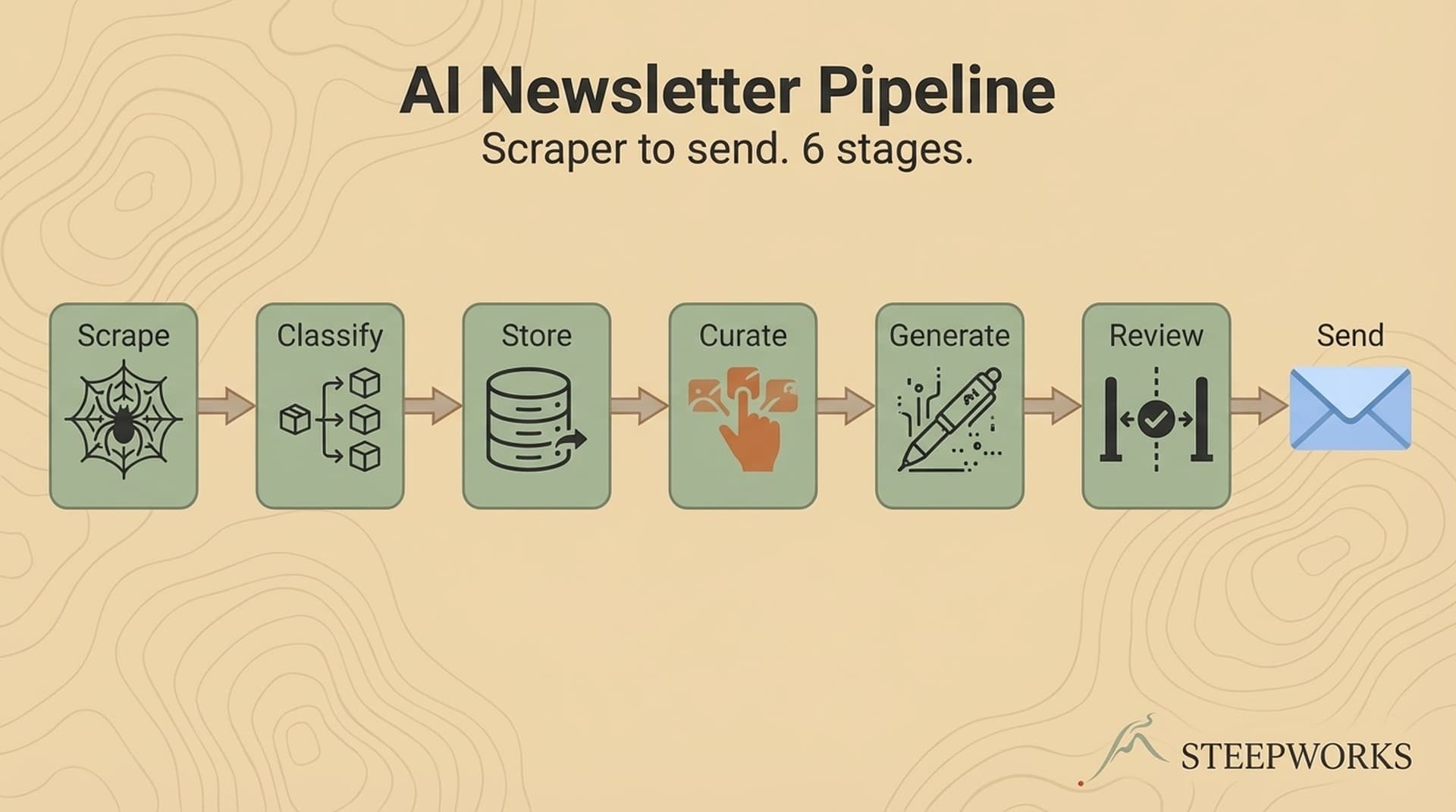
The pipeline I run in production across multiple newsletter brands has six stages:
- Scrape sources (including human curation)
- Classify content
- Store in a database
- Curate with AI + human judgment
- Generate the newsletter
- Review and send
Each stage exists because the previous architecture broke without it. The classification layer appeared after the third week of drowning in unfiltered content. The database appeared after I featured the same event in consecutive issues. The review gate appeared after a subscriber emailed to tell me a date was wrong.
If you don't run a newsletter, read "sources" as "intent signals," "classify" as "score," and "curate" as "prioritize." This is the same pipeline architecture behind lead scoring, competitive monitoring, and content syndication. Newsletters just happen to be where the full end-to-end pattern is easiest to see.
This tutorial is written from that pipeline. The costs are real. The failures are documented.
Stage 1 -- Scrape Sources (RSS Is Not Enough)
RSS covers maybe 20% of the sources a newsletter needs. Venue calendars, community boards, aggregator sites, program listings -- none of these publish RSS feeds. If your AI newsletter automation starts with "subscribe to RSS feeds," you've already lost 80% of your content universe.
The scraping stack
The tooling matters less than you'd think. Headless browser rendering for JavaScript-heavy sites (I use Firecrawl for this). Scheduled HTTP requests for static pages. API integrations where available. The real decision is how you schedule and tier your scrapers.
Tiered scheduling. Not every source needs daily scraping. High-churn sources (venue calendars with weekly event updates) get daily scrapes. Moderate-churn sources (museums, libraries) get twice-weekly. Low-churn aggregators get weekly. This tiering reduces cost and API load by 60-70% compared to scraping everything daily. Three tiers. Simple rules. Big savings.
Output contract. Every scraper produces the same structured output: title, description, date, location, source URL, raw HTML, and scrape timestamp. This uniformity makes the next stage (classification) possible without source-specific logic. Add a new source next Tuesday, and it slots in with zero changes downstream.
What breaks
Venues redesign their websites without warning. A scraper that worked last Tuesday fails this Tuesday because the DOM structure changed. The design principle: isolate scraping from everything downstream. A broken scraper is a scraping problem, not a pipeline problem. Alert on failure, fix the scraper, re-run. The database preserves everything that already succeeded.
I've had scrapers break silently for over a week because the page still returned 200 OK -- just a redesigned page with different CSS classes and zero events. Now every scraper validates that it found a minimum number of results. Zero results from a source that usually returns 30? That's an alert, not a success.
The source you can't automate: human curation
Here's what most pipeline architecture diagrams leave out: you.
My pipeline has 300+ automated sources. It also has me, reading articles every morning, bookmarking things in Slack with one-line annotations, flagging items in daily digests. This isn't a bottleneck. It's a source, treated architecturally the same as any scraper.
The Slack workflow is simple. I see something interesting -- an article someone shared, an event a friend mentioned, a post that contradicts the prevailing narrative -- and I bookmark it with a note. "Contrarian angle on AI SDR adoption." "Underreported but important for families with toddlers." "Pair this with the venue announcement from Monday." These annotations become first-class inputs to the curation stage, weighted higher than any automated scrape.
The deeper point isn't just that human bookmarks enter the pipeline. Spending 15 minutes every morning reading, reacting, annotating builds editorial taste. You develop a sense for signal vs. noise that no prompt can replicate. You start noticing patterns across sources before the classifier does. You develop a perspective -- the thing that separates a newsletter people read from a newsletter people archive.
I comment on articles in the STEEPWORKS feed every day. Not because the comments matter to the pipeline, but because forming a quick take on 10-15 items daily trains editorial judgment in a way that makes every other stage work better. The curation isn't just an input. It's a practice.
Build difficulty: Low-medium. Scraping requires comfort with HTTP requests and basic scripting. Tools like Firecrawl handle the headless rendering. n8n workflow templates offer a no-code path for scheduling. The human curation piece requires no tooling -- just a Slack channel and a habit.
Stage 2 -- Classify Content (The Intelligence Layer Most Pipelines Skip)
Without classification, your pipeline is a firehose. With it, you can filter by audience, content type, relevance score, geographic region, and topic. Every downstream decision -- what to curate, what to draft, what to skip -- depends on classification quality.
What the classifier outputs
For each scraped item, the classifier produces: relevance score (1-10), content category from your taxonomy, audience segment, topic tags, and a confidence score. In my pipeline, each event gets dual-audience classification -- family-friendly score, age range, content pillar, and a separate general-audience relevance score -- all from a single API call. That metadata turns raw scrapes into queryable, filterable intelligence.
Model selection for classification
Classification is a high-volume, moderate-complexity task. You don't need your most powerful model. Claude Haiku at $1/$5 per million tokens handles structured classification accurately when the prompt includes calibration examples. At 500+ items per week, model selection is a cost decision, not a quality decision. The prompt is where quality lives.
Calibration examples are everything
Without calibration examples in the prompt, the classifier drifts within 3 weeks. Scores inflate, categories blur, everything becomes "relevant." I watched it happen. An event listing that said "Family Paint Night -- Ages 21+" started scoring 7/10 on family-friendliness because the model anchored on "family" in the title and stopped reading.
Add 5-7 calibration examples that show what a 3 looks like vs. an 8. Specific, not abstract. "Saturday Morning Art Studio -- All Ages Welcome at a community center that hosts both kids' programs and adult workshops, $15, 10 AM Saturday" -- that's a 6, not a 9, because the signal is ambiguous. A "Toddler Splash Hour" at a pool with $5 admission? That's a 9. These scoring anchors keep the classifier honest over time.
This single prompt investment prevents the most common failure mode in AI classification. Don't skip it. Don't think your model is smart enough to "figure it out." It isn't. Not at volume.
If you run lead scoring, this is the same problem. A VP visits your pricing page -- is that a 7 or a 9? Depends on title, company size, and prior behavior. Without calibration anchors, your scoring model drifts toward generosity. Same fix: concrete examples of what each score means.
Stage 3 -- Store in a Database (Your Pipeline's Memory)
Without a database, your pipeline is stateless. Every run starts fresh. You can't deduplicate (the same event from 3 sources shows up 3 times). You can't track what you've already featured. You can't query across history ("show me all STEM events from the last month"). The database is the pipeline's memory.
What to store
Raw scraped data, classification metadata, curation decisions (included, excluded, flagged), and publication history. The schema is simpler than you'd expect -- one table for content records with classification columns alongside the raw fields. Deduplication via a unique source identifier catches exact duplicates at insert time. Fuzzy string matching on title + date catches 90% of near-duplicates at zero AI cost. The remaining near-duplicates (same event, different source, slightly different wording) get flagged for periodic human review. Don't default to AI for deduplication -- deterministic matching is faster, cheaper, and more reliable for this task.
Tool options
Supabase (Postgres with a generous free tier that handles newsletter scale). Airtable works for smaller volumes if you want a no-code option. Any relational database will do. The requirement is structured, queryable storage -- not a specific vendor.
The query payoff
Once your data is in a database, curation becomes a query problem. "Show me the 20 highest-scored items this week that haven't been featured in the last 3 issues" is a SQL query, not an AI task. The intelligence happened at classification. Selection happens at the database layer.
This is where the architecture starts paying dividends. You can build filtered views for different newsletter brands from the same data. You can track which content pillars you've covered recently and which are underrepresented. You can answer "what did we almost feature last week that's still relevant?" without re-running any AI. The database isn't just storage -- it's the layer where editorial strategy becomes executable.
Stage 4 -- Curate with AI and Human Judgment (The Editorial Layer)
Classification tells you what something IS. Curation tells you whether it MATTERS this week. An event can score 9/10 on relevance and still be wrong for this issue -- because you featured the same venue last week, because a more timely alternative exists, because the narrative arc of the newsletter needs a different beat. Curation is editorial judgment, not scoring.
AI-assisted curation
AI agents can evaluate classified content against editorial criteria: diversity of topics, freshness, audience coverage, thematic balance. Multi-agent evaluation, where different personas score the same content from different perspectives, catches blind spots a single evaluator misses. One agent weights novelty. Another weights practical value. A third represents the skeptic who asks whether readers actually care about this topic or whether it just sounds important.
I've written separately about how 7 AI agents evaluate 120 articles weekly -- the multi-agent evaluation architecture for one brand in this pipeline. The short version: a single agent produces consensus without friction. Multiple agents produce disagreements, and the disagreements are where editorial angles emerge.
The human-in-the-loop signal
Every production pipeline I've run that removed the human curation step produced newsletters that were technically competent but editorially flat. The fix: a lightweight daily curation step where the human reviews AI-classified items and marks picks, skips, and annotations. 10-15 minutes per day. That investment changes the quality of everything downstream.
Why not fully automated? Fully automated curation optimizes for the average reader. Editorial judgment serves the specific reader. A human editor knows that this week's audience conversation is about a specific topic, that a trending theme is overplayed, that there's an underrated angle nobody else is covering. AI handles scale. Humans handle taste. Architect for both.
To be fair, "fully automated" is fine if your standard is "good enough." It produces newsletters that nobody complains about and nobody shares. If that's your bar, skip this stage. But if you want people to forward the newsletter to a friend, the editorial layer is where that happens.
Stage 5 -- Generate the Newsletter (Where Most Tutorials Start and End)
If your upstream stages work, generation is a template problem, not an intelligence problem. The curated content is selected, ordered, and annotated. The generation prompt applies voice, structural formatting, and platform-specific rules. This is where tools like Beehiiv's built-in AI and Jasper help -- they're writing assistants, and at this stage, writing assistance is what you need.
Voice profiles
Every newsletter brand needs a voice profile -- tone, vocabulary, audience assumptions, structural patterns. The voice profile loads at generation time, not before. Separating voice from curation prevents "voice bleed" across brands when the same pipeline serves multiple newsletters. I run two newsletter brands from one pipeline. Same database, same classification layer, different voice profiles. Without that separation, the family newsletter starts sounding like the general audience one.
Structure matters more than prose
Newsletter readers scan before they read. The generation prompt should prioritize scannable structure: strong section headers, one-sentence summaries before longer descriptions, consistent formatting across items. A well-structured newsletter with adequate prose outperforms a beautifully written one that buries the signal.
The structural template is the underrated component. Section order, items per section, the ratio of featured items to quick picks -- these choices determine whether the newsletter gets read in 3 minutes or abandoned after 30 seconds. Define these constraints in the prompt, not in the human review step. By the time a human sees the draft, the structure should already be right.
Platform formatting
Beehiiv, Substack, ConvertKit -- each platform has formatting quirks. Beehiiv's rendering engine handles certain HTML patterns differently than a standard browser. Isolate platform-specific formatting in the generation step. When the platform changes its renderer (and it will), you fix one prompt, not the whole pipeline.
Stage 6 -- Review, Approve, and Send (The Quality Gate)
AI-generated content fails in two ways: factual errors and voice drift. Factual errors are obvious -- wrong dates, wrong locations, hallucinated details. I caught a generated newsletter listing a Saturday event on a Wednesday. The source data was correct; the generation prompt reformatted dates and got one wrong. A subscriber would have shown up on the wrong day.
Voice drift is subtler. Over weeks, the newsletter slowly stops sounding like your brand and starts sounding like a language model. Certain phrases creep in. Transitions get formulaic. The personality flattens. You don't notice it issue by issue. You notice it when you compare issue 1 to issue 12 and realize they sound like different publications.
Automated review dimensions
The review prompt checks: factual accuracy (do dates, names, and URLs match the source data?), voice consistency (does this sound like the brand?), structural compliance (right number of sections, proper formatting?), and audience appropriateness (nothing off-brand or off-topic?). That catches about 80% of issues.
Going deeper: content principles as training data
Here's where most pipeline builders stop with the quality gate. They write a review prompt, run it, and call it done. Good start, but the real value is building a system that improves over time.
I maintain a document of 26 content principles distilled from months of editorial corrections. Things like: speak to the individual ("you"), not abstract collectives ("organizations"). Cut jargon ruthlessly. Every word earns its place. No em-dash overuse (an immediate AI tell). Concrete impact before analytical framing. Each principle has specific before/after examples.
Here's what that looks like in practice.
Before (raw AI output):
"This weekend presents an exciting array of family-friendly activities across the Baltimore metropolitan area. Organizations throughout the region are offering comprehensive programming designed to engage children of all ages in enriching educational experiences."
After (principles applied):
"Three events worth your Saturday. Maryland Science Center opens a new hands-on physics exhibit for ages 5-10. Free admission, no registration. The Inner Harbor Farmers Market is back with a kids' cooking demo at 10 AM. And Fort McHenry is running ranger-led junior defender programs through March."
The difference isn't just stylistic. The first version says nothing. The second tells you what to do this Saturday. Principle #4 (aggressive concision), #2 (direct reader address), #13 (tactical specificity), and #22 (concrete impact before analysis) are all doing work in the rewrite.
Before (voice drift after 6 issues):
"In the realm of family entertainment, Baltimore continues to emerge as a vibrant hub for cultural programming. Parents seeking enriching activities will find no shortage of options this weekend."
After (voice correction):
"The Walters Art Museum added Saturday morning drop-in art for kids 3-7. No registration, no cost, just show up. It's the kind of quiet addition that fills up by word of mouth before it shows up in any event listing."
The review agent catches "in the realm of" and "continues to emerge" and "seeking enriching activities" because each phrase violates specific, documented principles. The fix isn't "rewrite this to be better." The fix is "Principle #3: cut jargon. Principle #4: state fact, give take, stop. Principle #12: cause-and-effect over abstract framing."
The feedback loop that compounds
Every time I correct something in review, that correction becomes training data. Not literally fine-tuning a model -- I mean updating the principles document, adding a new before/after example, tightening the review prompt. Issue 1 caught 15 problems. Issue 20 catches 3. The review stage isn't a static gate. It's a flywheel that improves the generation stage upstream.
This is the part nobody talks about in AI content workflows. The review process isn't just quality control for today's issue. It's the mechanism by which the system learns. Every "this sounds wrong" becomes a codified principle. Every principle gets an example. Every example makes the next generation prompt better. Treat the review stage as training infrastructure, not just a checkpoint.
The human final pass
The human final pass -- 10-15 minutes reading the draft with fresh eyes -- catches what automation misses: awkward transitions, tone-deaf framing, items that technically fit but editorially shouldn't be there. This is not a bottleneck. It's a quality gate. Skip it and you'll know within 3 issues.
The send workflow
After review and approval, the newsletter formats for the distribution platform and schedules for send. Templated API call. Deterministic. The intelligence is upstream. The send is mechanical. Automate this without hesitation.
The Realistic Starting Point -- Build 3 Stages This Weekend, Not 6
I just described a 6-stage pipeline. You do not need all 6 stages on day one. Over-engineering kills more newsletter projects than under-engineering.
The minimal viable pipeline: 3 stages.
- Collect. One script or workflow that gathers your source material into a structured format. RSS feeds plus one or two manual sources. No classification yet -- just raw collection into a spreadsheet or JSON file.
- Draft. One prompt with your voice profile that turns collected material into newsletter copy. Load the collected items as context, apply editorial voice, output a draft. This is the step every tutorial covers, and it works as a starting point.
- Review. One prompt that evaluates the draft against your brand standards and flags issues. Not editing -- diagnostic review that tells you what to fix. Even a simple review step ("check for factual errors, voice consistency, and formatting") prevents the worst failure modes.
That's buildable in a weekend. A marketing ops person comfortable with API calls can wire this up in a day.
When to add the remaining stages
Add Stage 2 (Classify) when you catch yourself manually filtering collected items because half aren't relevant. The manual filtering IS classification -- you're just doing it by hand. Automate the pattern you've already established.
Add Stage 3 (Store) when you feature the same content twice because you forgot you covered it last week, or when you want to draw from multiple weeks of collected content. Stateless pipelines have no memory. You need one.
Add Stage 4 (Curate) when your drafts are accurate but boring. Every issue reads the same. The "top picks" are always the most obvious choices. Your pipeline needs an editorial judgment layer between classification and drafting.
Cost reality
Infrastructure layers (orchestration, storage, scheduling) run on free tiers. Cloudflare Workers for scheduling and export. Supabase free tier for storage. Pipedream, n8n, or Make free tier for orchestration.
AI costs for classification and generation: roughly $8-15/month depending on volume and model choice. The most expensive component is human time -- 10-15 minutes daily for curation, 10-15 minutes per issue for review. That's the investment that makes the output worth reading.
If you want a starting-point codebase for the fetch-summarize-send loop, this open-source AI newsletter generator is a reasonable baseline. It covers the collect-draft path. You'll extend it with classification, storage, and curation as you hit the walls I described above.
The architecture is the point
Don't get me wrong -- the individual stages aren't hard. Classification prompts, database schemas, review checklists. Any competent operator can build each piece. The hard part is recognizing that you need 6 stages before you've built them. That's what this tutorial is for. Now you know where the walls are. Build the 3-stage version this weekend. Add stages as the walls appear. You'll know when you hit each one because I just told you what the symptoms look like.
For a deeper look at the boundary between deterministic orchestration and AI intelligence in this architecture, see STEEPWORKS Products -- specifically how the Knowledge OS separates mechanical operations from judgment calls.