Every AI project management tool assumes two things: that you work on a team, and that project management is a separate activity from the work itself. Both assumptions collapse when you're a solo operator running 8 parallel workstreams — consulting, a content business, side projects, personal systems, community work — and your AI coding agent is doing half the execution.
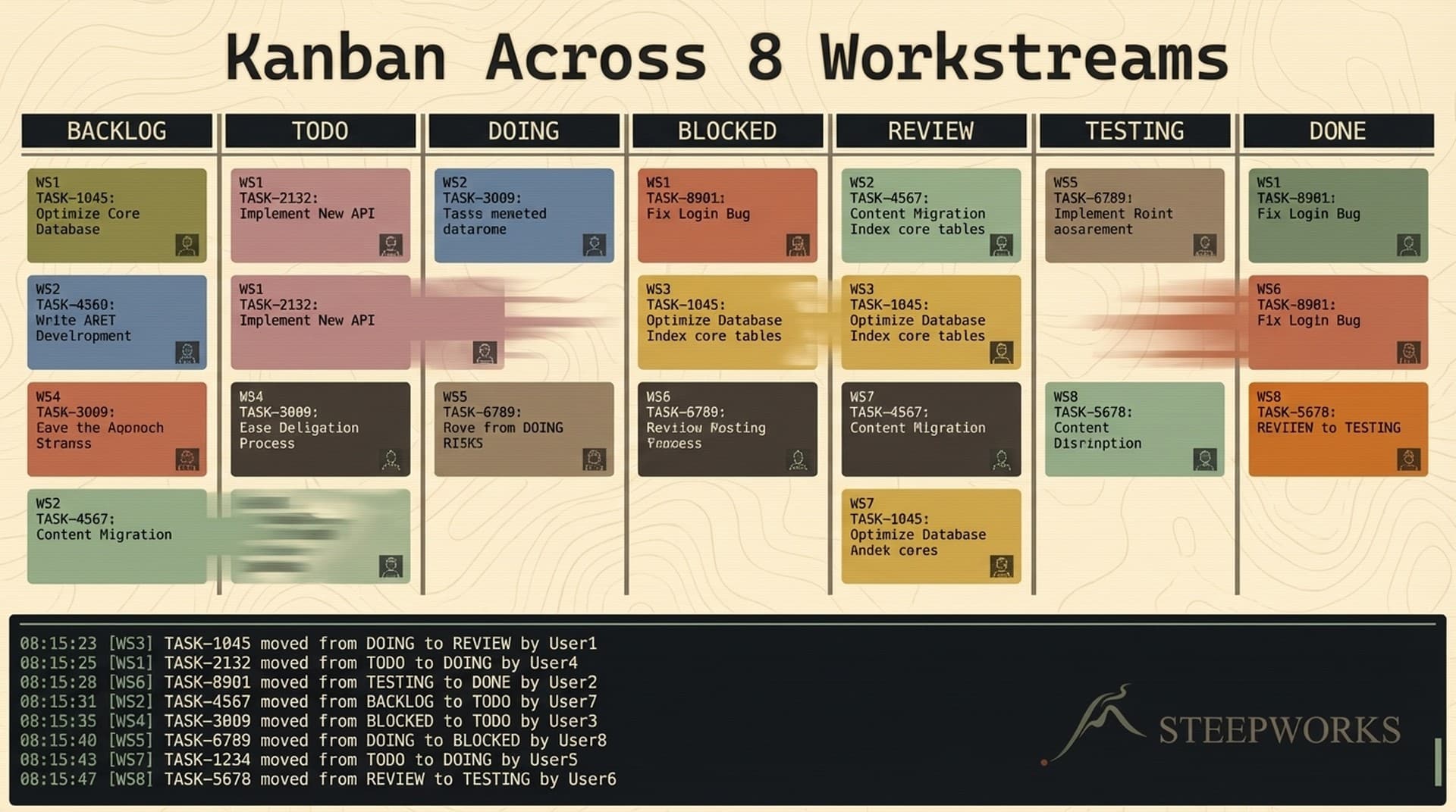
I run a personal kanban board with 7 columns, 8 workstreams, event-sourced storage, and auto-hydration from PRDs — entirely through Claude Code. No Asana. No Linear. No separate app. The agent that writes my code, drafts my content, and executes my plans also manages my task board. Zero context switching.
You might run 3 workstreams. The architecture is the same. The 8 is a stress test, not a minimum.
This system has tracked 90+ tasks since February 2026. It's survived session crashes, multi-terminal conflicts, and the context fragmentation that kills every other personal PM approach I've tried. It's not perfect — I'll show you what broke — but it compounds. And the event log has 140+ immutable entries that tell me exactly what happened and when.
Why AI Project Management Tools Get Solo Operators Wrong
The 2026 AI PM market is crowded. ClickUp AI, Asana Intelligence, Motion, Wrike AI, Notion AI — all launched autonomous agents this year. All assume an org chart. They build features for teams: sprint planning, shared boards, notifications, standup summaries.
The solo operator problem is different. I don't have sprints or standups. I don't have a team that benefits from shared-board overhead. What I have is 8 parallel contexts — consulting, a product business, two newsletter brands, a spirituality project, personal infrastructure, a family member's portfolio, and the system that holds it all together. Switching to a separate PM app kills the value.
Solo developers consistently report that full-featured PM tools "don't provide enough value to be worth the time and energy spent" when there's no team to share the setup cost with. The friction isn't the UI. It's the context switch — leaving your working environment to update a board in a different app, then rebuilding mental state when you come back.
The structural insight: for AI-assisted solo operators, the split between "the tool that does the work" and "the tool that manages the work" is artificial. If your AI agent already has context on what you're building — your plans, your codebase, your workstreams — why maintain a separate system to track it?
The typical approach — represented well by Zapier's roundup of AI PM tools — evaluates tools by their AI features: auto-scheduling, summarization, risk prediction. Nice add-ons. But the real differentiator isn't which AI features your PM tool has. It's whether your PM tool can be the same agent that executes the work.
| Capability | Asana / Linear | This Kanban System |
|---|---|---|
| Storage / audit trail | Vendor database, export-only | Event-sourced JSONL (git-tracked) + Supabase |
| Workstream awareness | Tags or projects | First-class field with context briefs |
| AI integration model | AI features bolted on | Agent IS the PM tool |
| Context switching | Separate app / tab | Zero — same terminal, same agent |
| Team collaboration | Full team features | Solo only (no sharing) |
| GUI / drag-and-drop | Full visual board | CLI only (no GUI) |
| Mobile access | Native apps | None |
| Cost | $10-30/seat/month | $0 (your existing Claude Code subscription) |
Honest tradeoffs: this is not a replacement for Linear if you need team collaboration, calendar views, or mobile access. It is a replacement if you need zero-context-switching task management across multiple domains.
The Architecture — JSONL + Supabase + Materialized Views
Every change to this board is an immutable event. When a session crashes — and it will — you replay the log and reconstruct perfectly. That's happened twice. Both times, the board recovered from a text file in under a second.
How It Works
Three-layer storage. Each layer serves a different need:
Layer 1: JSONL event log (tasks.jsonl). Every task mutation — create, move, complete, assign — appends an immutable event to a file. Git tracks it. Full version history of every state change, for free. No database migration. No vendor lock-in. A text file in your repo.
Real events in production:
{"event_type": "task_created", "task_id": "TASK-001", "timestamp": "2026-02-16T15:18:47Z",
"payload": {"title": "CLAL board prep", "workstream": "clal", "assignee": "victor",
"priority": "P2", "column_name": "backlog", "source": "manual"}}
{"event_type": "status_changed", "task_id": "TASK-001", "timestamp": "2026-02-16T16:00:00Z",
"payload": {"from_column": "backlog", "to_column": "in_progress"}}
{"event_type": "completed", "task_id": "TASK-001", "timestamp": "2026-02-16T17:30:00Z",
"payload": {"outcome": "Board prep doc finalized", "completed_at": "2026-02-16T17:30:00Z"}}
Three lines. Full lifecycle. Timestamped, immutable, git-tracked.
Layer 2: Supabase tables. You also need to query across tasks — "show me all P1 tasks in consulting" or "how many tasks completed this week." JSONL is append-only; SQL is query-friendly. Supabase provides kanban.tasks for current state and kanban.events for query-ready event history.
Layer 3: Materialized view (tasks_current.json). The fast-read snapshot, rebuilt from the event log. Session start reads this file to show in-progress work. No database call for the most common operation — answering "what am I working on right now?"
The dual-write rule: every mutation writes to both JSONL and Supabase. JSONL is the source of truth. Supabase is the query layer. If they diverge, JSONL wins.
This is event sourcing at personal scale. Microsoft's canonical pattern applied to a 90-task kanban. When a session crash corrupts state, you replay the event log. When you want to understand how a task evolved over 3 weeks, the events tell the full story. When you want to audit what the agent did while you were away, every action is recorded.
Hybrid storage is a resilience decision. The JSONL file has survived every failure mode I've encountered. The database is convenient but disposable.
This system lives inside a broader knowledge operating system built on a 300-file CLAUDE.md. Claude Code's native task system handles DAG dependencies and filesystem persistence. The kanban extends that into cross-workstream project management — the layer above individual tasks where you need to see everything at once.
Portability: Beyond CLI-Only
"What if I already use Notion / Airtable / Linear / Obsidian?"
The architecture is portable. The event log is a text file. The task schema is 18 fields of flat JSON. The materialized state is a single JSON document. Nothing is locked to Claude Code as a runtime — it's locked to a data model that any tool can read.
You could pipe tasks_current.json into Notion via their API, sync events to Airtable with a webhook, render the board in Obsidian's Kanban plugin, or flatten the state for Linear's CSV import.
I accept the CLI-only tradeoff because the context-switching cost of a separate app outweighs losing drag-and-drop. If you need spatial reasoning from a visual board, the data model still works. Export it, render it however you want, keep the event-sourced JSONL as your audit trail.
A visual dashboard would strengthen this. The board renders as a markdown table in the terminal — functional, not pretty. A lightweight web UI that reads tasks_current.json is on my backlog.
The 7-Column Flow — From Triage to Done
The column structure goes beyond To Do / Doing / Done. Each column exists because I hit a specific failure mode without it.
triage → backlog → ready → in_progress → blocked → review → done
Triage is the GTD inbox. Raw items arrive from automated extraction — the journal parser finds action items in daily notes, the PRD scanner finds untracked plans, the agent backlog surfaces proposals. The rule: you process triage, you don't work from it. Skip this column and you end up with tasks you never actually accepted.
Backlog means "accepted work I understand." Reviewed and agreed as real work, but might have unresolved dependencies, unclear scope, or lower priority.
Ready means "fully defined, dependencies met, can start now." I used to collapse backlog and ready into one column. Kept picking up tasks, realizing mid-execution they were blocked on something I hadn't checked, and context-switching to unblock. Ready is a pre-flight check.
Blocked is explicit because in a solo system, blocked usually means "waiting on external input." A client response. An API approval. A decision I haven't made. Parking it here keeps it visible without cluttering in-progress.
Review creates a pause point — work that's done but not verified. Investigation PRDs needing approval. Content needing a final read. Don't get me wrong, I skip it for trivial tasks. But for anything with downstream consequences, the pause pays for itself.
No WIP limits. The board displays in-progress counts per assignee — "Victor: 3, Agent: 2" — but never blocks a move. WIP limits make sense when coordinating a team. For a solo operator, awareness is enough.
Directional transitions. Flow is forward with exceptions: blocked and in_progress are bidirectional, review can return to in_progress for rework, and any column can fast-track to done. This prevents the "drag cards anywhere" chaos where tasks teleport from done to backlog because someone grabbed the wrong card.
8 Workstreams on One Board — How Cross-Domain Filtering Works
The 8 workstreams aren't labels. Each represents a different domain with its own context, cadence, and decision criteria:
- consulting — client engagements with deadlines and deliverables
- steepworks — the product business: website, newsletter, content, payments
- knowledge_os — the system that powers everything else
- shared_foundation — repository infrastructure, agents, pipelines
- personal_victor — family projects, personal systems, side ventures
- clal — board service and spirituality work
- markets2mountains — the blog
- josh_portfolio — managing a family member's investment portfolio
These aren't different projects. They're different modes of thinking. Consulting has external deadlines. STEEPWORKS has a product roadmap. The knowledge OS has technical debt. Personal projects have no deadline at all. Running them on one board only works if workstream is a first-class concept, not an afterthought.
Workstream as a first-class field. Every task requires a workstream field at creation. Board views filter by it. Stats aggregate by it. Triage routes by it. /kanban board --workstream=consulting shows only consulting tasks. /kanban board shows everything.
Filtering happens through natural language. No dropdowns. I type "show me what's blocked in steepworks" and get a filtered view. The query interface is conversation, not clicks.
Cross-workstream awareness at session start. Opening a new session shows a summary: "3 tasks in progress across consulting and steepworks. 2 items in triage. 1 blocked." A cross-domain view of where your attention is spread, delivered before you ask.
Stats by workstream. Which workstream has the most open tasks? Which has the oldest item? Where are things piling up? These become SQL queries against Supabase, formatted as markdown tables. The most useful: "stale tasks by workstream" — anything that hasn't moved in 7+ days. That's where work goes to die quietly.
The assignee dimension. Tasks can be assigned to victor (human) or agent (AI). The AI agent executes tasks, marks them done, and records outcomes. "TASK-051: Kanban Agent Kickoff — done — outcome: 12 success criteria met, PR #XX created" is the agent reporting its own work. The board reflects reality because the executor and the tracker are the same entity.
Why swim lanes don't solve this. Swim lanes are visual grouping. Workstreams are semantic. The agent knows what "consulting" means — it can load the consulting brief, understand the client's constraints, apply the right decision framework. A Trello swim lane is a colored stripe. It groups cards visually. It doesn't change how the tool reasons about the work.
Task Hydration — How PRDs and Journals Feed the Board
The board isn't manually maintained. If it were, it would die within a week. Every manual PM system I've tried breaks at the same point: the effort of keeping the board current exceeds the value of having one. Auto-hydration inverts that.
Three hydration sources:
1. Active PRDs. The system scans for active plan files. If a PRD exists that isn't tracked on the board, it auto-creates a card with the PRD title, current phase, and workstream. I create a PRD for "STEEPWORKS GTM Source Expansion," the next cycle creates TASK-040 with source: prd and prd_ref pointing to the plan file. The board reflects the plan without me touching it.
2. Stream journal extraction. My daily capture file — ideas, follow-ups, action items. The extract command parses recent entries and identifies actionable items, not with regex but with the agent's natural language understanding. "Check if the Beehiiv API supports POST on the free tier" becomes a triage card. The agent reads prose and extracts intent.
3. Agent backlog hydration. A file of proposed-but-not-approved work items. The hydrate command checks for untracked proposals and creates cards. When the system proposed "Run first weekly repo audit cycle," hydration picked it up and created TASK-009.
The deduplication problem. Early versions created duplicates when the cycle ran against the same PRDs twice. A real bug: 6 duplicate task IDs in production, including a state conflict where one task appeared in both done and in_progress.
The fix: three-layer deduplication — exact PRD reference match, exact source reference match, and fuzzy title-plus-workstream match. All three must pass before a new task is created.
Manual task creation is the bottleneck that makes every PM system feel like overhead. You finish work, think "I should update the board," and don't. Auto-hydration inverts that — the board fills itself from the work you're already doing. Processing the triage inbox is a much smaller cognitive load than maintaining the full backlog.
What Broke — Lessons From Production
Engineering notebook honesty: this system has broken in multiple ways. Each failure taught something, and most are failure modes you'll hit with any PM approach.
Duplicate task IDs. The W09 audit found 6 duplicates — TASK-044 appeared in both done and in_progress. Root cause: full regeneration from the JSONL log during concurrent sessions could materialize the same ID twice. Fix: fast-path direct updates for normal operations. Full JSONL regeneration only on corruption recovery.
Multi-terminal conflicts. Multiple Claude Code terminals share one working tree. A branch switch in one destroyed unstaged kanban state in another. Fix: stage immediately after writes. After any mutation to tasks.jsonl or tasks_current.json, git add before anything else.
Session crash state loss. A compaction event mid-task left the materialized view stale. Fix: replay JSONL, reconstruct state. This is why the event log exists — not for academic architecture, but because session crashes happen when you run a coding agent for hours.
Triage overflow. Automated extraction without matching triage review means unbounded growth. I've had 15+ items sitting in triage untouched. Fix: weekly triage habit with stale-item flags after 7 days. Still the weakest part of the system. The technology works. The discipline is harder.
The meta-lesson: every failure mode here also existed in the SaaS PM tools I used to pay for. The difference is I can read the event log, find the root cause, and fix the architecture. In Asana, I'd file a support ticket.
Current Limitations
No GUI. You type commands. The board renders as a markdown table. Functional, not visual.
No calendar view. No Gantt chart, no timeline, no deadline visualization beyond a due_date field. If your work is date-driven, you'll feel this gap.
No team collaboration. Solo infrastructure only. No sharing, no commenting, no permissions. If you manage a team, use Linear.
No mobile access. Terminal only. You can open Supabase directly from a phone, but it's not a designed experience.
Learning curve. You need comfort with the terminal and CLAUDE.md-based workflows before this adds value. Second-month skill, not first-day tool.
This is infrastructure for a specific kind of operator. If you need the above, use the right tool. If you need your AI agent to manage your work without context switching, and you're already in the terminal, keep reading.
Why This Compounds
The kanban system isn't standalone. It's a node in a larger operating system.
PRDs feed the board through hydration. The board tracks execution across workstreams. Completed tasks with documented outcomes become context for future planning. Session start loads the board for instant context recovery. Workstream briefs inform how tasks are prioritized.
This is systems over tactics in practice. A tactic is "use Trello." A system is: the agent that does the work also tracks the work, auto-populates from plans, event-sources every state change, reconstructs from crashes, and reports across 8 domains without being asked. The tactic requires maintenance. The system maintains itself.
Compounding is real but slow. Every task completion with a documented outcome becomes context for better planning. Every hydration cycle reduces manual overhead. Every triage session sharpens my sense of what's worth tracking versus noise. The system gets better at reflecting reality over time — not through ML, but through accumulated context and refined process.
For the reader who manages multiple domains: this isn't prescriptive. Your workstreams are different. Your column flow might need 3 columns, not 7. Your storage might skip Supabase. The principle is the same: if your AI agent has context on your work, let it manage the tracking too.
The kanban skill is part of the broader Knowledge OS. Start small. Let it grow.
Getting Started
Build your own version in a week:
- Create a
tasks.jsonlfile in your repo. One line per event. Start empty. Audit trail from day one. - Define your workstreams — even just 2. "work" and "personal" is fine. Split later.
- Add a kanban instruction block to your CLAUDE.md (or equivalent agent config). Define the commands: add, board, move, done. Give the agent the JSONL event schema.
- Add your first task:
/kanban add "Set up kanban system" --ws=your_workstream - Run it for one week with 3 columns — backlog, in_progress, done — before adding triage, hydration, or Supabase.
Don't start with 7 columns and 8 workstreams. Don't build Supabase until you've outgrown the JSONL file. Don't add auto-hydration until you've manually maintained the board long enough to feel the friction. Each layer was added because the simpler version broke. Let your own breakdowns guide your architecture.
This is where the system is today. It does what I need. It breaks in known ways. It compounds. Start with three columns and one workstream. Let it steep.