Why Most AI GTM Tools Lists Are Useless
Every "best AI GTM tools" article follows the same formula. A vendor reviews 10-15 tools, ranks them by features nobody asked about, and buries their own product at number three so it looks objective.
The problem isn't the tools. The problem is that every listicle evaluates tools in isolation, as if you're going to run each one in a vacuum. You're not. You're going to wire them together, and the wiring is where the value lives or dies. A tool that scores 9/10 on its own can score 3/10 in your stack if it doesn't connect to anything.
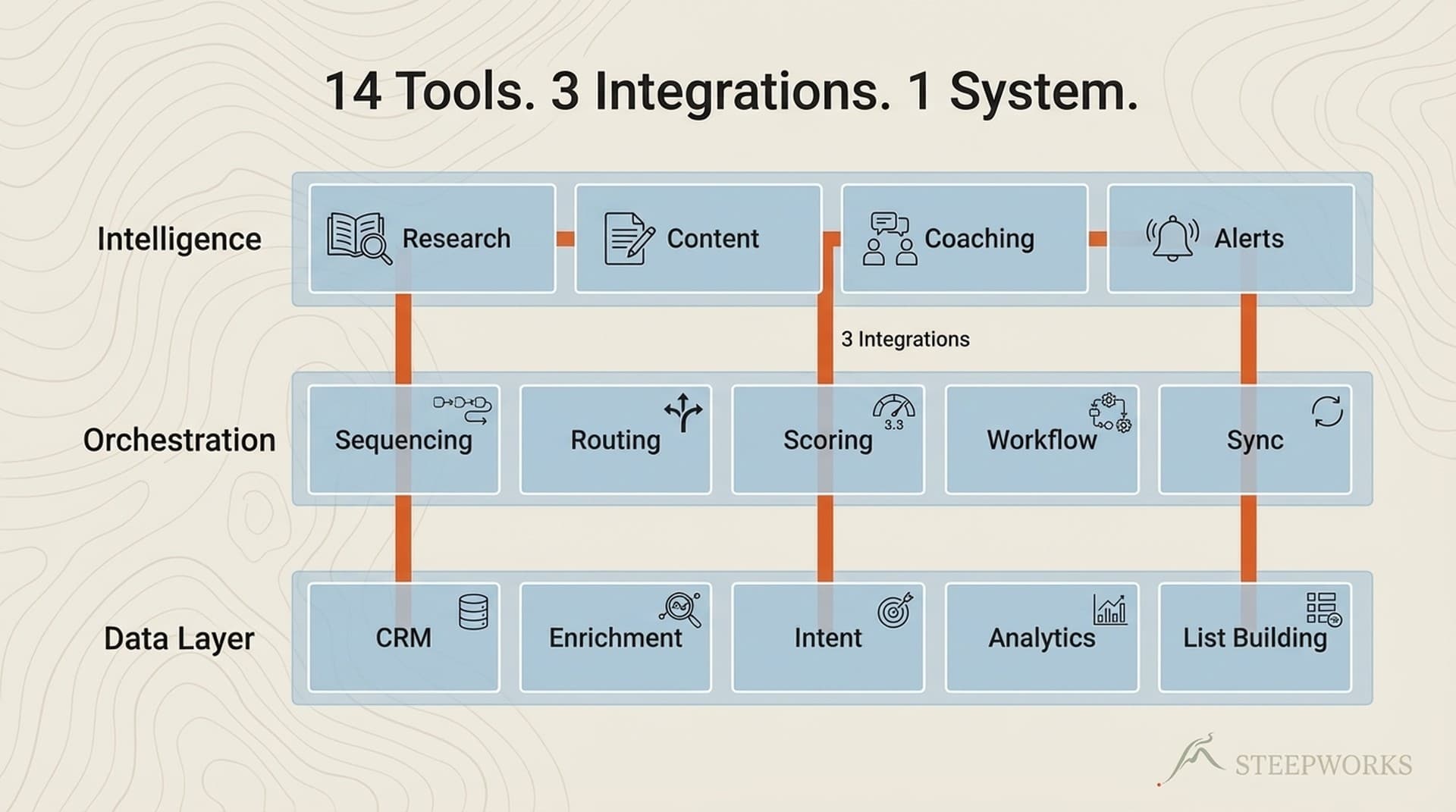
So instead of another ranked list, I'm sharing an architecture. Fourteen tools, three integrations, one system that's been running in production for about 2.5 years. I'll include actual costs, what I replaced, and where the whole thing falls apart. Fair warning: it took that full stretch to build and tune. Whether that investment makes sense for you depends on questions I'll help you answer, or maybe a managed platform gets you there faster.
Two things upfront. This is a solo-operator stack. I run it myself. Scales to maybe two to five people, but if you manage fifty reps, the architectural thinking transfers even if the specific tools don't.
And I chose to build composable because I'm technical, I operate solo, and I wanted full control over data flows. That was the right call for me. Probably the wrong call for most teams. I'll flag where.
The Architecture: How 14 AI GTM Tools Form One System
Three layers, three integration backbones, one orchestrator at the center. If fourteen tools sounds like a lot, skip to "How to Start" at the bottom -- the three-tool foundation is where everything begins.
Layer 1: The Orchestration Core
Tools: Claude Code (orchestrator), Supabase (data), Pipedream (automation)
Claude Code orchestrates everything. When I say "research this company," it pulls enrichment from Clay, CRM history from HubSpot, recent news from the web, and competitive context from my knowledge graph -- chained into a single workflow. The practical difference: what used to be four tabs and twenty minutes of copy-pasting is one command that returns a structured brief.
Supabase holds the structured data that every other tool queries. Events, contacts, content metadata, enrichment results. One database, many consumers. When Clay enriches a contact, the result lands in Supabase. When Vercel builds a page, it reads from Supabase.
Pipedream handles the plumbing between tools that don't natively talk to each other. New HubSpot contact triggers a Clay enrichment. Supabase insert triggers a Vercel rebuild. Scheduled jobs, webhooks, error handling.
The key decision that shaped everything else: I picked the connection layer first and plugged tools into it. Most operators do it backwards -- they pick tools and then try to connect them. That's the difference between a stack and a system.
I should be honest about the cost of that decision. This orchestration layer took months to build and tune. If you don't have someone on the team who genuinely enjoys wiring systems together, platforms like 6sense or Outreach give you a pre-built orchestration layer out of the box. Less flexibility, dramatically faster time-to-value. That's a legitimate trade.
Layer 2: Intelligence
Tools: Clay (enrichment), HubSpot (CRM), GA4 + GTM (analytics)
I chose Clay for enrichment because I wanted to build custom waterfalls -- premium sources fire first, free sources fall back, results get scored before they touch the CRM. Clay's workflow engine supports that level of control.
A quick reality check on Clay: the "150+ data sources" marketing sounds impressive. In practice, maybe five to eight sources do 90% of the work for any given use case. The value isn't breadth -- it's the sequencing logic and the ability to score results programmatically before they write to your CRM.
Would Apollo or ZoomInfo have worked? Probably. Apollo's all-in-one approach or Clearbit's native HubSpot integration gets you to roughly 80% of the value in 20% of the setup time. If your team needs plug-and-play enrichment without a technical operator configuring workflows, start there. The enrichment tool matters less than whether it actually writes structured data back to your CRM -- that integration pattern is what counts.
Whatever enrichment tool you pick, the other two stay constant:
- HubSpot is the system of record. Everything writes back to HubSpot. If data doesn't end up in the CRM, it doesn't exist for pipeline purposes.
- GA4 + GTM is the measurement layer. What content drives pipeline, which pages convert, where traffic comes from. Free tier covers most needs.
Layer 3: Execution
Tools: Vercel (deployment), Beehiiv (newsletter), Playwright (QA), plus supporting tools
- Vercel deploys two websites from Supabase data, powering over 1,000 programmatic SEO pages. The database is the CMS.
- Beehiiv runs newsletter distribution for two brands, twice a week. The referral programs and SEO-optimized web versions were the features that pulled me off Mailchimp.
- Playwright MCP screenshots every deployment automatically. Regressions get caught before readers see them.
- Supporting cast: GitHub, Cloudflare Workers for edge compute, VS Code.
Architecture Diagram
┌─────────────────────────────────────────┐
│ LAYER 3: EXECUTION │
│ Vercel | Beehiiv | Playwright │
│ GitHub | Cloudflare Workers │
└──────────────────┬──────────────────────┘
│
┌──────────────────┴──────────────────────┐
│ LAYER 2: INTELLIGENCE │
│ Clay | HubSpot | GA4 + GTM │
└──────────────────┬──────────────────────┘
│
┌──────────────────┴──────────────────────┐
│ LAYER 1: ORCHESTRATION CORE │
│ ┌─────────────┐ │
│ │ Claude Code │ │
│ │ (Orchestrator)│ │
│ └─────────────┘ │
│ Supabase (data) | Pipedream (glue) │
└─────────────────────────────────────────┘
KEY INTEGRATION FLOWS:
━━━ Clay ──→ HubSpot (enrichment-to-CRM pipeline)
━━━ Supabase ──→ Vercel (content pipeline, 1000+ pages)
━━━ Claude Code ──→ Everything (MCP + APIs, universal connector)
Maintenance reality: I spend roughly two to three hours a week on this. Most of that is reviewing automated outputs -- newsletter drafts, enrichment results, deployment screenshots -- not fixing broken integrations. Something breaks maybe once a month. On a bad week, two or three integrations hiccup simultaneously, usually after a vendor API change, and the fix takes half a day. That's happened twice in the past year.
The 3 Integrations That Actually Matter
The architecture shows where tools sit. This section is about how they talk to each other -- and why these three connections are where the value compounds.
Integration 1: Enrichment-to-CRM Pipeline (Clay to HubSpot)
Every new contact or company in HubSpot triggers a Clay enrichment workflow. Clay pulls from its sources, scores fit, and writes structured data back to HubSpot custom properties.
The waterfall logic is the interesting part. Premium data sources fire first. If they return nothing, cheaper sources fall back. Results get scored for quality before they touch the CRM. Cost works out to roughly $0.15-0.50 per contact depending on depth. End result: every contact has 30+ enriched fields within minutes of creation.
This pattern works regardless of which enrichment vendor you use. The principle is: CRM event triggers enrichment, enrichment writes structured data back. Whether that's Clay, Apollo's CRM sync, or ZoomInfo's HubSpot integration, the flow is the same. I built it with Clay because I wanted granular control over the waterfall logic. Clay University has a walkthrough if you want the mechanics.
Integration 2: Supabase to Vercel Content Pipeline
Structured data in Supabase -- events, articles, SEO metadata -- flows to Vercel-deployed Next.js sites via API routes. Each row in a Supabase table becomes a page. No manual page creation.
This is the integration I'd build first if I were starting over. The "database as CMS" pattern eliminated an entire category of content operations work. Change one row, one page regenerates. Cloudflare Workers handle edge caching between the two.
Integration 3: Claude Code as the Universal Connector
Claude Code reads from and writes to every tool in the stack via MCP servers, APIs, and direct database access. It's what turns fourteen disconnected tools into one system.
The practical example that makes this concrete: "research this company" triggers Clay enrichment, HubSpot lookup, web search, and competitive analysis -- all in one command. Company research from six months ago is still in the knowledge graph, so today's outreach is informed by context that would otherwise be lost in some Notion doc nobody reopened.
Every execution adds context. The system gets denser with use. That compound effect is the thing I couldn't have predicted when I started building this, and it's the hardest part to replicate with managed platforms.
Build vs. Buy
I built a composable stack. That was the right call for me. It might be the wrong call for you. Here's how I'd think about it.
Where building wins:
- Cost. My fourteen-tool stack runs $1,200-1,900/month. A comparable managed setup (6sense + Outreach + ZoomInfo) costs $60-100K+/year for a small team.
- Compound knowledge. Custom skills accumulate institutional context. Research from six months ago still informs today's work. Managed platforms reset when you churn.
- Swap flexibility. I replaced ZoomInfo with Clay, Zapier with Pipedream, WordPress with Vercel -- each independently. Try switching from 6sense to Demandbase. That's a six-month migration.
Where managed platforms win:
- Speed. Outreach or Apollo can have a team productive in days. My stack took months.
- Team scale. Past twenty-ish reps, the orchestration burden of a composable stack becomes a full-time job.
- 2am failures. When my Pipedream webhook breaks on a Saturday, I fix it myself. Enterprise platforms have support teams.
- Compliance. SOC 2, GDPR, data residency -- managed platforms handle this at the platform level. Building your own means owning every obligation yourself.
| If you are... | Consider... |
|---|---|
| Solo operator or 2-3 person team, technical | Build composable |
| Small team (5-15) with a RevOps person | Composable, but budget 1-2 months setup |
| Growing team (15-50) needing reps productive fast | Managed platform + selective composable additions |
| Enterprise (50+ reps) with compliance requirements | Managed platform, full stop |
| Non-technical team, no dedicated ops person | Managed platform. Don't build what you can't maintain |
The honest answer: most teams should start managed and selectively add composable pieces as they outgrow the platform. I went full composable because I'm a technical operator who builds GTM systems for a living. I'm the exception.
What This Actually Costs
Monthly costs, composable approach:
| Tool | Tier | Monthly Cost | Notes |
|---|---|---|---|
| Claude Code | Max plan | ~$100-200 | Usage-based |
| HubSpot | Professional | ~$800 | CRM + Marketing Hub |
| Clay | Explorer/Pro | ~$150-350 | Credit-based, scales with volume |
| Supabase | Pro | $25 | Database, auth, edge functions |
| Vercel | Pro | $20 | Two sites |
| Pipedream | Pro | $29 | Workflow automation |
| Beehiiv | Scale | $49 | Two newsletter brands |
| GA4 + GTM | Free | $0 | |
| Playwright | Open source | $0 | Runs via Claude Code MCP |
| GitHub | Free | $0 | |
| Cloudflare Workers | Free tier | $0-5 | Edge compute |
Total: $1,200-1,900/month
For comparison, managed-platform equivalents run $60-100K+/year when you add up ZoomInfo ($15-40K), Outreach or Salesloft ($12-30K), and 6sense ($30-80K). Apollo's all-in-one is more like $6-12K/year.
My stack costs 10-20% of the managed equivalent. But it took over two years to build, and it requires a technical operator to maintain. If you value your time at $200/hour, the managed platforms are probably cheaper for year one. The composable approach pays off in year two and beyond -- if you get there.
The expensive part isn't any single tool. It's the time to wire them together. That integration work is what I've been packaging into STEEPWORKS Knowledge OS, so other operators don't start from zero.
What I Replaced and Why
Here's what I tried and abandoned.
ZoomInfo to Clay. ZoomInfo's data is deep but static and expensive -- $15K+/year. Clay's waterfall approach gets roughly 80% of the coverage at maybe 10% of the cost, pulling from sources in sequence rather than querying a single static database. Caveat: if I managed thirty SDRs who needed push-button prospecting, I'd probably keep ZoomInfo. Clay rewards the technical operator; ZoomInfo rewards scale. (Narrative Field Guide has a good comparison of the three major enrichment platforms.)
Zapier to Pipedream. Zapier's pricing scales painfully once you exceed the free tier. Pipedream's code-first approach gives better debugging visibility and a generous free tier that covers most workflows before you pay anything.
WordPress to Vercel + Supabase. WordPress is a CMS that happens to have a database. I needed a database that happens to have a website. That reframe changed everything. A thousand pages from structured data, each SEO-optimized, all generated from database rows.
Mailchimp to Beehiiv. Migration took a weekend. The improvement was immediate -- specifically, the referral program and the per-post analytics that let me see exactly which newsletter content drives subscriber growth vs. which just gets opens.
Standalone dashboards to GA4 + Claude Code. Instead of paying for a dashboard tool, Claude Code queries GA4 directly and generates reports tailored to whatever question I'm asking, not a pre-built dashboard designed around questions nobody asked.
The pattern across all of these: I swapped monolithic tools for composable ones. Cheaper, more flexible. But every swap required the technical ability to configure the replacement. A non-technical team making these same moves would spend months in configuration.
When NOT to Build
The composable approach has real costs.
Don't build if:
- You don't have a technical operator. Someone needs to enjoy debugging webhook failures and maintaining documentation. If that person doesn't exist, you'll build a system nobody can maintain when they leave.
- You need reps productive in weeks. Composable takes two to six months to reach the productivity that Outreach delivers on day fourteen. If you're hiring this quarter, buy managed and build later.
- Twenty-plus people use the system daily. Role-based permissions, audit trails, onboarding flows -- managed platforms handle these by default. Building them yourself is a full-time engineering job.
- Your budget is under $500/month. Ironically, the cheapest option for constrained budgets is Apollo's free tier or HubSpot's free CRM plus one enrichment tool. Not a fourteen-tool composable stack.
What to do instead: Apollo free tier + HubSpot free CRM + GA4. Total: $0-100/month. Covers prospecting, CRM, and analytics. Add complexity only when you hit its limits.
Pavilion has a solid framework for the organizational build-vs-buy decision.
The Compound Effect
Here's the part I didn't expect when I started building this.
Most tool stacks are static. You add a tool, it does its thing, nothing changes. This stack gets denser with use. Every enrichment run adds data to HubSpot that improves future ICP scoring. Every Claude Code skill execution adds context to a knowledge graph -- 4,700+ files now -- that improves the next execution. Every newsletter generates engagement data that feeds back into content decisions.
Some numbers on what that compounding looks like in practice. Newsletter generation dropped from roughly six hours of manual curation to about 45 minutes of review after six months of agent memory accumulation. ICP enrichment accuracy climbed from maybe 60% usable match rates to 85%+ after tuning waterfall sequences and feeding CRM outcomes back in. Adding a new content type (venue pages, for example) takes hours instead of weeks because the Supabase-to-Vercel pipeline pattern already exists.
I should be honest about the J-curve, though. For the first six months, my composable stack was slower and less productive than Outreach would have been. The compound advantage only shows up after month six to twelve. If your time horizon is under a year, managed platforms win.
See what a pre-built compound system costs on STEEPWORKS Pricing.
How to Start
Don't try to replicate fourteen tools on day one.
| If you... | Start here |
|---|---|
| Have nothing or just a CRM | Managed all-in-one (Apollo free + HubSpot). Add complexity when you hit its limits. |
| Have CRM + enrichment but they're not connected | Wire your first integration (enrichment to CRM). Works managed or composable. |
| Have most tools but no orchestration layer | Decision point: add an orchestrator to go composable, or consolidate onto a managed platform. |
| Have tools + integrations but no compound loop | Build the feedback loops. This is where composable outperforms managed. |
If you choose composable, build in this order: CRM + AI assistant + analytics (weeks 1-2) → enrichment connected to CRM (weeks 3-4) → content deployment + newsletter + automation (month 2) → custom skills, programmatic content, compound loops (month 3+).
One thing I learned the hard way: when a second operator joins, budget a week to document what's in your head before they start. Solo operators carry context implicitly. Two people need shared playbooks, defined ownership, and clear escalation paths.
If you choose managed: Apollo or Outreach + HubSpot + GA4. Focus energy on execution, not architecture. Trade long-term flexibility for short-term velocity. For many teams, that's the right trade.
Kyle Poyar's "Becoming an AI-Native Operator" on Growth Unhinged is a strong framework for the operator mindset regardless of which path you take.
What to Do With This
The question isn't "what AI GTM tools should I use." It's: what's your team's technical capacity, time horizon, and budget?
If you have the technical chops and the patience, build composable. After a year you'll have something no managed platform can replicate -- a system that gets smarter with every execution.
If you don't, buy managed, focus on execution, and revisit architecture when you've outgrown it. There's no shame in that. The best system is one your team can actually operate.
Victor Sowers is the founder of STEEPWORKS and a GTM operator with 15 years of experience scaling B2B SaaS companies including CB Insights and BurnAlong. He's spent the last 2.5 years building AI-native GTM systems in production.